 docs.healthdata.be
(NEW) Additional field information for CSV and API
Table of contents
Additional field information for S2S API
Author group, Author and Coauthor
When the Author Group, Author and Coauthor have been left out in the json file, the default Author group, Author and Coauthor will be used automatically.
When the desired Author Group, Author and Coauthor are specified in the json file, the following fields TX_AUTHOR_GR, TX_AUTHOR and TX_COAUTHOR must be added to the json file with their values respectively.
Example:

Note:
The Author group, Author and Coauthor must exist and are well configured at the back-end of the system. TX_AUTHOR_GR can be a string that identifies the Author group to which this Author belongs. Commonly, the first name and last name are used to identify the TX_AUTHOR_GROUP. Be sure to avoid leading and trailing spaces when entering the Author group value.
STATUS field - submission of drafts
To submit a draft, the only thing to add is the key STATUS (all upper case) with the value "draft" to the request, like this:
"STATUS": "draft",
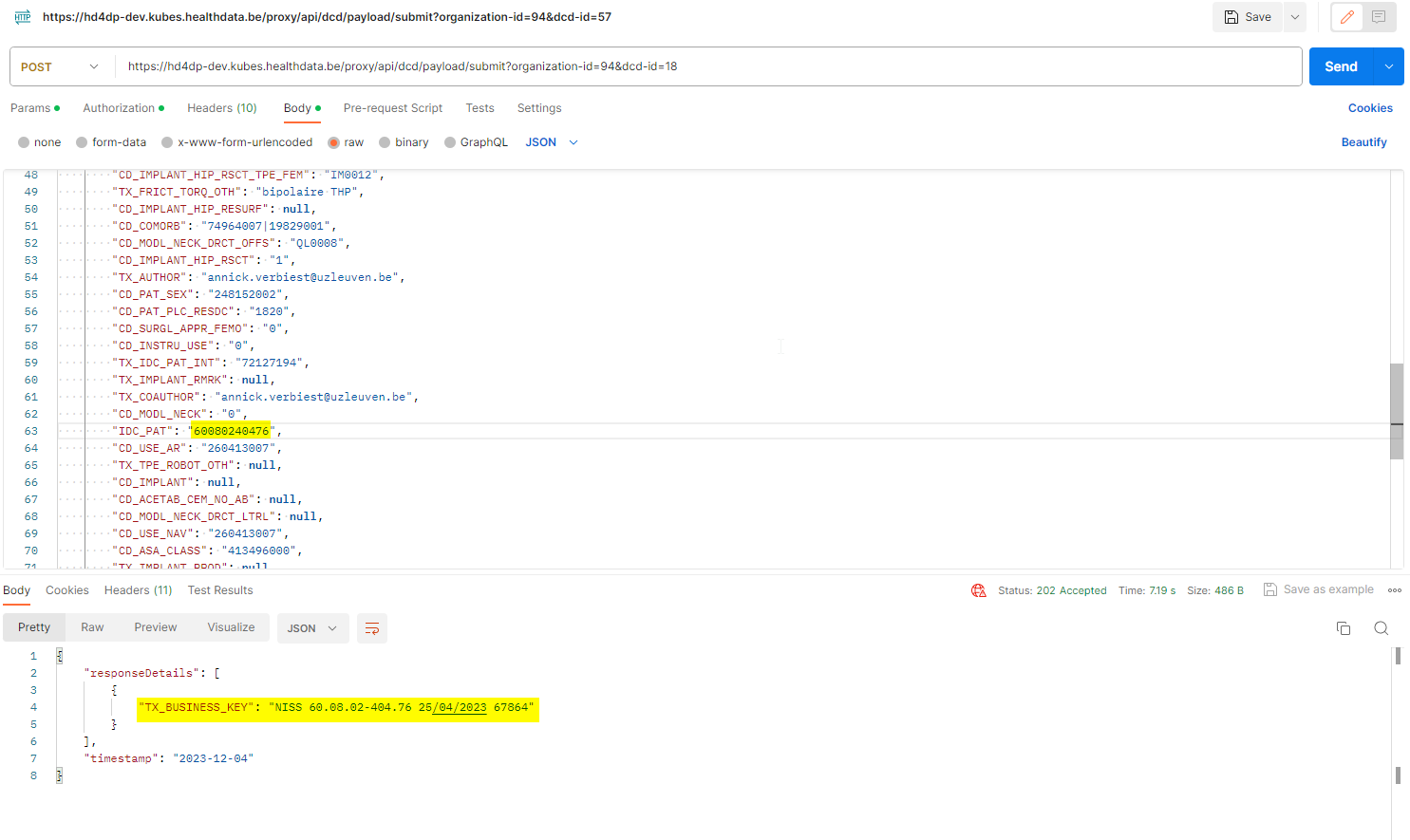
If the status is sent as "draft", a draft registration is created. In case of a successful submission the user receives a HTTP 202 (Accepted) notification with an empty business key, like this:

If the status key is not sent, the default value "submit" is used. The user performs a complete submission, and in case of a successful submission the user receives a HTTP 202 (Accepted) notification with a business key, like this:

Note that only "draft" status needs to be sent when sending a draft. The status "submit" is not necessary when performing a complete submission.
In the GUI, the difference is that the draft submission has the status open while the complete submission has the status submitted:

Once the draft is submitted in the GUI, the business key is generated and the process completed.
NISS number formatting
Adding separators to a NISS number
It is not necessary to add separators in a NISS number when uploading a file using S2S API. You can fill out the NISS number both with or without separators. E.g.: 85.04.02-169.32 or 85040216932.
Example:
COUNTRY and POSTAL CODE
Completion of the postal code if the country to be selected is not Belgium
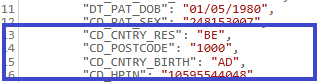
Only for the registries that need completion of the field Country (CD_CNTRY_RES) and the country to be selected is NOT Belgium, then the postal code (CD_POSTCODE) needs to be left empty and thus the code “9999 – Woonplaats niet in België” should not be selected.
This is important to avoid blocking and not uploading of your S2S API uploads.
Example:

Compare to:
Formatting of 'Date' and 'Time'
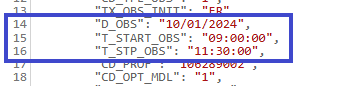
The correct format for a field reporting the Date is "dd/mm/yyyy".
The correct format for a field reporting the Date and time is "dd/mm/yyyy:hh:mm:ss".
Example:
Formatting of repeatable fields
In some DCDs, a complete block of fields is repeatable. In that case, the values have to be separated by a semi-colon (",")
Example:
    "TX_TTL_IMPLANT_DATA": [
        {
            "CD_IMPLANT": "127909",
            "CD_PAC_SADMI_NOTIFIC": "000017811475",
            "CD_IMPLANT_CAT": "",
            "CD_IMPLANT_PRD_NM": "",
            "TX_IMPLANT_PRODUC": "",
            "TX_IMPLANT_DSTRBTR": "",
            "TX_IMPLANT_DESC": ""
        },
        {
            "CD_IMPLANT": "127910",
            "CD_PAC_SADMI_NOTIFIC": "",
            "CD_IMPLANT_CAT": "127906",
            "CD_IMPLANT_PRD_NM": "productnaam",
            "TX_IMPLANT_PRODUC": "fabrikant",
            "TX_IMPLANT_DSTRBTR": "verdeler",
            "TX_IMPLANT_DESC": "opmerking product"
        }
    ],
Additional field information for CSV Upload
Author group, Author and Coauthor
When the Author Group, Author and Coauthor have been left out in the csv file, the default Author group, Author and Coauthor will be used automatically.
When the desired Author Group, Author and Coauthor are specified in the csv file, the headers TX_AUTHOR_GR, TX_AUTHOR and TX_COAUTHOR must be added to the csv file with their respective values.
Example:TX_AUTHOR_GR;TX_AUTHOR;TX_COAUTHORTest group;test@sciensano.be;test@sciensano.be
Note:
The Author group, Author and Coauthor must exist and are well configured at the back-end of the system. TX_AUTHOR_GR can be a string that identifies the Author group to which this Author belongs. Commonly, the first name and last name are used to identify the TX_AUTHOR_GROUP. Be sure to avoid leading and trailing spaces when entering the Author group value.
STATUS field - submission of drafts
Add the field name 'STATUS' in capitals in an additional column.
Add the value 'draft' for this field name in case a manual submission of the record is requested. If the value is not added, the record will be submitted without manual intervention.
NISS number
Adding separators to a NISS number
It is not necessary to add separators in a NISS number when uploading a file using CSV Upload. You can fill out the NISS number both with or without separators. E.g.: 85.04.02-169.32 or 85040216932.
Example:

COUNTRY and POSTAL CODE
Completion of the postal code if the country to be selected is not Belgium
Only for the registries that need completion of the field Country (CD_CNTRY_RES) and the country to be selected is NOT Belgium, then the postal code (CD_POSTCODE) needs to be left empty and thus the code “9999 – Woonplaats niet in België” should not be selected.
This is important to avoid blocking and not uploading of your CSV uploads.
Formatting of 'Date' and 'Date:Time'
The correct format for a field reporting the Date is dd/mm/yyyy.
The correct format for a field reporting the Date and time is dd/mm/yyyy:hh:mm:ss
Formatting of repeatable fields
In some DCDs, a complete block of fields is repeatable. In that case, the values have to be separated by a semi-colon (";")
Example:
- as presented in the DCD:

- as presented in the form:

Manually enter the repeatable fields as shown in the following template: field_category|<index>|field.
- Values:
Repeatable 1:
Transplants
transplant_status
Repeatable 2:
Transplants
transplant_status
- Formatting:
transplants|0|transplant_status;transplants|1|transplant_status

treating_physician|0|rizivinamicode_of_the_treating_physician;treating_physician|1|rizivinamicode_of_the_treating_physician
Formatting of a multiple choice
With multi codes there is only one column per field. So when a select box is set as multiple, values have to be separated by a "|". e.g.: 68452|68453|68454.
Example:
- as presented in the DCD:

- as presented in the form:

For reporting fields with a multiple choice formatting, the selected answers can be reported separatedly by means of the pipe symbol (|).
- Example:
cftr_modulating_therapy_1
1|2|3|4|5|6
Other formatting
- Boolean: true / false
- Codes: the value of the code (not the translation)
- CSV file name: HD_DCD_submcsv_HDBPnumber_HDBPabbreviation_versionnumber_versionreleasedate