 docs.healthdata.be
Authenticated user actions in HD4DP2 using the EAM interface
Table of contents
How to request access to a project in HD4DP2 with the role of "Local Study Lead" using the EAM interface?
How to request access to a project in HD4DP2 with the role of "Local Study Associate" using the EAM interface?
How to request access to a project in HD4DP2 with the role of "Local Study Support" for an author group "Author Group" using the EAM interface?
How to create an account for a project in HD4DP2 with the role of "Local Study Lead" using the EAM interface?
How to create an account for a project in HD4DP2 with the role of "Local Study Associate" using the EAM interface?
How to create an account for a project in HD4DP2 with the role of "Local Study Support" for an author group "Author Group" using the EAM interface?
How to approve an account for a project in HD4DP2 with the role of "Local Study Lead" using the EAM interface?
How to approve an account for a project in HD4DP2 with the role of "Local Study Associate" using the EAM interface?
How to approve an account for a project in HD4DP2 with the role of "Local Study Support" for an author group "Author Group" using the EAM interface?
How to remove an account for a project in HD4DP2 using the EAM interface?
How to restore an account for a project in HD4DP2 using the EAM interface?
How to reset a password of an account for a project in HD4DP2 using the EAM interface?
How to request to change an account for a project in HD4DP2 to the role of "Local Study Lead" using the EAM interface?
How to request to change an account for a project in HD4DP2 to the role of "Local study Associate" using the EAM interface?
How to request to change an account for a project in HD4DP2 to the role of "Local Study Support" for an author group "Author Group" using the EAM interface?
How to approve to change an account for a project in HD4DP2 to the role of "Local Study Lead" using the EAM interface?
How to approve to change an account for a project in HD4DP2 to the role of "Local Study Associate" using the EAM interface?
How to approve to change an account for a project in HD4DP2 to the role of "Local Study Support" for an author group "Author Group" using the EAM interface?
How to change an account for a project in HD4DP2 to the role of "Local Study Lead" using the EAM interface?
How to change an account for a project in HD4DP2 to the role of "Local Study Associate" using the EAM interface?
How to change an account for a project in HD4DP2 to the role of "Local Study Support" for an author group "Author Group) using the EAM interface?
How to change an author group of an account for a project in HD4DP2 using the EAM interface?
How to view accounts for projects in HD4DP2 of all participants to an own project of the own organization using the EAM interface?
How to view accounts for projects in HD4DP2 of all participants to all projects of the own organization using the EAM interface?
How to view accounts of own projects in HD4DP2 using the EAM interface?
How to view all accounts for all projects in HD4DP2 of all organizations using the EAM interface?
How to request access to a project in HD4DP2 with the role of "Local Study Lead" using the EAM interface?
Completing the user profile and becoming an Authenticated User
Go here to learn how to complete the user profile and how to become an Authenticated User.
Adding and provisioning an EAM account
Go here to learn how to add and provision an account.
Adding grants for a project in HD4DP2
Go here to learn how to add grants.
Next, select the Role Local Study Lead and click on the Save button.
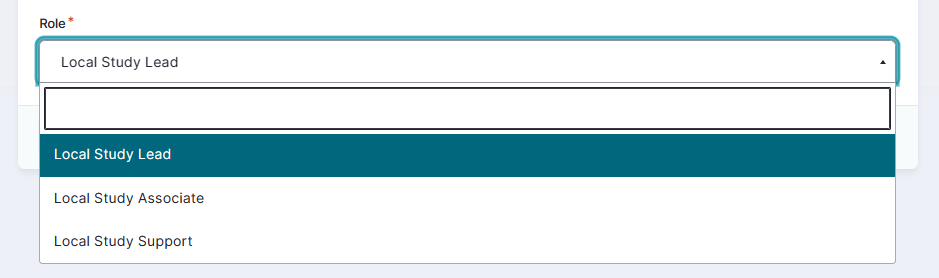
When you return to the My accounts page, you will see that the accounts list has been updated with the selected grant:

You just have created an account for a project in HD4DP2 with the role of "Local Study Lead".
Requesting approval
To request access to a project with a specific role, your account in Draft state needs to be approved by the Access Manager.
Click on either the "n grants" link or the Edit button on the row featuring the account for which you would like the approval by your Access Manager.

To request for approval you click on the Request approval button in the displayed Account: Manage grants screen.

The Account State is updated to Approval in the Account details section.

Return to the My Accounts page which now displays the Account State as Approval.

The Access Manager will be notified of your request via e-mail and prompted to take action. This can take multiple hours. Upon confirmation the Account State will change to Approved.
Next step: Access Manager's approval of the access grants as described here.
How to request access to a project in HD4DP2 with the role of "Local Study Associate" using the EAM interface?
Completing the user profile and becoming an Authenticated User
Go here to learn how to complete the user profile and how to become an Authenticated User.
Adding and provisioning an EAM account
Go here to learn how to add and provision an account.
Adding grants for a project in HD4DP2
Go here to learn how to add grants.
Next, select the Role Local Study Associate and click on the Save button.
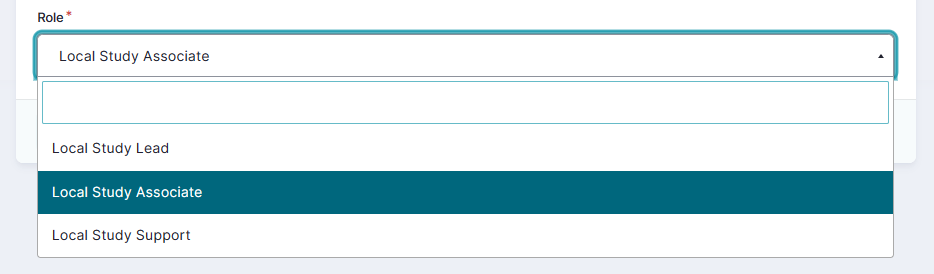
When you return to the My accounts page, you will see that the accounts list has been updated with the selected grant:
You just have created an account for a project in HD4DP2 with the role of "Local Study Associate".
Requesting approval
To request access to a project with a specific role, your account in Draft state needs to be approved by the Access Manager.
Click on either the "n grants" link or the Edit button on the row featuring the account for which you would like the approval by your Access Manager.
To request for approval you click on the Request approval button in the displayed Account: Manage grants screen.
The Account State is updated to Approval in the Account details section.
Return to the My Accounts page which now displays the Account State as Approval.
The Access Manager will be notified of your request via e-mail and prompted to take action. This can take multiple hours. Upon confirmation the Account State will change to Approved.
Next step: Access Manager's approval of the access grants as described here.
How to request access to a project in HD4DP2 with the role of "Local Study Support" for an author group "Author Group" using the EAM interface?
Completing the user profile and becoming an Authenticated User
Go here to learn how to complete the user profile and how to become an Authenticated User.
Adding and provisioning an EAM account
Go here to learn how to add and provision an account.
Adding grants for a project in HD4DP2
Go here to learn how to add grants.
Next, select the Role Local Study Support. The additional field Author group appears - here you also make a selection in the drop-down list. Finally, click on the Save button.
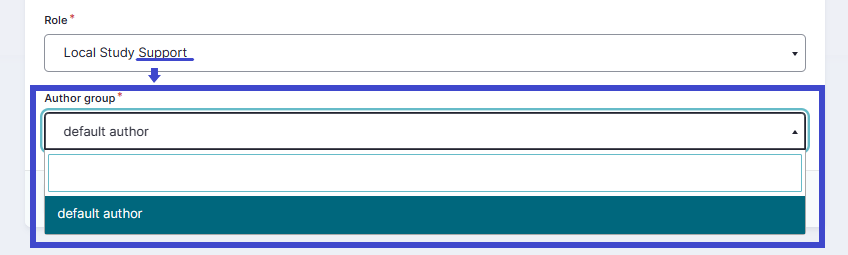
When you return to the My accounts page, you will see that the accounts list has been updated with the selected grant:
You just have created an account for a project in HD4DP2 with the role of "Local Study Support".
Requesting approval
To request access to a project with a specific role, your account in Draft state needs to be approved by the Access Manager.
Click on either the "n grants" link or the Edit button on the row featuring the account for which you would like the approval by your Access Manager.
To request for approval you click on the Request approval button in the displayed Account: Manage grants screen.
The Account State is updated to Approval in the Account details section.
Return to the My Accounts page which now displays the Account State as Approval.
The Access Manager will be notified of your request via e-mail and prompted to take action. This can take multiple hours. Upon confirmation the Account State will change to Approved.
Next step: Access Manager's approval of the access grants as described here.
How to create an account for a project in HD4DP2 with the role of "Local Study Lead" in EAM?
Completing the user profile and becoming an Authenticated User
Go here to learn how to complete the user profile and how to become an Authenticated User.
Adding and provisioning an EAM account
Go here to learn how to add and provision an account.
Adding grants for a project in HD4DP2
Go here to learn how to add grants.
Next, select the Role Local Study Lead and click on the Save button.
When you return to the My accounts page, you will see that the accounts list has been updated with the selected grant:
You just have created an account for a project in HD4DP2 with the role of "Local Study Lead".
How to create an account for a project in HD4DP2 with the role of "Local Study Associate" in EAM?
Completing the user profile and becoming an Authenticated User
Go here to learn how to complete the user profile and how to become an Authenticated User.
Adding and provisioning an EAM account
Go here to learn how to add and provision an account.
Adding grants for a project in HD4DP2
Go here to learn how to add grants.
Next, select the Role Local Study Associate and click on the Save button.
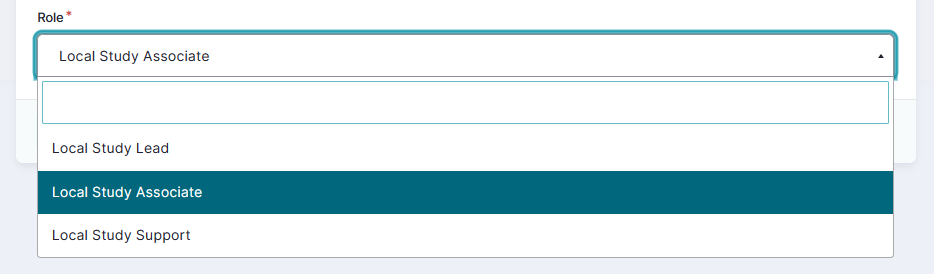
When you return to the My accounts page, you will see that the accounts list has been updated with the selected grant:
You just have created an account for a project in HD4DP2 with the role of "Local Study Associate".
How to create an account for a project in HD4DP2 with the role of "Local Study Support" for an author group "Author Group" in EAM?
Completing the user profile and becoming an Authenticated User
Go here to learn how to complete the user profile and how to become an Authenticated User.
Adding and provisioning an EAM account
Go here to learn how to add and provision an account.
Adding grants for a project in HD4DP2
Go here to learn how to add grants.
Next, select the Role Local Study Support. The additional field Author group appears - here you also make a selection in the drop-down list. Finally, click on the Save button.

When you return to the My accounts page, you will see that the accounts list has been updated with the selected grant:
You just have created an account for a project in HD4DP2 with the role of "Local Study Support" for the author group "default author".
How to approve an account for a project in HD4DP2 with the role of "Local Study Lead" in EAM?
An Authenticated User is not able to carry out this action.
How to approve an account for a project in HD4DP2 with the role of "Local Study Associate" in EAM?
An Authenticated User is not able to carry out this action.
How to approve an account for a project in HD4DP2 with the role of "Local Study Support" in EAM?
An Authenticated User is not able to carry out this action.
How to remove an account for a project in HD4DP2 in EAM?
Completing the user profile and becoming an Authenticated User
Go here to learn how to complete the user profile and how to become an Authenticated User.
Adding and provisioning an EAM account
Go here to learn how to add and provision an account.
Removing an account
To remove an account that is still in the state Draft, you simply select Remove from the Edit toggle button. If you want to see an account removed that is in the state Approval, Approved ... you need to contact your Access Manager who will then disable it.

How to restore an account for a project in HD4DP2 in EAM?
An Authenticated User is not able to carry out this action.
How to reset a password of an account for a project in HD4DP2 in EAM?
An Authenticated User is not able to carry out this action.
How to request to change an account for a project in HD4DP2 to the role of "Local Study Lead" in EAM?
Completing the user profile and becoming an Authenticated User
Go here to learn how to complete the user profile and how to become an Authenticated User.
Adding and provisioning an EAM account
Go here to learn how to add and provision an account.
Adding grants for a project in HD4DP2
Go here to learn how to add grants.
Next, you select one of the Roles Local Study Lead, Local Study Associate or Local Study Support and click on the Save button. See "How to create an account for a project ..." above for selecting the respective roles.
Changing of the role
If you want to change your role for one of the projects you need to check first whether your account still has the state Draft. If this is not the case, you need to contact your Access Manager to have your role changed.
Otherwise, return to the Accounts: Manage grants page and navigate to the list of projects at the bottom.

Select the Edit button of the relevant HD4DP2 project.

The Edit grant window shows the relevant Project with the current role.

Change the current role in the drop-down menu to Local Study Lead and click on the Save button.

Requesting approval of role change
To request approval of this role change you need to click on "n grant(s)" in the Grants column to open the Account: Manage grants screen. Click on the Request approval button.

The Account state is updated in the Account details section.

Return to My accounts page where you notice the changed Account state to Approval.

The Access Manager will be notified of your request via e-mail. You will have to wait now for the Access Manager to take action. This can take multiple hours. Upon confirmation the Account state will change to Approved.
How to request to change an account for a project in HD4DP2 to the role of "Local Study Associate" in EAM?
Completing the user profile and becoming an Authenticated User
Go here to learn how to complete the user profile and how to become an Authenticated User.
Adding and provisioning an EAM account
Go here to learn how to add and provision an account.
Adding grants for a project in HD4DP2
Go here to learn how to add grants.
Next, you select one of the Roles Local Study Lead, Local Study Associate or Local Study Support and click on the Save button. See "How to create an account for a project ..." above for selecting the respective roles.
Changing of the role
If you want to change your role for one of the projects you need to check first whether your account still has the state Draft. If this is not the case, you need to contact your Access Manager to have your role changed.
Otherwise, return to the Accounts: Manage grants page and navigate to the list of projects at the bottom.
Select the Edit button of the relevant HD4DP2 project.
The Edit grant window shows the relevant Project with the current role.
Change the current role in the drop-down menu to Local Study Lead and click on the Save button.
Requesting approval of role change
To request approval of this role change you need to click on "n grant(s)" in the Grants column to open the Account: Manage grants screen. Click on the Request approval button.
The Account state is updated in the Account details section.
Return to My accounts page where you notice the changed Account state to Approval.
The Access Manager will be notified of your request via e-mail. You will have to wait now for the Access Manager to take action. This can take multiple hours. Upon confirmation the Account state will change to Approved.
How to request to change an account for a project in HD4DP2 to the role of "Local Study Support" for an author group "Author Group" in EAM?
Completing the user profile and becoming an Authenticated User
Go here to learn how to complete the user profile and how to become an Authenticated User.
Adding and provisioning an EAM account
Go here to learn how to add and provision an account.
Adding grants for a project in HD4DP2
Go here to learn how to add grants.
Next, you select one of the Roles Local Study Lead, Local Study Associate or Local Study Support and click on the Save button. See "How to create an account for a project ..." above for selecting the respective roles.
Changing of the role
If you want to change your role for one of the projects you need to check first whether your account still has the state Draft. If this is not the case, you need to contact your Access Manager to have your role changed.
Otherwise, return to the Accounts: Manage grants page and navigate to the list of projects at the bottom.
Select the Edit button of the relevant HD4DP2 project.
The Edit grant window shows the relevant Project with the current role.
Change the current role from the drop-down menu to Local Study Support and click on the Save button. Don't forget to select the correct Author group for this Local Study Support

Requesting approval of role change
To request approval of this role change you need to click on "n grant(s)" in the Grants column to open the Account: Manage grants screen. Click on the Request approval button.
The Account state is updated in the Account details section.
Return to My accounts page where you notice the changed Account state to Approval.
The Access Manager will be notified of your request via e-mail. You will have to wait now for the Access Manager to take action. This can take multiple hours. Upon confirmation the Account state will change to Approved.
How to approve to change an account for a project in HD4DP2 to the role of "Local Study Lead" using the EAM interface?
An Authenticated User is not able to carry out this action.
How to approve to change an account for a project in HD4DP2 to the role of "Local Study Associate" using the EAM interface?
An Authenticated User is not able to carry out this action.
How to approve to change an account for a project in HD4DP2 to the role of "Local Study Support" for an author group "Author Group" using the EAM interface?
An Authenticated User is not able to carry out this action.
How to change an account for a project in HD4DP2 to the role of "Local Study Lead" using the EAM interface?
Completing the user profile and becoming an Authenticated User
Go here to learn how to complete the user profile and how to become an Authenticated User.
Adding and provisioning an EAM account
Go here to learn how to add and provision an account.
Adding grants for a project in HD4DP2
Go here to learn how to add grants.
Next, you select one of the Roles Local Study Lead, Local Study Associate or Local Study Support and click on the Save button. See "How to create an account for a project ..." above for selecting the respective roles.
Changing of the role
If you want to change your role for one of the projects you need to check first whether your account still has the state Draft. If this is not the case, you need to contact your Access Manager to have your role changed.
Otherwise, return to the Accounts: Manage grants page and navigate to the list of projects at the bottom.
Select the Edit button of the relevant HD4DP2 project.
The Edit grant window shows the relevant Project with the current role.
Change the current role from the drop-down menu to Local Study Lead and click on the Save button.

You have now changed an account for a project in HD4DP2 to the role of Local Study Lead.
How to change an account for a project in HD4DP2 to the role of "Local Study Associate" using the EAM interface?
Completing the user profile and becoming an Authenticated User
Go here to learn how to complete the user profile and how to become an Authenticated User.
Adding and provisioning an EAM account
Go here to learn how to add and provision an account.
Adding grants for a project in HD4DP2
Go here to learn how to add grants.
Next, you select one of the Roles Local Study Lead, Local Study Associate or Local Study Support and click on the Save button. See "How to create an account for a project ..." above for selecting the respective roles.
Changing of the role
If you want to change your role for one of the projects you need to check first whether your account still has the state Draft. If this is not the case, you need to contact your Access Manager to have your role changed.
Otherwise, return to the Accounts: Manage grants page and navigate to the list of projects at the bottom.
Select the Edit button of the relevant HD4DP2 project.
The Edit grant window shows the relevant Project with the current role.
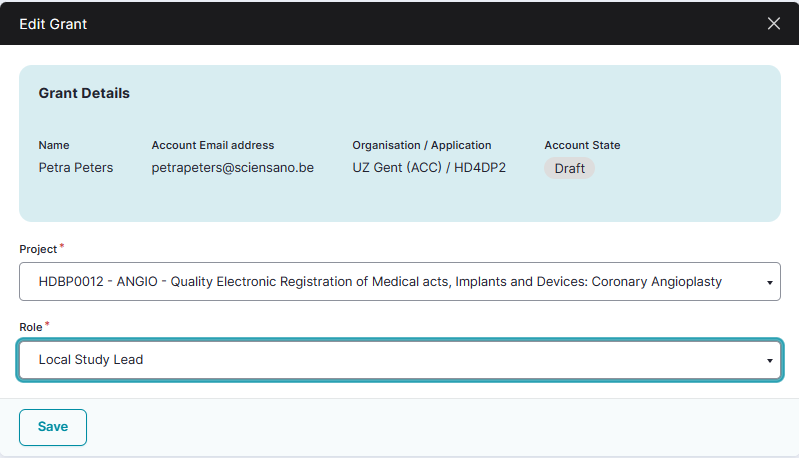
Change the current role from the drop-down menu to Local Study Associate and click on the Save button.

You have now changed an account for a project in HD4DP2 to the role of Local Study Associate.
How to change an account for a project in HD4DP2 to the role of "Local Study Support" using the EAM interface?
Completing the user profile and becoming an Authenticated User
Go here to learn how to complete the user profile and how to become an Authenticated User.
Adding and provisioning an EAM account
Go here to learn how to add and provision an account.
Adding grants for a project in HD4DP2
Go here to learn how to add grants.
Next, you select one of the Roles Local Study Lead, Local Study Associate or Local Study Support and click on the Save button. See "How to create an account for a project ..." above for selecting the respective roles.
Changing of the role
If you want to change your role for one of the projects you need to check first whether your account still has the state Draft. If this is not the case, you need to contact your Access Manager to have your role changed.
Otherwise, return to the Accounts: Manage grants page and navigate to the list of projects at the bottom.
Select the Edit button of the relevant HD4DP2 project.
The Edit grant window shows the relevant Project with the current role.
Change the current role from the drop-down menu to Local Study Support and click on the Save button. Don't forget to select the correct Author group for this Local Study Support.

You have now changed an account for a project in HD4DP2 to the role of Local Study Support.
How to change an author group for a project in HD4DP2 using the EAM interface?
Completing the user profile and becoming an Authenticated User
Go here to learn how to complete the user profile and how to become an Authenticated User.
Adding and provisioning an EAM account
Go here to learn how to add and provision an account.
Adding grants for a project in HD4DP2
Go here to learn how to add grants.
Next, you select one of the Roles Local Study Lead, Local Study Associate or Local Study Support and click on the Save button. See "How to create an account for a project ..." above for selecting the respective roles.
Changing of the role
If you want to change your role for one of the projects you need to check first whether your account still has the state Draft. If this is not the case, you need to contact your Access Manager to have your role changed.
Otherwise, return to the Accounts: Manage grants page and navigate to the list of projects at the bottom.
Select the Edit button of the relevant HD4DP2 project.
The Edit grant window shows the relevant Project with the current role.
Change the current role from the drop-down menu to Local Study Support. If it is necessary to change the author group, you select the correct Author group from the drop-down menu.
Click on the Save button.
You have now changed the author group to the desired name.
How to view the accounts of all participants to an own project in HD4DP2 of the own organization using the EAM interface?
There is currently no concept "own project"
How to view the accounts of all participants to all projects in HD4DP2 of the own organization using the EAM interface?
An Authenticated User is not able to carry out this action.
How to view accounts of own projects in HD4DP2 using the EAM interface?
Completing the user profile and becoming an Authenticated User
Go here to learn how to complete the user profile and how to become an Authenticated User.
Completing the user profile and becoming an Authenticated User
Go here to learn how to complete the user profile and how to become an Authenticated User.
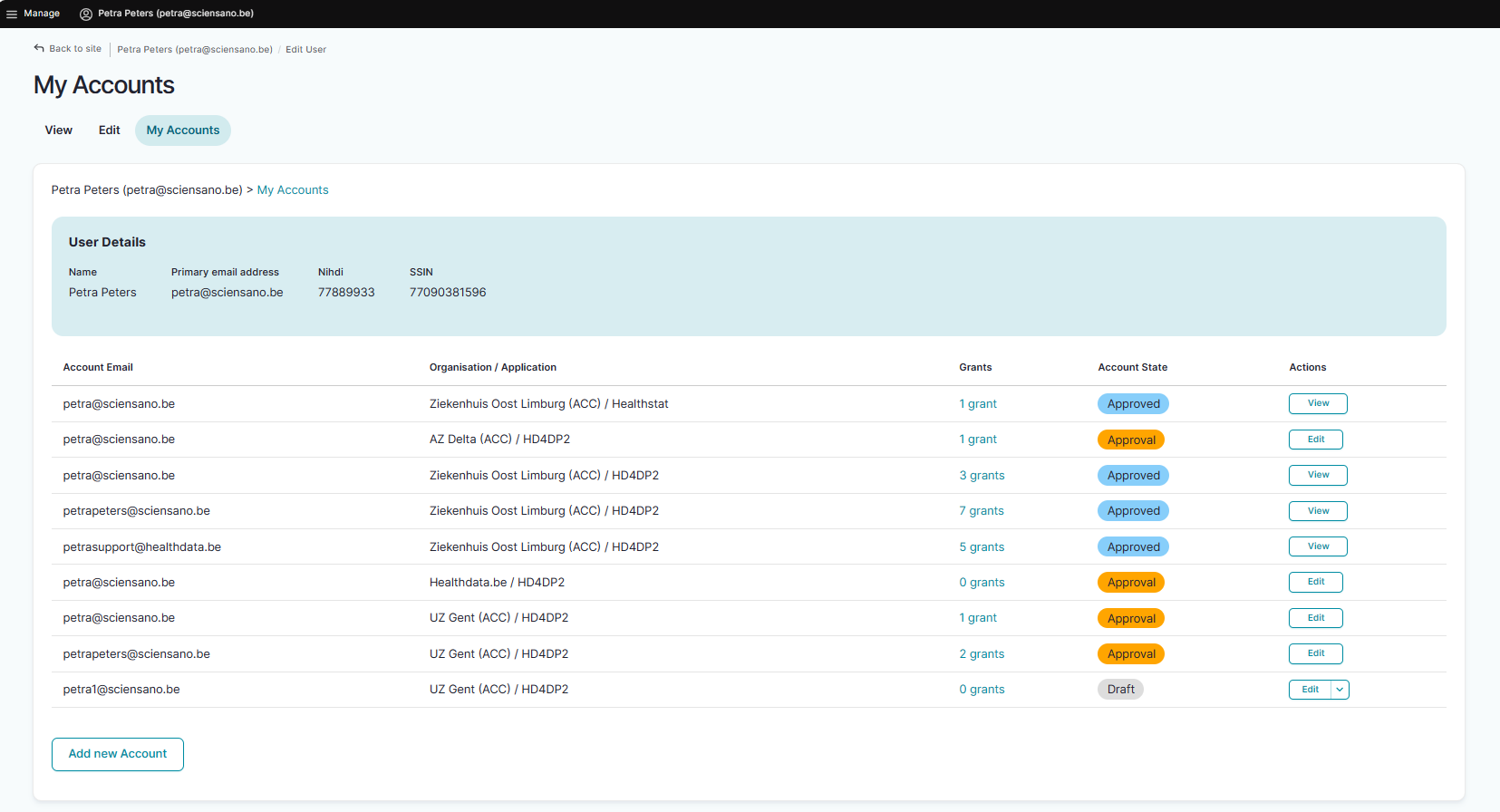
The page above shows all accounts for the projects of the Authenticated User in the applications HD4DP2 or Healthstat.
How to view all accounts of all projects in HD4DP2 of all organizations using the EAM interface?
An Authenticated User is not able to carry out this action.