 docs.healthdata.be
EAM actions using the EAM Portal
Table of contents
How to create an account in EAM?
How to approve an account request in EAM?
How to remove an account in EAM?
How to restore an account in EAM?
How to change the user type to Access Manager in EAM?
How to change the user type to Authenticated User in EAM?
How to change the user type to Manager in EAM?
How to change the user type to Administrator in EAM?
How to reset the password of an account in EAM?
How to view the accounts of all participants to an own project of the own organization in EAM?
How to view the accounts of all participants to all projects of own organizations in EAM?
How to view the accounts to own projects in EAM?
How to view all accounts to all projects of all organizations in EAM?
How to create an account in EAM?
Completing the user profile and becoming an Authenticated User
Go here to learn how to complete the user profile and how to become an Authenticated User.
Adding and provisioning an EAM account
Go here to learn how to add and provision an account.
How to approve an account request using the EAM Portal?
An Authenticated User is not able to carry out this action.
How to remove an account using the EAM Portal?
Completing the user profile and becoming an Authenticated User
Go here to learn how to complete the user profile and how to become an Authenticated User.
Adding and provisioning an EAM account
Go here to learn how to add and provision an account.
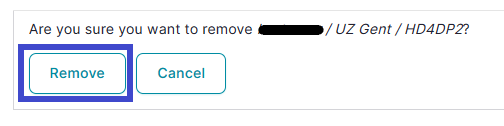
Removing an account
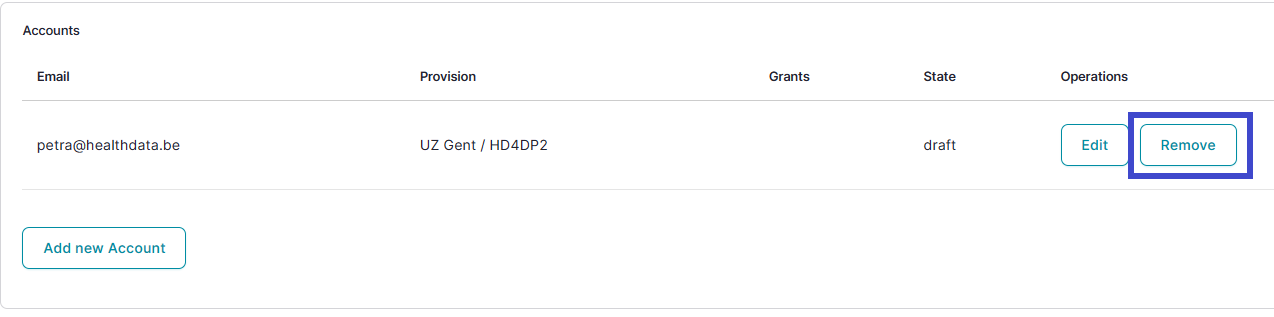
And to confirm:
How to restore an account using the EAM Portal?
An Authenticated User is not able to carry out this action.
How to change the user type to Access manager using the EAM Portal?
An Authenticated User is not able to carry out this action.
How to change the user type to Authenticated User using the EAM Portal?
Completing the user profile and becoming an Authenticated User
Go here to learn how to complete the user profile and how to become an Authenticated User.
How to change the user type to Manager using the EAM Portal?
An Authenticated User is not able to carry out this action.
How to change the user type to Administrator using the EAM Portal?
An Authenticated User is not able to carry out this action.
How to reset password of an account using the EAM Portal?
An Authenticated User is not able to carry out this action.
How to view the accounts of all participants of an own project of the own organization using the EAM Portal?
There is currently no concept "own project"
How to view the accounts of all participants of all projects of own organizations using the EAM Portal?
An Authenticated User is not able to carry out this action.
How to view the own project accounts using the EAM Portal?
There is currently no concept "own project"
How to view all accounts of all projects of all organizations using the EAM Portal?
An Authenticated User is not able to carry out this action.