 docs.healthdata.be
New and familiar concepts of HD EAM
Underlying to the new HD Entity Access Management system "EAM 3.0" is a new architecture that has been built with the idea to give the control of the users back into the hands of the Access Managers, ensuring an end-to-end management of the life cycle of a user in the system.
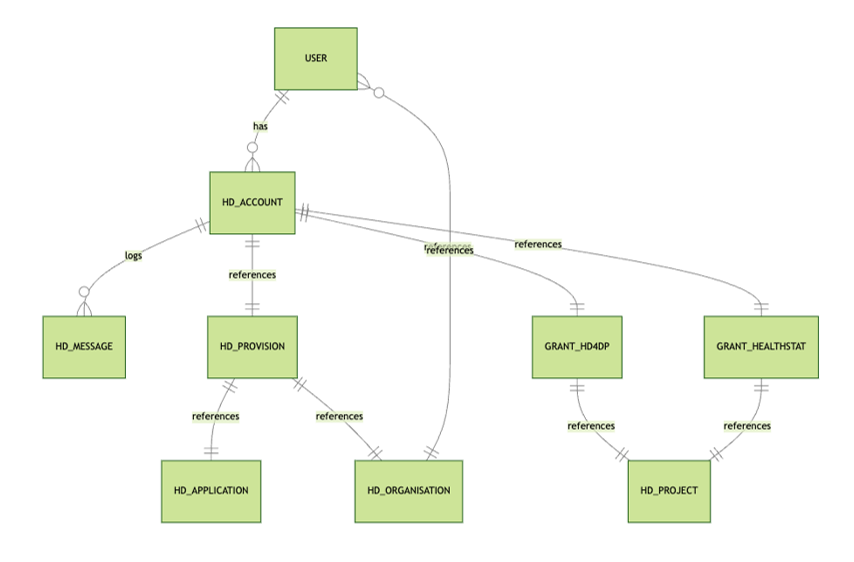
The new architecture together with its relevant processes bring along some new concepts. We have listed them for you below, supplemented with rather familiar concepts.
Access Manager
An Access Manager is an Authenticated User having access manager rights within the EAM system. These rights are granted by healthdata.be to the first Access Manager of a certain Organization. Any additional access managers are to be appointed by the data provider and rights are to be granted by the existing Access Manager of that Organization.
An Access Manager validates and manages user accounts within the Entity Access Management system, approves and manages the accesses of these EAM users to different applications for any available projects, and has the power to create EAM users and EAM accounts by means of csv bulk upload.

Account (EAM account)
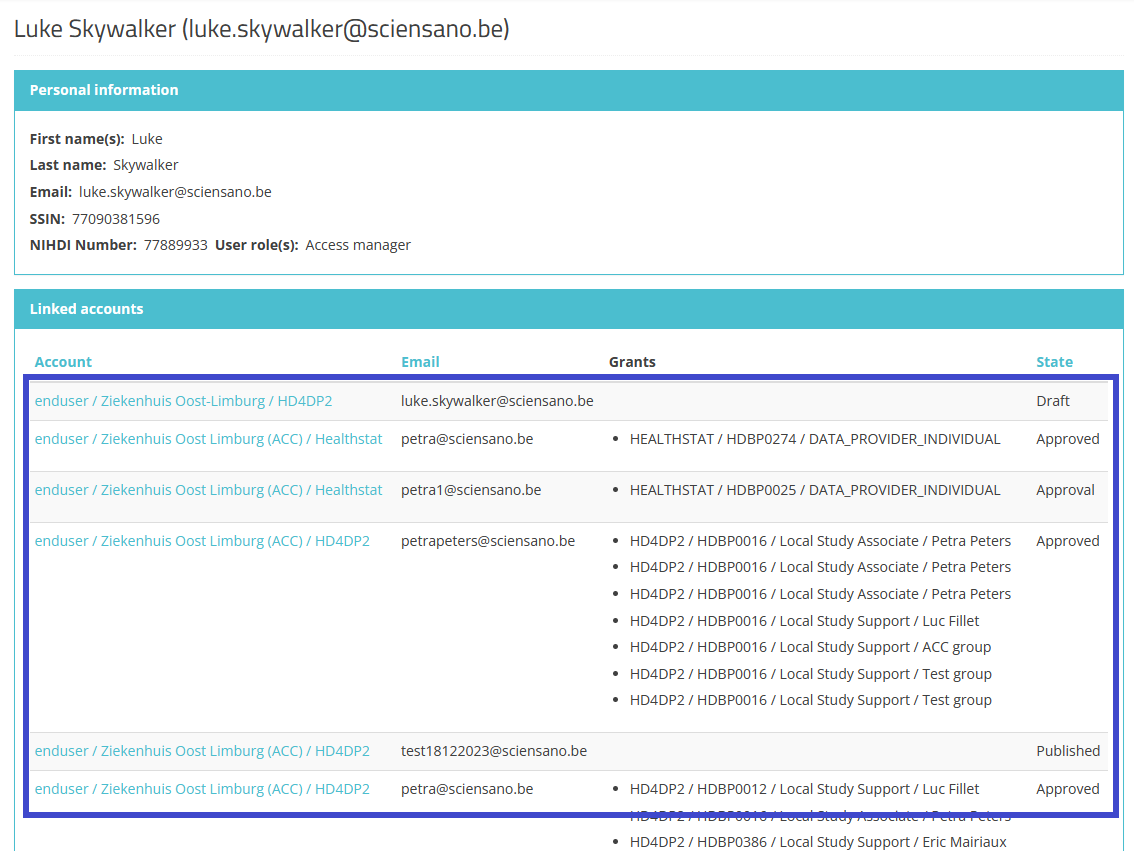
An account in EAM 3.0 is a combination of an e-mail address and a provision completed with a set of rights (access grants) giving access to a certain registry. An account thus links EAM user to the desired registry within an application.
A user can have more than one account, each with a different e-mail address, e.g. when working in different healthcare organizations (HCOs), and each with another provision.
Account state
The below overview shows the different states of an EAM account throughout the workflow. The Label column mentions the name of the action button available for the Authenticated User and/or Access Manager in the relevant GUI screens. (Only Create New Draft and Request approval are available for an Authenticated User.)

Admin
The Admin or administrator is part of the healthdata.be staff and has all permissions and abilities within the system. This user type should be used sparingly and only for highly technical or emergency purposes.
Authenticated User
A person who is logged in to the EAM system via itsme or eID and has a user profile based on First name, Last name and NISS code shared during login. An Authenticated User is able to access the EAM application, create accounts and request access grants, and has access to the own account information in case changes are necessary.
Author group
The Author Group creation is based on First_name Last_name principle of the user requesting access.
For the HD4DP2 application the Author Group field is automatically populated for user roles 1 (Study Lead) and 2 (Study Associate). The Author Group for role 3 (Study Support) needs to be selected from the relevant drop-down list.
Grants (Access grants)
Grants define a user's access to a registry in an application with a specific role. They are added to a provisioned EAM account and need to be approved by the Access Manager of the relevant organization.
Legacy requests
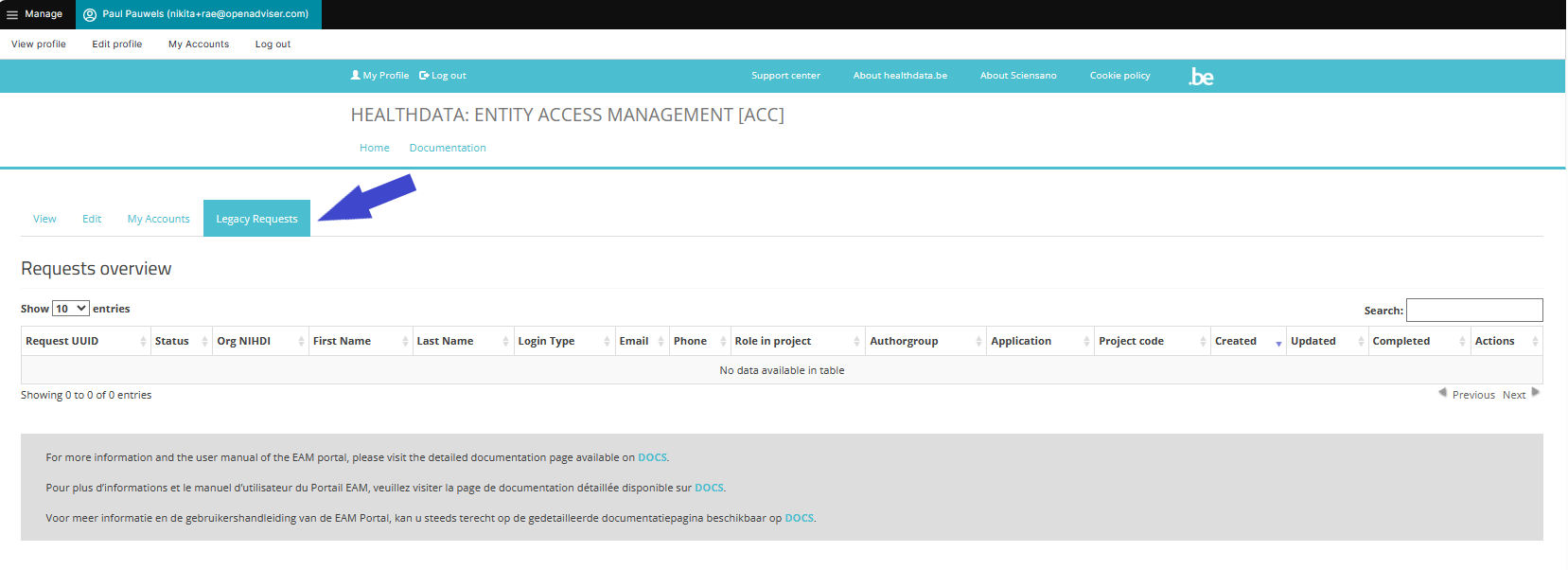
The Legacy requests tab retrieves the "Requests overview" of the previous EAM version (2.7). The purpose of this overview is to follow-up on pending requests after migration to EAM 3.0.
Manager (HD Manager)
The Manager is a user type in EAM performed by healthdata.be Service Desk staff. Compared to an Access Manager the manager profile has more extensive rights for advanced actions, without the emergency functionalities of an Administrator.
Organization
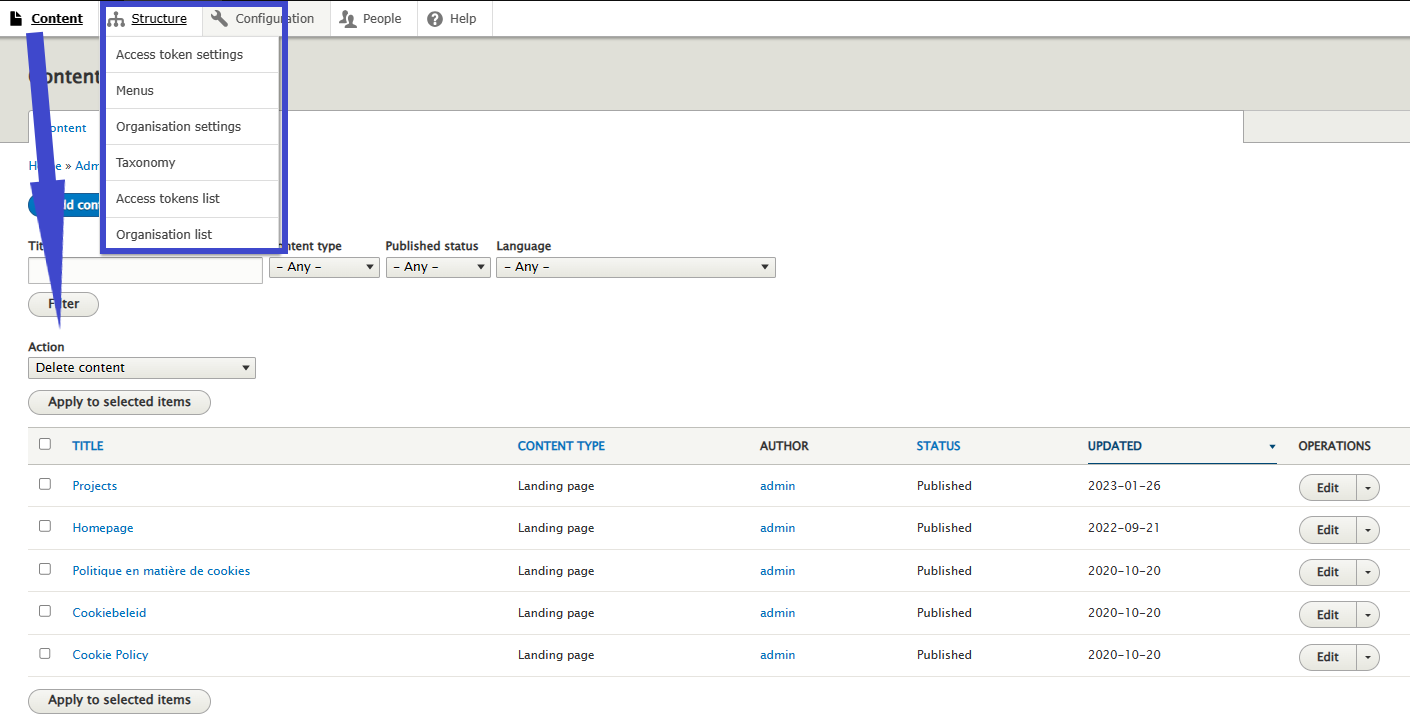
In full: Healthcare Organization (HCO). A list of all organizations including Name, NIHDI number and the respective list of Access Managers is managed by the HD Manager. An organization that is not active anymore, will receive the status Disabled, without being deleted from the EAM system.
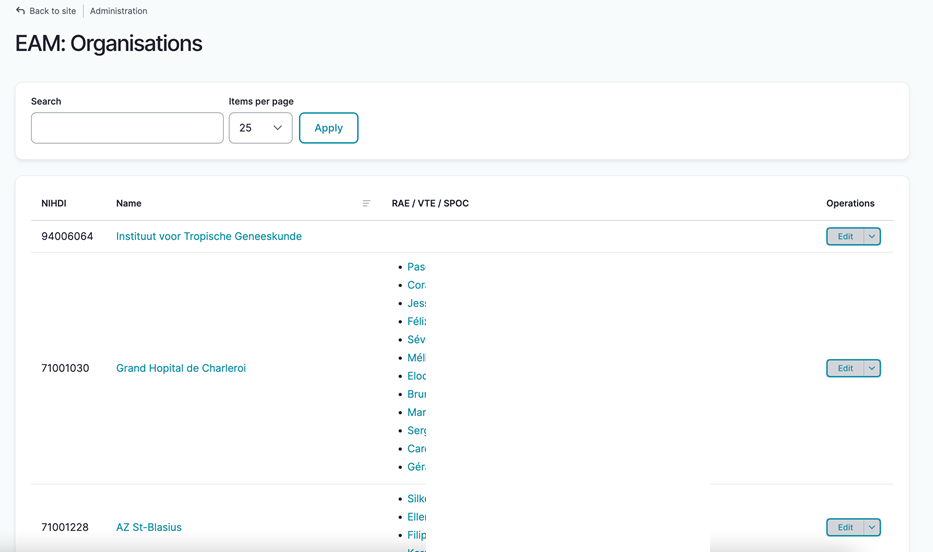
Moderation state
See Account state.
Messages (log)
Messages are created whenever actions are performed on EAM account level, e.g. password reset, request of account approval, approving of grants etc. A message is the representation of something we send to or receive from Service bus. The messages will be logged within EAM for history purposes.
Provision
The provision is the deployment of a certain Application to a certain Organization along with any specific parameters providing extra information on the deployment.
Service Bus
Is a communication layer between our EAM portal and the installations at the DP's side. Whereas the former EAM system mainly managed access requests, the new EAM 3.0 focusses on complete User management incl. access requests, account creating, feedback loop ... aiming at faster user onboarding, a better user experience and less manual intervention by Support / DevOps.

User (EAM user)
The user is the main entity within the EAM system. Once the user's profile, containing basic information such as Username, Primary e-mail address, First name, Last name, SSIN and professional NIHDI code, has been validated, the user has access to EAM, ready to interact. EAM 3.0 offers the possibility to add more than one NIHDI code. Each user can be linked to more than one Account.
User matrix
The introduction of the HD Entity Access Management system leads to some new concepts. In this section, we explain these new concepts and complement them with some familiar ones.
In general, a user matrix is a structured way to organize information about user segments and their characteristics: in our case, by plotting the two axes in relation to each other, the user matrix provides a comprehensive view of the user types and their respective functionalities.
User roles
Or HD4DP2/Healthstat.be User Roles. They determine your access options as requestor in the HD application for the relevant project and does not necessarily corresponds to the staff structure within your organization. More on User roles in HD4DP2 can be found here.
User types
There are several EAM User Types denoting the level of rights you have within the EAM system:
- Authenticated user
- Access manager
- (HD) Manager
- Administrator
- Validated User
Different from user roles that are typical for applications.
Validated user
User type. Can be found in the EAM users overview after migrating validated users from EAM 2.7 to EAM 3.0. This migrated user type corresponds with the one of an Authenticated user in EAM 3.0.
After migration of your healthcare organisation from EAM 2.7 to EAM 3.0, the Access Manager might notice the user type of Validated user in the Role(s) column on the EAM Users overview page.
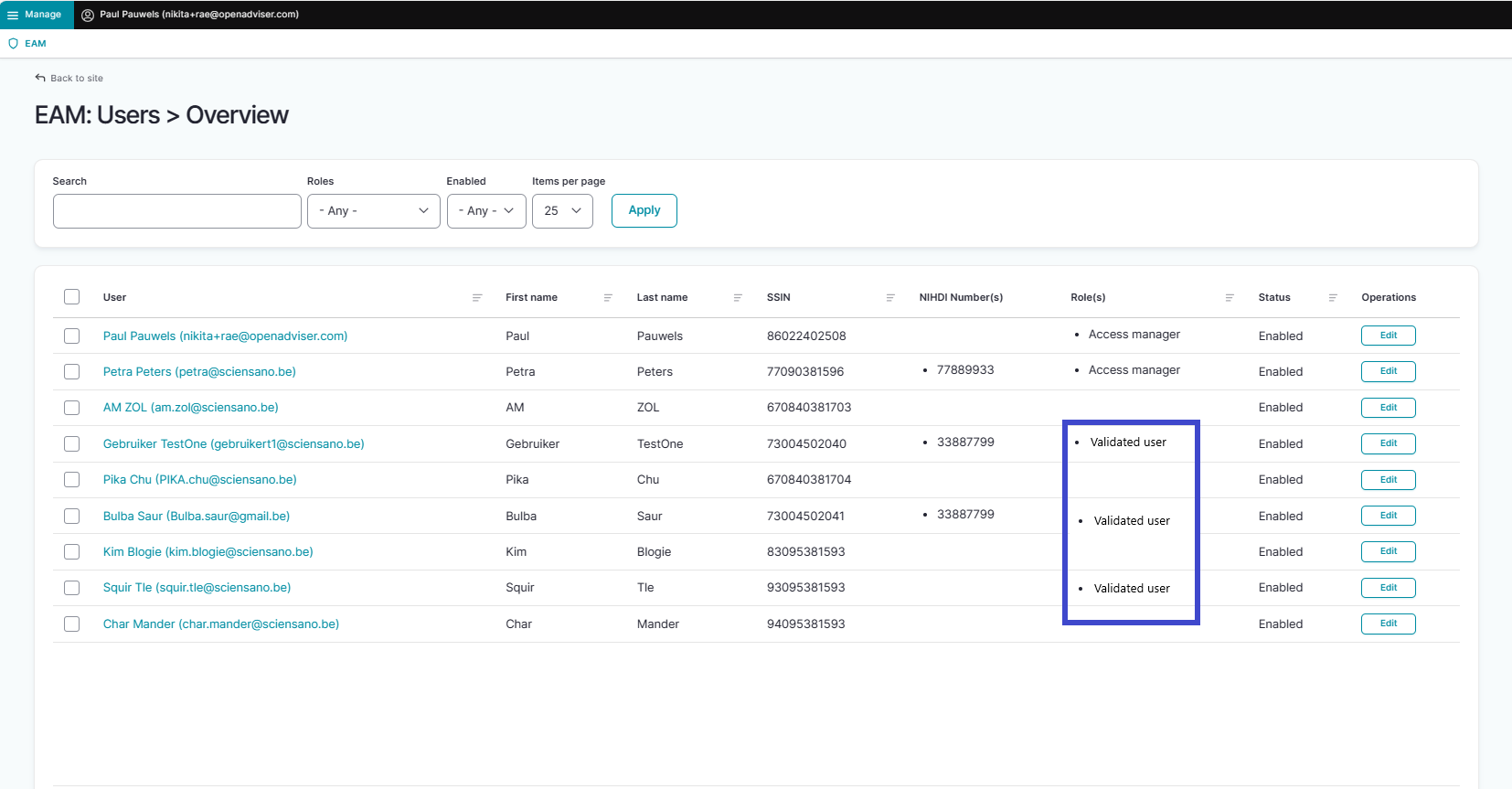
The label "Validated user" is a remnant of EAM version 2.7 where it meant to indicate that a user's profile had been completed and validated by the Access Manager. This migrated user type corresponds to the Authenticated user type in EAM 3.0. As such, "Validated user" is not an active role in EAM 3.0, nor does it influence the functionality of EAM 3.0.
This documentation is being updated regularly. We try to provide as correct, complete and clear as possible information on these pages. Nevertheless, if you see anything in the documentation that is not correct, does not match your experience or requires further clarification, please create a support ticket via our portal (https://healthdatabe.atlassian.net/servicedesk/customer/portals) or send us an e-mail via support.healthdata@sciensano.be to report this documentation issue. Please, do not forget to mention the URL or web address of the page with the documentation issue. We will then adjust the documentation as soon as possible. Thank you!