 docs.healthdata.be
Online acceptance DP environment
Rebuild environment
Every Saturday, the online acceptance DP environment is rebuilt and all data will be removed automatically. This is triggered by a workflow with a cron: https://github.com/Sciensano-Healthdata/hd4dp/blob/main/.github/workflows/promote.yml#L6
Add organization
When a new organization wants to have access to the online acceptance DP environment. A ticket will be created at the service desk.
The organization and Riziv numbers must be added to the Liquibase scripts of MDM services. You can request the developer to add the organization to the Online Acceptance DP environment and tell them to use the context on liquibase dpacc.
Once the mdm-services image is tagged you can validate the result here https://github.com/Sciensano-Healthdata/hd-integration-mdm-services/actions/workflows/build-release-docker-image.yml. The latest version tag of GitHub is used for the next deployment.
Workflow Deployment
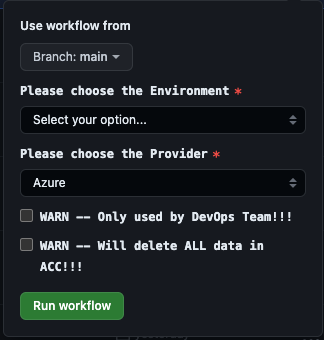
You can trigger the workflow https://github.com/Sciensano-Healthdata/hd4dp/actions/workflows/promote.yml to rebuild the environment.
Note: If you run manually an extra and optional option/checkbox to clean the database. This is optional just use it if necessary.
Credentials
Once the environment is up and running and all accounts are created. The credentials can be found in our vault. https://vault.healthdata.be.
Go to secret_v2/azure_k8s > environments > acceptance
UI logins (HD4DP -- Front-End) : formio-users-pass
API S2S login: s2s-api-user-pass
CSV SFTP logins: dpsftp-users
Front-End ( HD4DP ) -- URL: https://hd4dp.acceptance.healthdata.be
API S2S -- URL: https://hd4dp.acceptance.healthdata.be/proxy/api/dcd/payload/submit?organization-id=00&dcd-id=00
Upload the CSV -- URL: sftp.acceptance.healthdata.be Port: 2220
For more information on how to use S2S and CSV consult the documentation here https://docs.healthdata.be
When you want to share the credentials with the ticket owner in ServiceNow. Make sure to use the Arxus secure password link. Add the different endpoints for CSV, API, and UI to the ticket.
Users/Author groups
Each organization will have 1 user test@sciensano.be and 1 Author group Test group. This can be used as Author, Co-Author, and Author group in the CSV and API payloads.
CSV user is based on organization-<org_id>
API S2S user is 1 generic user for all organizations.