 docs.healthdata.be
End of year updates (weekly)
At the end of each year, a number of steps need to be taken to ensure the weekly SLA reporting continues to run automatically and uninterrupted during the following year. These steps have already been completed to prepare for the year 2024 but will need to be followed for all subsequent years.
STEP ONE - Create a new folder for the new year
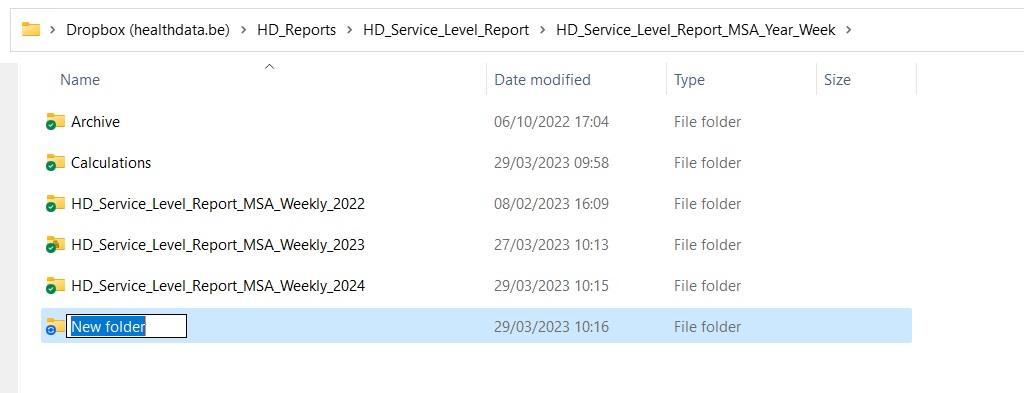
Create a new folder in the following location on Dropbox as shown below:
HD_Reports\HD_Service_Level_Report\HD_Service_Level_Report_MSA_Year_Week
The folder should have the same naming convention as for others.
For example, in 2025 the folder should be named: HD_Service_Level_Report_MSA_Weekly_2025
STEP TWO - Copy and rename Excel and Powerpoint files
Navigate to the following folder on Dropbox:
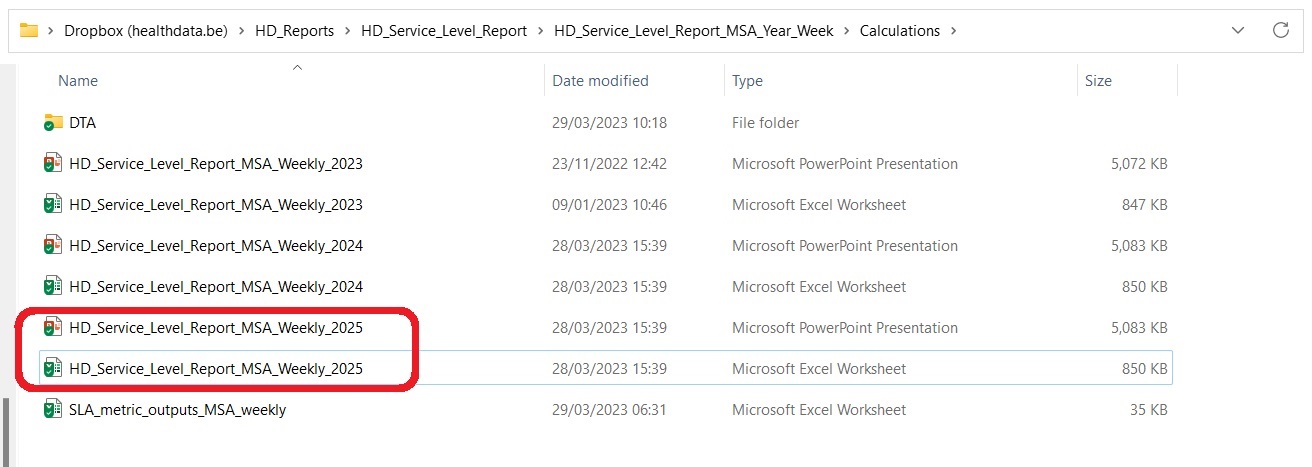
HD_Reports\HD_Service_Level_Report\HD_Service_Level_Report_MSA_Year_Week\Calculations
Copy the Excel and Powerpoint files for the current year.
At the end of 2024 these will be called: HD_Service_Level_Report_MSA_Weekly_2024
Rename these two files by adding a suffix with the following year as shown below.
STEP THREE -
STEP FOUR -
STEP FIVE -
STEP SIX -
STEP SEVEN -