 docs.healthdata.be
Access Manager actions using the EAM interface
Table of contents
How to create a user using the EAM interface?
How to create an own account using the EAM interface?
How to create an account for another user using the EAM interface?
How to approve an account request using the EAM interface?
How to disable an account using the EAM interface?
How to restore an account using the EAM interface?
How to change the user type to Access manager using the EAM interface?
How to change the user type to Authenticated user using the EAM interface?
How to change the user type to Manager using the EAM interface?
How to change the user type to Administrator using the EAM interface?
How to reset the password of an account using the EAM interface (FAS)?
How to view the accounts of all participants to an own project of the own organization using the EAM interface?
How to view the accounts of all participants to all projects of own organization using the EAM interface?
How to view the accounts of own projects using the EAM interface?
How to view all accounts of all projects of all organizations using the EAM interface?
This documentation is being updated regularly. We try to provide as correct, complete and clear as possible information on these pages. Nevertheless, if you see anything in the documentation that is not correct, does not match your experience or requires further clarification, please create a support ticket via our portal (https://healthdatabe.atlassian.net/servicedesk/customer/portals) or send us an e-mail via support.healthdata@sciensano.be to report this documentation issue. Please, do not forget to mention the URL or web address of the page with the documentation issue. We will then adjust the documentation as soon as possible. Thank you!How to create a user using the EAM interface?
An Access Manager is not able to carry out this action.
How to create an own account using the EAM interface?
End-to-end process:
Navigating to the HD EAM Portal and Access Manager profile
Go here to learn how to login via the Federal Authentication Service (FAS) with eID or itsme.
Creating an own account
Go here to learn how an Access Manager creates an account on his own profile page.
How to create an account for another user using the EAM interface?
End-to-end process:
Navigating to the HD EAM Portal and Access Manager profile
Go here to learn how to login via the Federal Authentication Service (FAS) with eID or itsme.
Creating an account for a user
Go here to learn how an Access Manager creates an account for a user.
How to approve an account request using the EAM interface? (own orgs)
End-to-end process:
Navigating to the HD EAM Portal and Access Manager profile
Go here to learn how to login via the Federal Authentication Service (FAS) with eID or itsme.
Approving an account approval request
Go here to learn how to approve an account request and how to perform a push action
How to disable an account using the EAM interface? (own orgs)
End-to-end process:
Navigating to the HD EAM Portal and Access Manager profile
Go here to learn how to login via the Federal Authentication Service (FAS) with eID or itsme.
Disabling an account
Go here to learn how to disable an account.
How to restore an account using the EAM interface? (own orgs)
End-to-end process:
Navigating to the HD EAM Portal and Access Manager profile
Go here to learn how to login via the Federal Authentication Service (FAS) with eID or itsme.
Restoring an account
Go here to learn how to restore an account that has been disabled.
How to change the user type to Access manager using the EAM interface?
End-to-end process:
Navigating to the HD EAM Portal and Access Manager profile
Go here to learn how to login via the Federal Authentication Service (FAS) with eID or itsme.
Promoting to Access Manager
Go here to learn how to promote an Autenticated User to the user type of Access Manager.
How to change the user type to Authenticated user using the EAM interface?
End-to-end process:
Navigating to the HD EAM Portal and Access Manager profile
Go here to learn how to login via the Federal Authentication Service (FAS) with eID or itsme.
Demoting to Authenticated User
Go here to learn how to demote an Access Manager to the user type of Authenticated User.
How to change the user type to Manager using the EAM interface?
An Access Manager is not able to carry out this action.
How to change the user type to Administrator using the EAM interface?
An Access Manager is not able to carry out this action.
How to reset the password of an account using the EAM interface? (FAS)
An Access Manager is not able to carry out this action.
How to view the accounts of all participants to an own project of the own organization using the EAM interface?
There is currently no concept "own project"
How to view the accounts of all participants to all projects of own organization using the EAM interface?
End-to-end process:
Navigating to the HD EAM Portal and Access Manager profile
Go here to learn how to login via the Federal Authentication Service (FAS) with eID or itsme.
Viewing all accounts of all participants
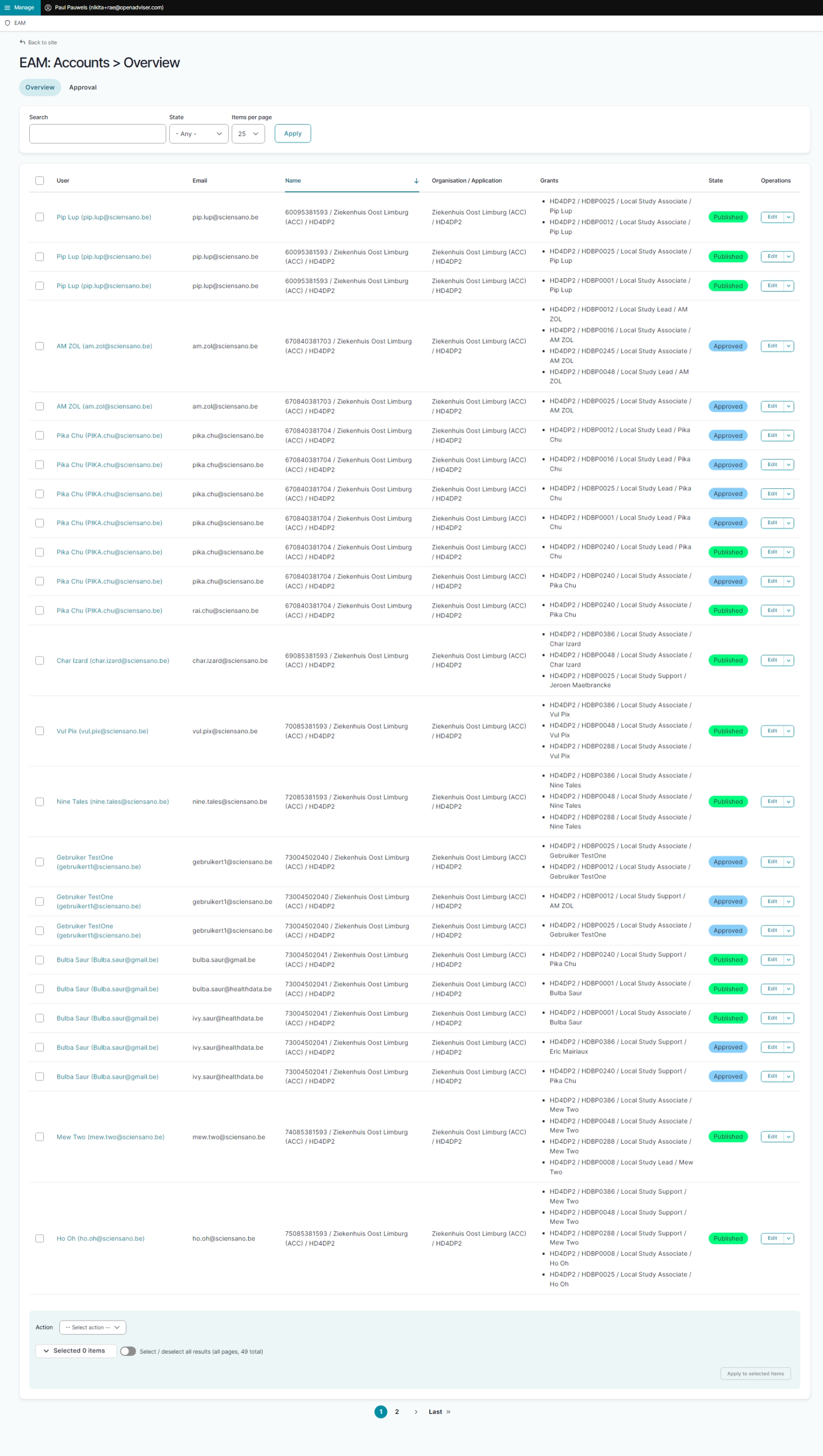
Click on Manage to the top left of the screen, so that EAM appears. When hovering over this, the items EAM Users and EAM Accounts become visible.

Click on EAM Accounts. You will now see the overview of all accounts of all users.
How to view the accounts of own projects using the EAM interface?
There is currently no concept "own project"
How to view all accounts of all projects of all organizations using the EAM interface?
An Access Manager is not able to carry out this action.
This documentation is being updated regularly. We try to provide as correct, complete and clear as possible information on these pages. Nevertheless, if you see anything in the documentation that is not correct, does not match your experience or requires further clarification, please create a support ticket via our portal (https://healthdatabe.atlassian.net/servicedesk/customer/portals) or send us an e-mail via support.healthdata@sciensano.be to report this documentation issue. Please, do not forget to mention the URL or web address of the page with the documentation issue. We will then adjust the documentation as soon as possible. Thank you!