 docs.healthdata.be
Envoyer un enregistrement CPVS-ME « Suivi - Contact gestion de cas »
Pour envoyer un enregistrement Suivi - Contact gestion de cas pour le projet d'étude Centres belges de Prise en charge des Violences Sexuelles : Monitoring et Évaluation en utilisant le tableau récapitulatif, sélectionnez « Suivi - Contact gestion de cas » dans le menu bleu foncé de gauche.

Lorsque vous sélectionnez une version de cette section d'étude, vous verrez le tableau récapitulatif dans la partie principale de votre écran. Ce tableau contient, entre autres, les éléments suivants : ID d'enregistrement, Progrès, Auteur, Co-auteur, ID unique, Business key, Code d'enregistrement, Numéro de registre national du patient...

Utilisez les filtres dans l'en-tête du tableau pour trouver le ou les enregistrement(s) que vous voulez soumettre. Par exemple, vous pouvez utiliser les filtres « Statut » (défini sur « Ouvert ») et « Erreurs de validation » (défini sur « 0 ») pour trouver les enregistrements qui peuvent être soumis.

Une fois que vous avez trouvé le ou les enregistrement(s) que vous voulez soumettre, vous devez sélectionner le ou les enregistrement(s) en cochant la case au début de la ligne dans le tableau récapitulatif.

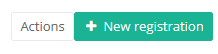
Then you need to press the "Actions" button at the top right of the overview table.
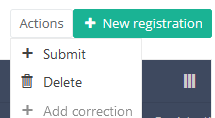
There are now two options, "Send" and "Delete". Now press "Submit".
After you press "Submit," a pop-up message will appear asking you to confirm the deletion of the selected registration(s). If you are sure about this action, press "Confirm." If not, press "Cancel."
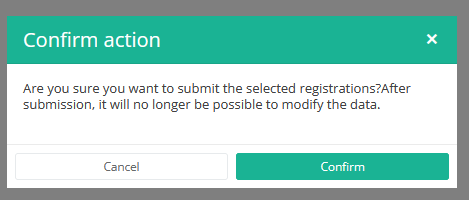
Once you confirm the submission, you cannot change the content of the registration(s). Submitted registrations can also no longer be deleted.
The submitted registration remains present in the overview table, but the status has changed from "Open" to "Submitted".
If you want to see only "Open" registrations, you can adjust the filter on the "Status" item in the overview table.
A Follow-up - Casemanagement contact registration can be submitted at the end of the creation process using the study form (see: Create BSACC-ME registration "Follow-up - Casemanagement contact").
When the registration was completed using the study form, saved and there are no more validation errors, the registration can also be submitted via the overview table. This method can be useful to submit multiple registrations in the same action.
This documentation is being updated regularly. We try to provide as correct, complete and clear as possible information on these pages. Nevertheless, if you see anything in the documentation that is not correct, does not match your experience or requires further clarification, please create a support ticket via our portal Jira Service Management or send us an e-mail via support.hd@hda.fgov.be to report this documentation issue. Please do not forget to mention the URL of the page. We will then adjust the documentation as soon as possible. Thank you!