HD Incident Management Process
HD Incident Management ProcessWelcome at the documentation pages for the process "HD Incident Management Process", of the service healthdata.be (Sciensano).
The following sections are (will be) provided:
- Introduction
- Implementation of the Incident Management Process
- Start and evaluation of the Incident Management Process
- Modifications to the Incident Management Process
- Incident Management
- Definition and scope
- Overall Process
- Diagram
- Roles & Responsibilities
- RACI matrix
- Process activity steps
- Service Portal for Incident management
- Work instructions for Incident management
- Definitions
- General definitions
- Abbreviations
Introduction
IntroductionThis document describes the healthdata.be Incident Management Process. The process is end-to-end oriented and based upon the lifecycle model wherever applicable.
Implementation of the Incident Management Process
Implementation of the Incident Management ProcessThe implementation of the healthdata.be Incident Management Process will be done on a pragmatic base.
During a start-up phase (6 months as of the use in the production environment), the results will be measured.
At the end of the start-up phase, the healthdata.be Incident Management Process will be fixed. This will be done by taking into account the achievements during the start-up phase, the statistical information provided by the Information Technology Service Management System (i.c. ServiceNow).
Start and evaluation of the Incident Management Process
Start and evaluation of the Incident Management ProcessThis Incident Management Process takes effect on January 1st 2022 and remains active until a new version is communicated.
The evaluation of the Incident Management Process is done on a regular basis.
Once a year, the year results, the content of the Incident Management Process will be evaluated by the Accompanying Committee of the healthdata.be platform. The Incident Management Process can be modified as described in Par “Modifications to the Incident Management Process”. Related documents can have start dates different from the Incident Management Process start date.
Modifications to the Incident Management Process
Modifications to the Incident Management ProcessEvery request by the Partner to change the contents of this Incident Management Process will officially be sent to the healthdata.be Service Management.
The Changes, if approved by the healthdata.be Service Management, will become active as soon as the Incident Management Process have been published.
Incident Management
Incident Management manager zo, 12/05/2021 - 14:46Definition and scope
Definition and scopeAn Incident is considered to be an item, that is a disturbance of the business continuity/services in the broadest sense of the word. This could be a malfunctioning of a system, an outage, a blocked access, a non-availability of any kind of system (infra, app, telco).
The Incident Management Process is an end-to-end process, handling:
- receiving
- capturing
- classifying
- resolving
- closing
of incidents.
The Incident Management Process relates to the following other processes managed by heathdata.be:
- Request Management Process
- Change Management Process
- Problem Management Process
- Configuration Management Process
- SLO/SLA Management Process
As for the relation with Request Management Process:
- Requests that are entered in the system, but are in fact Incidents, are transferred from Request to Incident.
As for the relation with Change Management Process:
- If the resolution of an Incident requires to implement a Change, the Incident will go into phase “Awaiting Change” and the Change Management Process will be invoked. After completion, the Incident Management Process will be resumed.
NOTE: the linkage to Problem, Configuration, SLO/SLA Management Process will be accomplished once these processes are defined and implemented.
The Incident Management Process is implemented in the following applications used by healthdata.be:
- ServiceNow
The Incident Management Process is interfacing with the following applications used by healthdata.be:
- DB2 Reporting Process/Tool
- ServiceNow ServicePortal
The Incident Management Process is owned by:
- Team lead “Services & Support” of healthdata.be.
Overall Process
Overall Process manager zo, 12/05/2021 - 14:48Diagram
DiagramThis diagram describes the major process related activities, for each of the major steps. For each step, the responsibilities of all roles applicable are explained in a RACI matrix. Each step is explained as well in the next paragraphs.

Roles & Responsibilities
Roles & Responsibilities| Role | Description |
| Incident Owner | The Incident Owner is responsible for ensuring that all activities defined within the process are undertaken and that the process achieves its goals and objectives. |
| Incident Coordinator | The Incident Coordinator is responsible of managing all incidents that are assigned to his group, within the SLA defined. |
| Incident Manager | The Incident Manager is responsible for process design and for the day to day management of the process. The manager has authority to manage Incidents effectively through First, Second, Third Level Support. |
| End User | The End User is the person using an IT resource. This role is responsible to report all Incidents and make all IT requests and contacts through the Service Desk. |
| Service Desk Agent | The Service Desk Agent is responsible for the day to day communication with all End Users and to facilitate the resolution and fulfillment of Incidents. |
| L2/L3 Incident Analyst | The Incident Analyst is responsible for implementing and executing the Incident process as defined by the Incident Owner/Manager, and to be a point of contact for escalated issues, questions, or concerns. |
| Major Incident Team | The Major Incident Team is a group of individuals brought together to manage a Major Incident. This team includes the Service Desk function, the IT organization, and Third-Party companies. |
Implementation of the major roles in the healthdata.be team:
| Role | Healthdata function |
| End User | anybody who is not part of the healthdata organization, but is a user of its services (scientists, Sciensano staff, hospital/laboratory staff, …) |
| Service Desk Agent | Is part of the role of Support Engineer/Service Desk Officer in the Services & Support Team |
| L2/3 Incident Analyst | Is part of engineer/developer functions in all HD teams- IAT, DC, DWH, SOB; as well as the DPO, EA, other architects |
| Incident Coordinator | Is part of the role in all HD teams |
| Incident Manager | Is part of the role of Incident management in the Services & Support Team |
RACI matrix
RACI matrix| Ref | Functional Process Item | End User | Service Desk Agent | L2/3 Incident analyst | Incident Coordinator | Incident Manager |
| I01 | Incident Identification | I | R | R | R, A | |
| I02 | Incident Logging | I | R | A | ||
| I03 | Incident Categorization & Prioritization | I | R | R | A | |
| I04 | Known error | R | R | A | ||
| I05 | Incident diagnosis | R | R | A | ||
| I06 | Investigate & resolve | R | I | A | ||
| I07 | Consult end-user | C | R | R | A | |
| I08 | Set incident as resolved | R | R | A | ||
| I09 | L2 needed ? | R | R | A | ||
| I10 | Assign incident to L2/L3 | R | I | R | A, I | |
| I11 | Investigate incident | I | R | I | A | |
| I12 | Change required ? | R | R | A | ||
| I13 | Incident resolved ? | C | I | R | R | A |
| I14 | Reassign ticket to Service Desk | C | R | I | A, I | |
| I15 | Apply workaround | C | R | I | C | A, I |
| RACI | Description |
| A = Accountable | The single owner who is accountable for the final outcome of the activity. |
| R = Responsible | The executor(s) of the activity step. |
| C = Consulted | The expert(s) providing information for the activity step. |
| I = Informed | The stakeholder(s) who must be notified of the activity step. |
Process activity steps
Process activity stepsI01. Incident Identification
| Input(s) | A ticket can be initiated by phone call, email, portal, walk-in or via a monitoring event to the Service Desk. |
| Output(s) | Incident ticket is identified in Service Now |
| Status | New |
| Description | The End-user can initiate an incident via : |
| Portal : preferable way of reporting an incident. Email : a user send a mail to Support.Healthdata@sciensano.be. The Service Desk has one day to pick this up and create a ticket on behalf of that user. Phone : a user contacts the Service Desk by phone to report an incident. The Service Desk will immediately, while on the phone, create a ticket on behalf of that user. Walk-in : a user can visit physically the Service Desk to report an incident. The Service Desk will immediately create a ticket on behalf of that user. Monitoring event : an alert or event can initiate the automatic creation of an incident. |
I02. Incident Logging
| Input(s) | Details gathered from the End User is added to the ticket |
| Output(s) | Ticket is enriched with information in the work notes. |
| Status | Work in Progress |
| Description | The Service Desk will perform a first analysis of the incident ticket : It is not an incident, but a request : the incident ticket will be closed and the Service Desk will create an Service Request It is an incident : the ticket will be enriched with the first analysis. |
I03. Incident Categorization
| Objective | To categorize every new Service Desk Record for assignment, diagnosis, and reporting purposes. |
| Input(s) | Open Incident Record |
| Output(s) | Categorized Incident Record |
| Status | Work in Progress |
| Description | The Service Desk will verify or modify the category on which the incident has been opened : |
I03. (2) Incident Prioritization
| Objective | To set an appropriate Priority for scheduling and handling the Incident. |
| Input(s) | Open, Categorized Incident Record |
| Output(s) | Open, Categorized and Prioritized Incident Record |
| Status | Work in Progress |
| Description | The Service Desk will verify or modify the priority on which the incident has been opened. The priority is defined, conform the Master Service Agreement of the healthdata.be platform, by both Impact and Business Importance. The impact is defined based upon the following table. |
| Impact | Situation |
| High | The incident affects all end-users |
| Medium | The incident affects a group of end-users |
| Low | The incident affects one or a limited number of end-users |
| None | No degradation of the Service |
| Description (cont.) | When the situation changes over time, Impact and Priority will be adapted accordingly The priority is calculated as follows: |
| Business Importance Level | Impact | |||
| HIGH | MEDIUM | LOW | NONE | |
| GOLD | Priority 1 (P01) | Priority 2 (P02) | Priority 8 (P08) | Priority 40 (P40) |
| SILVER | Priority 2 (P02) | Priority 4 (P04) | Priority 16 (P16) | Priority 40 (P40) |
| BRONZE | Priority 4 (P04) | Priority 8 (P08) | Priority 40 (P40) | Priority 40 (P40) |
I04. Known error ?
| Objective | To identify if a solution for the incident is already known. |
| Input(s) | Open, Categorized and Prioritized Incident Record |
| Output(s) | Open, Categorized and Prioritized Incident Record |
| Status | Work in Progress |
| Description | The Service Desk will try to detect if a solution is already known in the knowledge base or in a problem record. If found, the Service Desk will apply this solution. |
I05. Incident Diagnosis
| Objective | To define whether an incident can be solved by the Service Desk or not. |
| Input(s) | Open, Categorized and Prioritized Incident Record |
| Output(s) | Open, Categorized and Prioritized Incident Record |
| Status | Work in Progress |
| Description | Incident diagnosis will be carried out after the first analysis (I02) |
I06. Investigate and resolve
| Objective | To resolve as many incidents as possible at the Service Desk. |
| Input(s) | Open, Categorized and Prioritized Incident Record |
| Output(s) | Open, Categorized and Prioritized Incident Record |
| Status | Work in Progress |
| Description | Incident investigation will be carried after the first analysis (I02) using all tools, skills, and techniques made available to the Service Desk. This may include matching to similar Incident Records, matching to Known Errors and Work-Arounds, use of knowledge bases and Frequently Asked Questions (FAQ) documents. |
| Resolving the incident is the final step after the investigation. |
I07. Consult end-user
| Objective | To have the confirmation of the end-user that the solution applied solves the incident. |
| Input(s) | Open, Categorized and Prioritized Incident Record |
| Output(s) | Open, Categorized and Prioritized Incident Record |
| Status | Awaiting caller information |
| Description | The Service Desk will contact the end-user, preferably by phone If not available by phone, the Service Desk will send a mail. The SOP ‘Manage awaiting tickets’ will apply |
I08. Set incident as resolved
| Objective | To set the incident ticket to status ‘resolved’ after confirmation of the end-user. |
| Input(s) | Open, Categorized and Prioritized Incident Record |
| Output(s) | Open, Categorized and Prioritized Incident Record |
| Status | Resolved |
| Description | Once the Service Desk has changed the status of the incident ticket to ‘resolved’, the end-user has 5 working days left to re-open the ticket. After 5 working days, the ticket will be automatically set to the status ‘closed’. The end-user will not be able to re-open the ticket, and has to create a new incident ticket. |
I09. L2 needed?
| Objective | To determine, after diagnosis (I05), whether the Service Desk can solve the incident or a L2-group has to manage the incident. |
| Input(s) | Initial Diagnosed Incident Record |
| Output(s) | Open, Categorized and Prioritized Incident Record |
| Status | Work in Progress |
| Description | If the Service Desk is able to solve the incident, the ticket will remain in the group and continue with I06. If Service Desk cannot resolve the incident, the ticket will be assigned to L2-group. |
I10. Assign incident to L2/L3
| Objective | To assign the incident ticket to a L2/L3 group. |
| Input(s) | Investigated and Diagnosed Incident Record |
| Output(s) | Open, Categorized and Prioritized Incident Record |
| Status | Work in Progress |
| Description | Once the ticket is assigned to a L2/L3-group, the incident coordinator of that particular group has to manage this ticket, under control of the incident manager. |
I11. Investigate incident
| Objective | To solve an incident, which could not be fixed by the Service Desk, as soon as possible. |
| Input(s) | Investigated, diagnosed and documented Incident Record by Service Desk |
| Output(s) | Open, Categorized and Prioritized Incident Record |
| Status | Work in Progress |
| Description | With the investigation and diagnosis of the Service Desk, the L2-group will further investigate the incident, with possible help of an L3-group (external party) |
I12. Change required ?
| Objective | To determine whether a change is required to solve the incident. |
| Input(s) | Documentation from Level 2/3 |
| Output(s) | Fully Updated Incident Record |
| Status | Work in Progress/On hold/ Awaiting change |
| Description | After further investigation, the L2-group has to decide if a change is needed (functional or infrastructure related) to solve the incident. If not, the next step I13 is applicable, and the status remains ‘Work in Progress’. If yes, the change management process starts, and status is ‘On hold’, ‘Awaiting change’. |
I13. Incident resolved ?
| Objective | To ensure that L2 was able to resolve the incident. |
| Input(s) | Fully Updated Incident Record |
| Output(s) | Updated Incident Record |
| Status | Work in Progress/On hold, Awaiting problem |
| Description | If the incident is solved, the incident ticket will be updated. If no change is required, but the incident is still not solved : problem management process starts the status is set to ‘On hold’, ‘Awaiting problem’ a workaround has to be found to solve the incident temporarily |
I14. Reassign ticket to Service Desk
| Objective | To ensure that the solution is validated by the end-user. |
| Input(s) | Fully Updated Incident Record |
| Output(s) | Updated Incident Record |
| Status | Work in Progress |
| Description | When the solution (permanent or via workaround (I15) is applied, the incident ticket will be reassigned to the Service Desk, who will continue with step I07.. |
I15. Apply workaround
| Objective | To ensure that L2 was able to resolve the incident. |
| Input(s) | Fully Updated Incident Record |
| Output(s) | Updated Incident Record |
| Status | Work in Progress/On hold, Awaiting problem |
| Description | If the incident cannot be solved permanently : A workaround has to be applied to solve the incident temporarily The ticket is reassigned to the Service Desk (I14) |
HD Service and Support portal
HD Service and Support portal manager vr, 02/20/2026 - 11:32User manual of the Jira Service Management portal
User manual of the Jira Service Management portalIn the following sections we will provide the user the information below:
- Access the Jira Service Management portal
- How to create an account
- How to set default language
- How to create a ticket
- How to follow up a ticket
- How to delete my account
- How to submit a question or complaint
Access the Jira Service Management portal
Access the Jira Service Management portalBrowse to the public main page of the HD Service and Support portal: Jira Service Management portal.
Enter your e-mail address and click on "Next". This will lead you to the next step, which is "How to create an account".
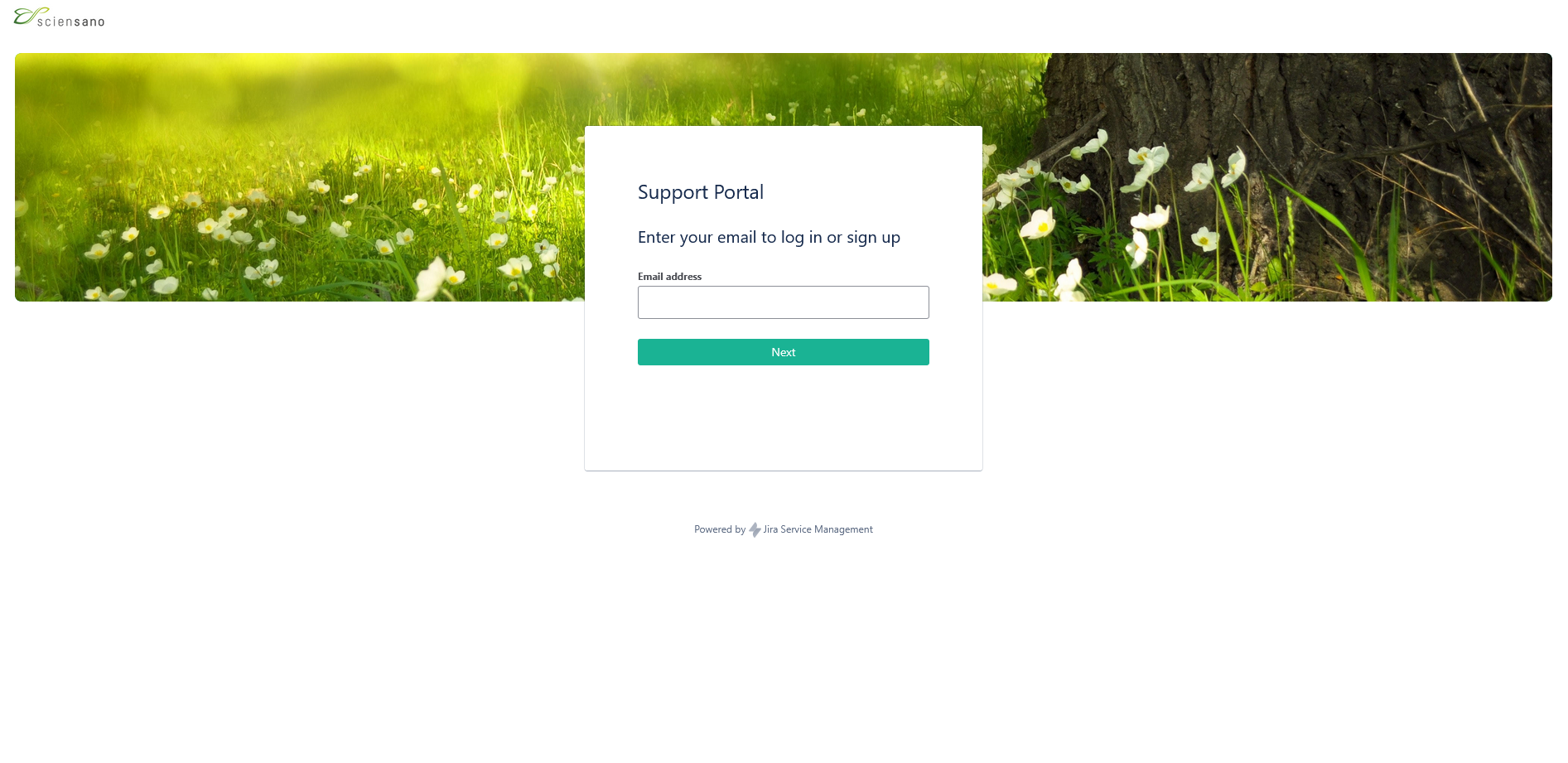
How to create an account
How to create an accountTo use the Jira Service Management portal, you need to create an account. To do so, enter your email address and click on "Sign Up".

You will then receive an e-mail to set your password.

Once you have set your password, you will be able to log in to the Jira Service Management portal.
To use the Jira Service Management portal, you need to create an account. To do so, enter your email address and click on "Sign Up".
You will then receive an e-mail to set your password.
Once you have set your password, you will be able to log in to the Jira Service Management portal.
How to set default language
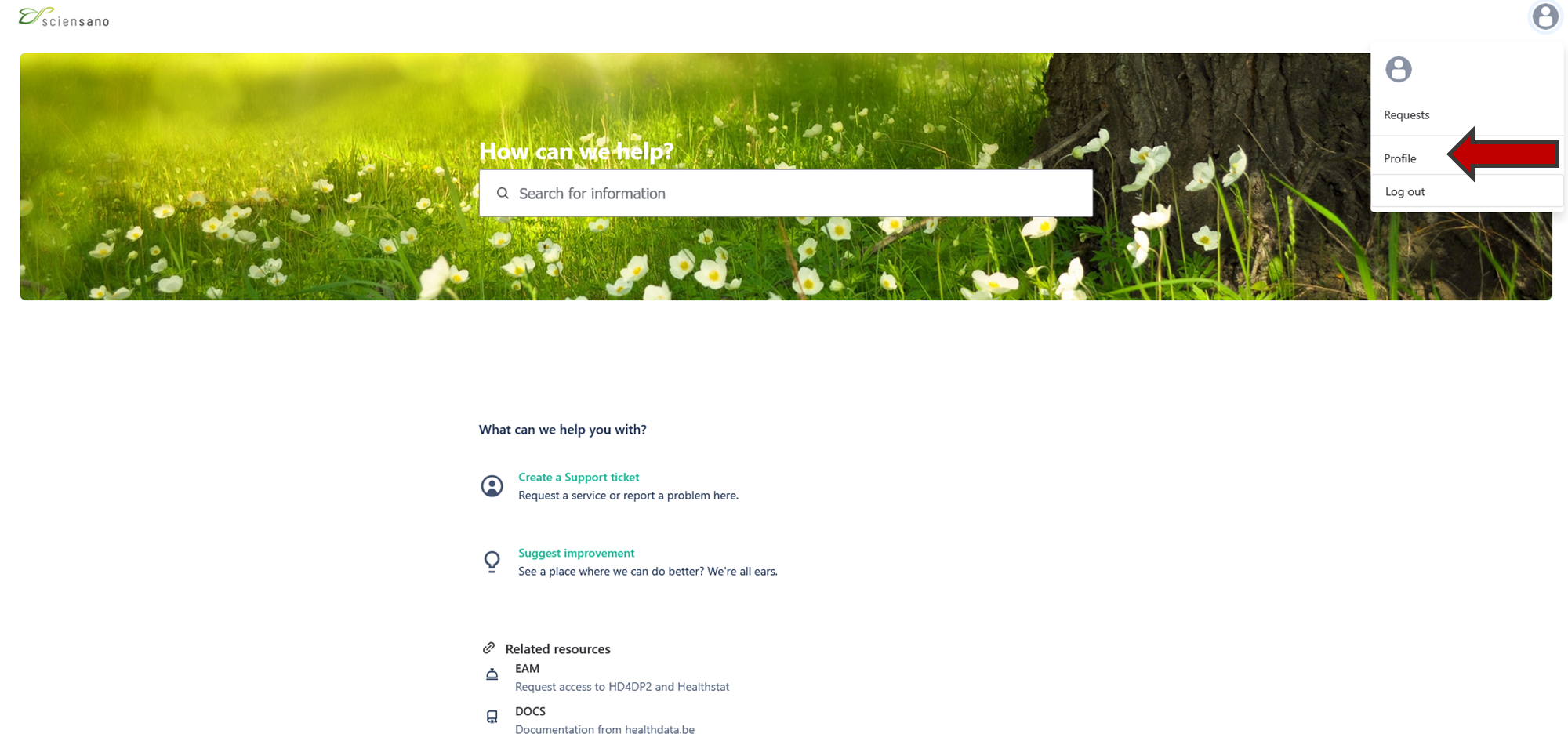
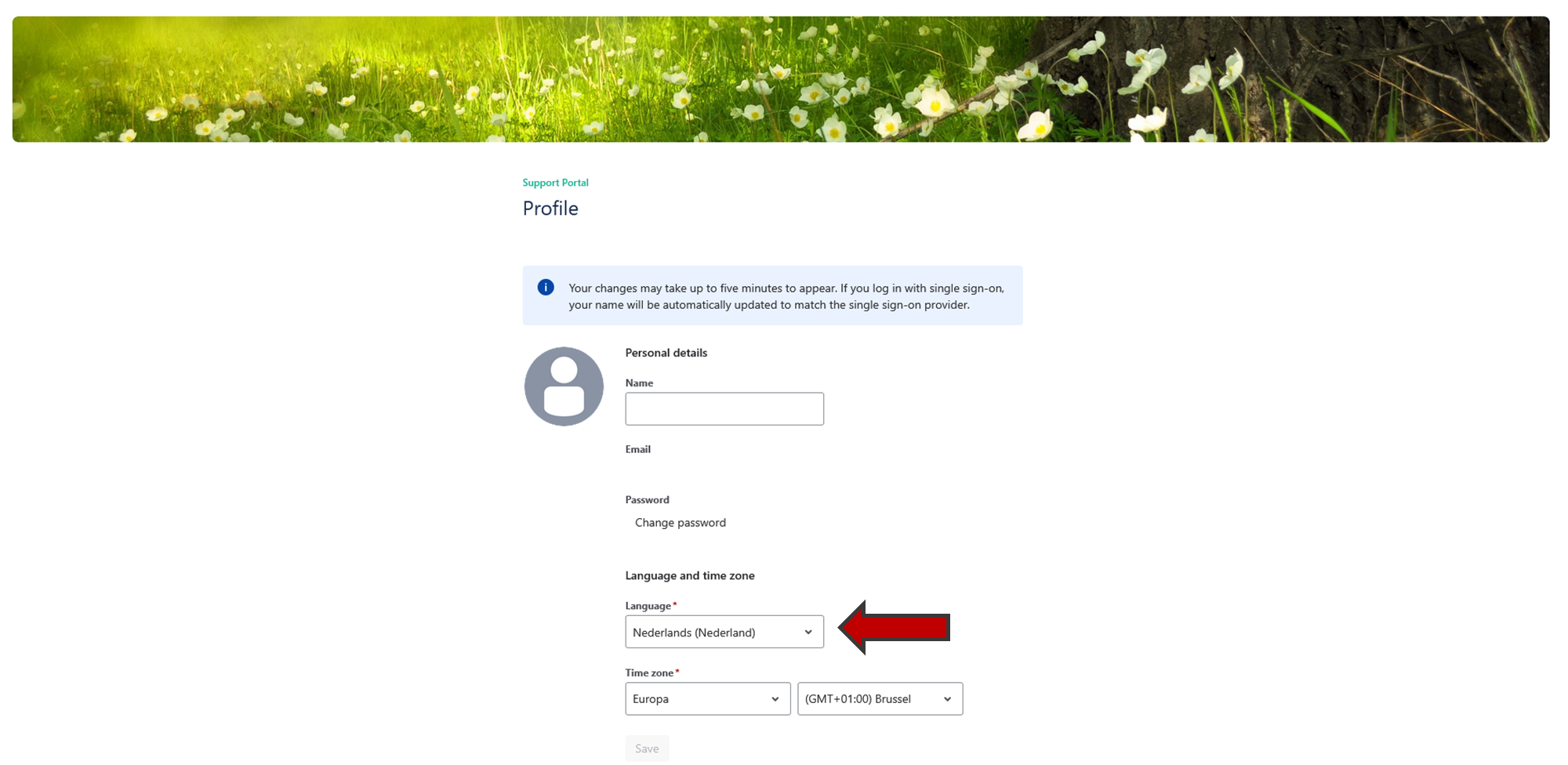
How to set default languageOnce you are logged in the Jira Service Management portal, you can modify the default language of the portal.
Go to your profile page on the top right of your screen.

Click on "Profile" and edit the language.
How to create a ticket
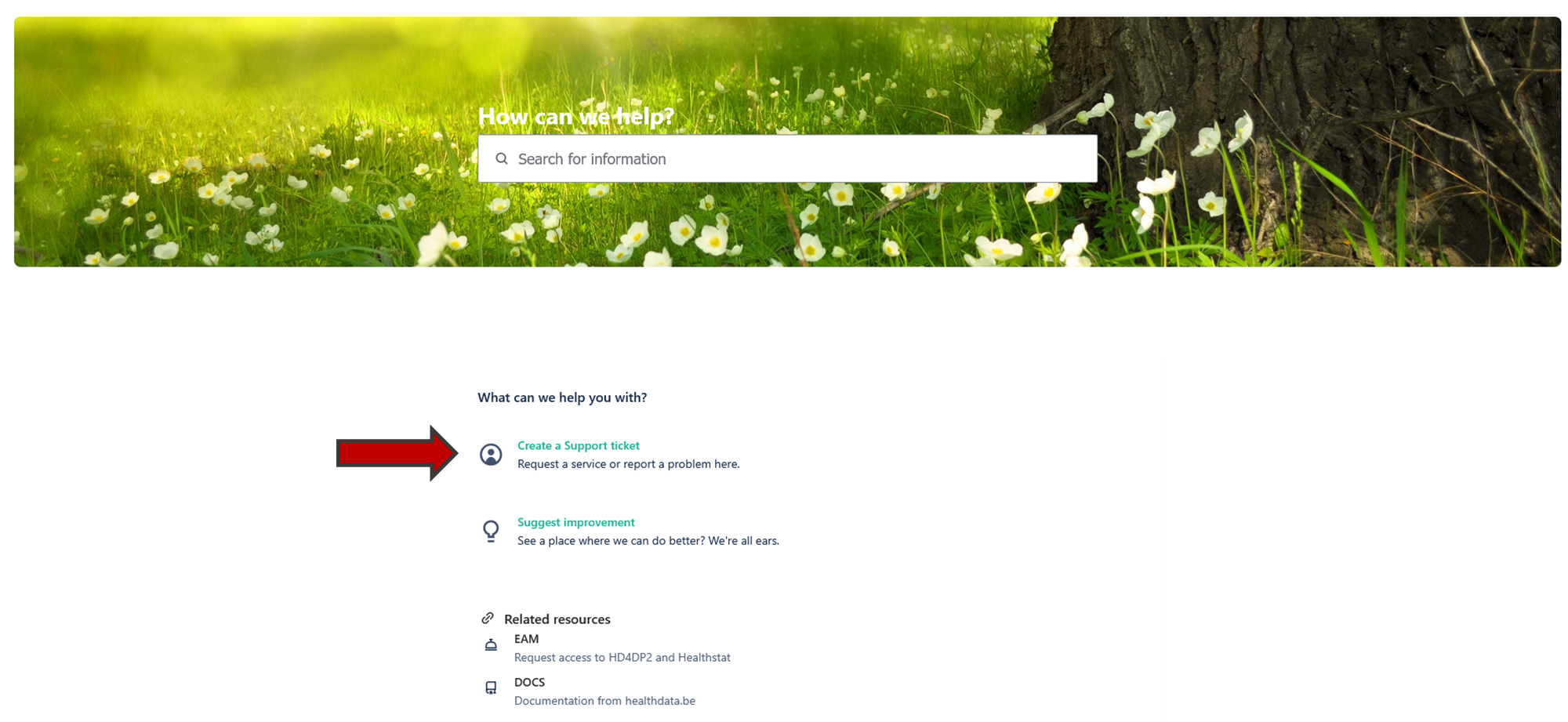
How to create a ticketTo create a ticket click on "Create a Support ticket"' on the main page.
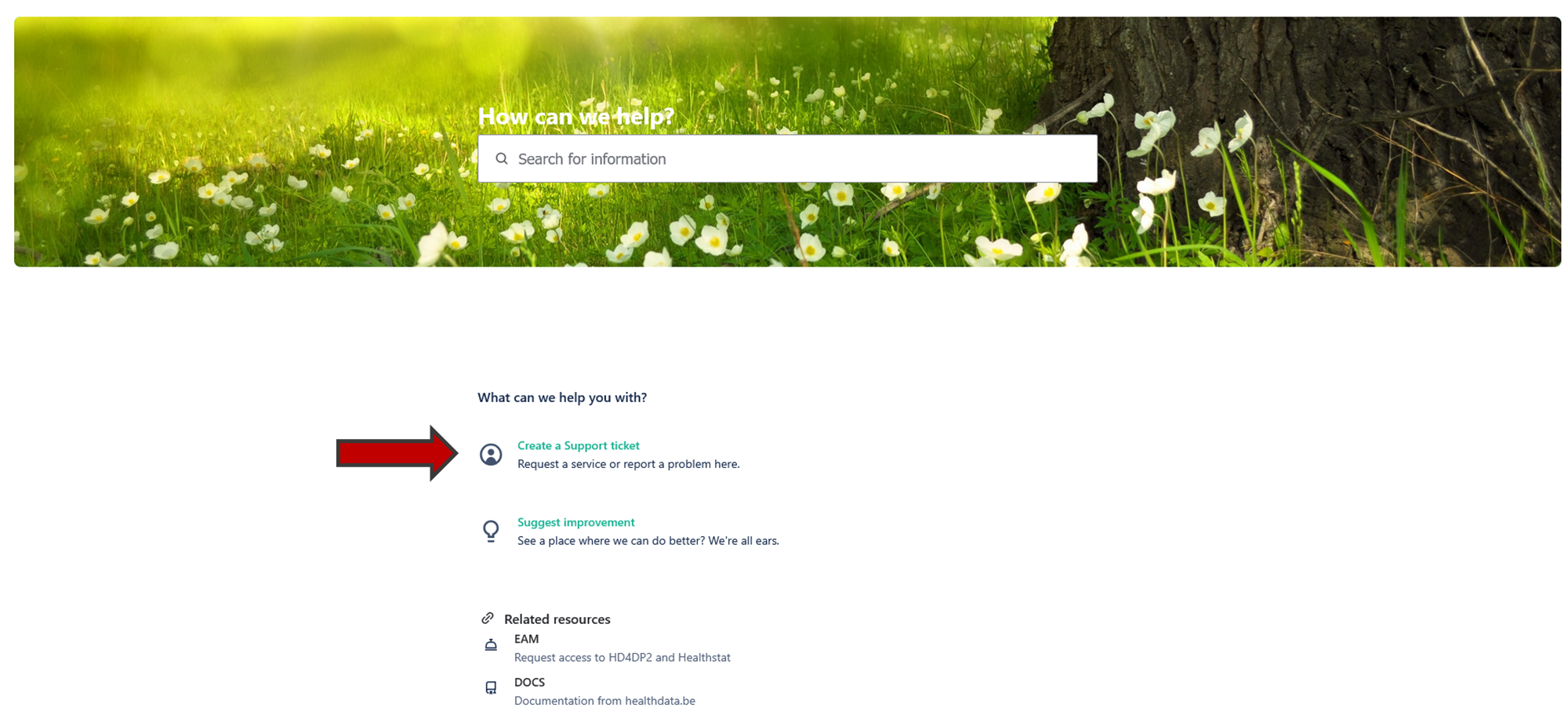
You will see the page below. Once you have filled in all the mandatory fields, click on "Send".
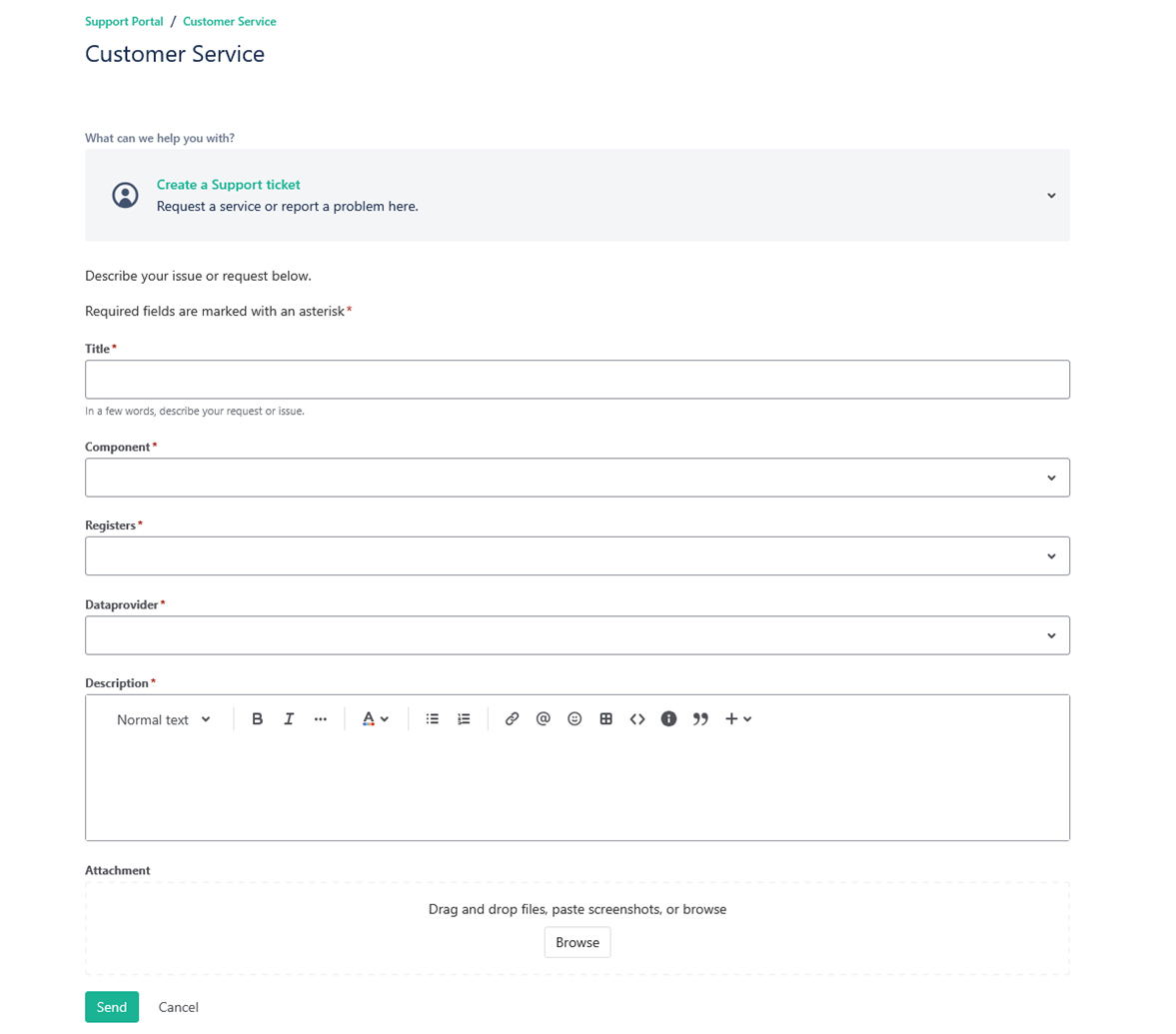
To create a ticket click on "Create a Support ticket"' on the main page.
You will see the page below. Once you have filled in all the mandatory fields, click on "Send".
How to follow up a ticket
How to follow up a ticketTo follow up a ticket, go to your profile page and click on "Requests".

You will see the following page with all the requests you submitted.
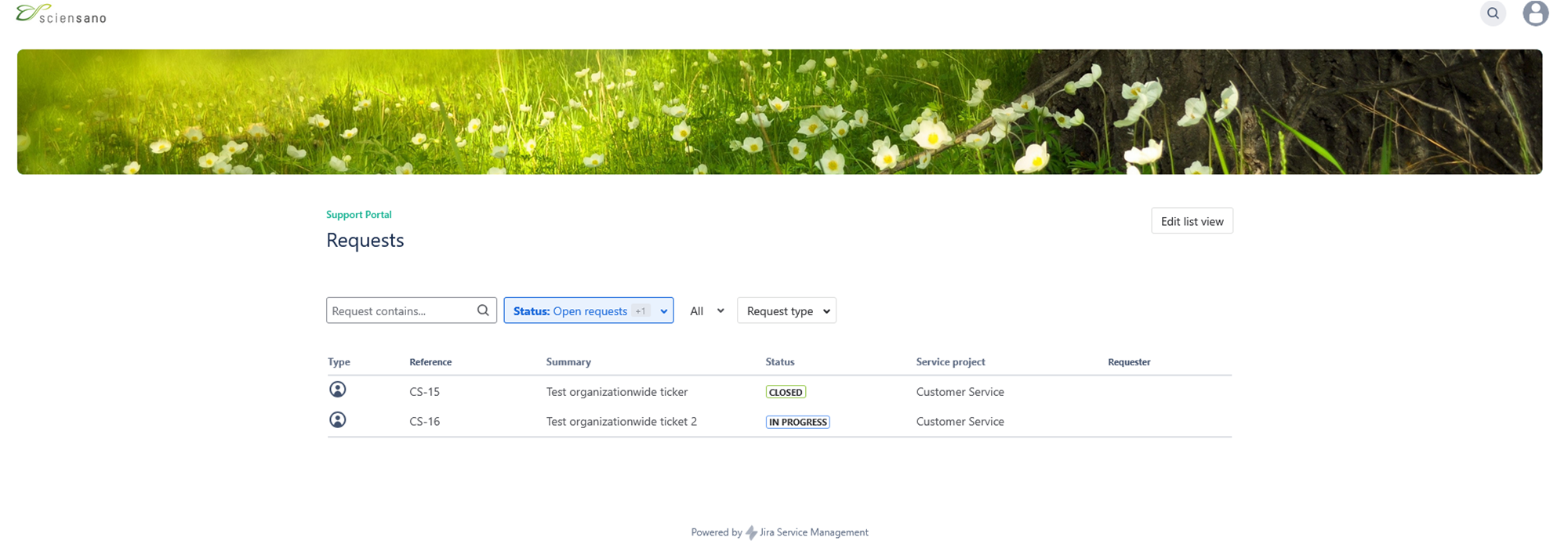
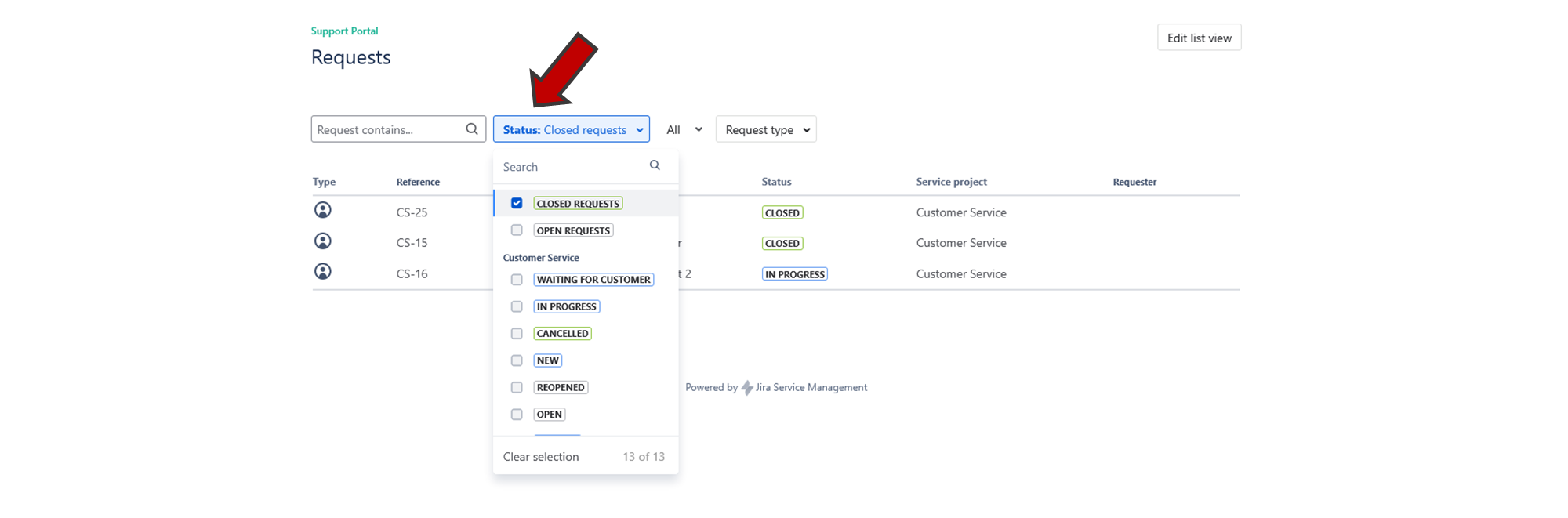
You can filter your requests by clicking on the "Status" button.
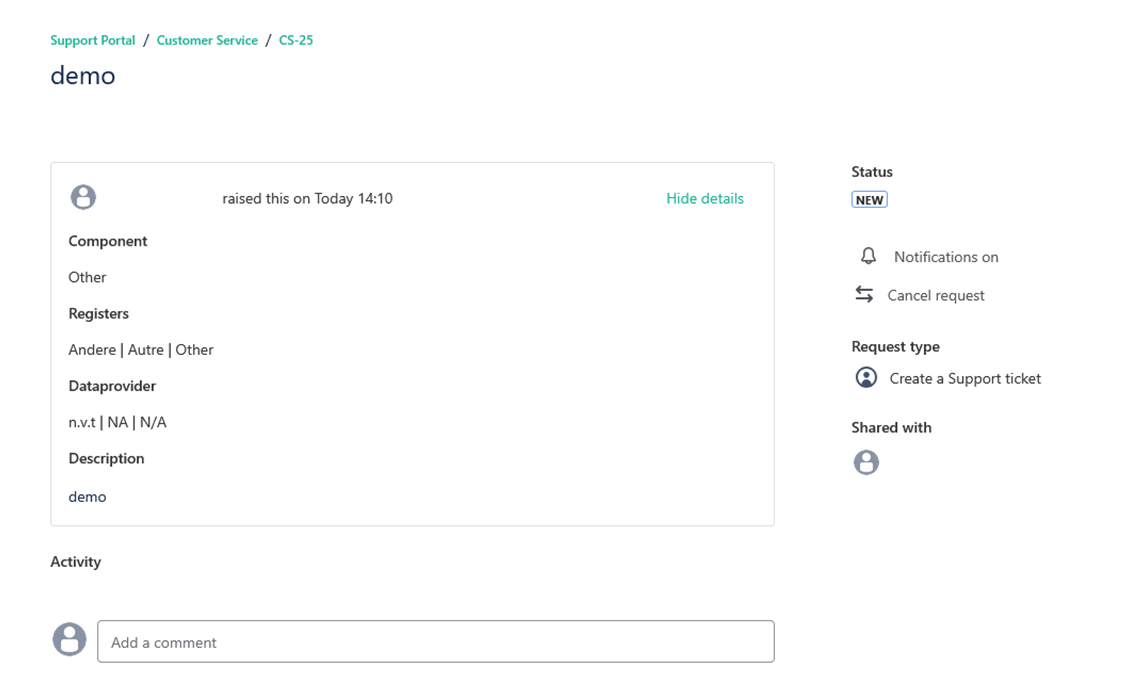
If you click on one of your requests, you will get an overview of the request you submitted.
To follow up a ticket, go to your profile page and click on "Requests".
You will see the following page with all the requests you submitted.
You can filter your requests by clicking on the "Status" button.
If you click on one of your requests, you will get an overview of the request you submitted.
How to delete your account
How to delete your accountTo delete your account your need to create a Support ticket.
To delete your account your need to create a Support ticket.
How to submit a question or complaint
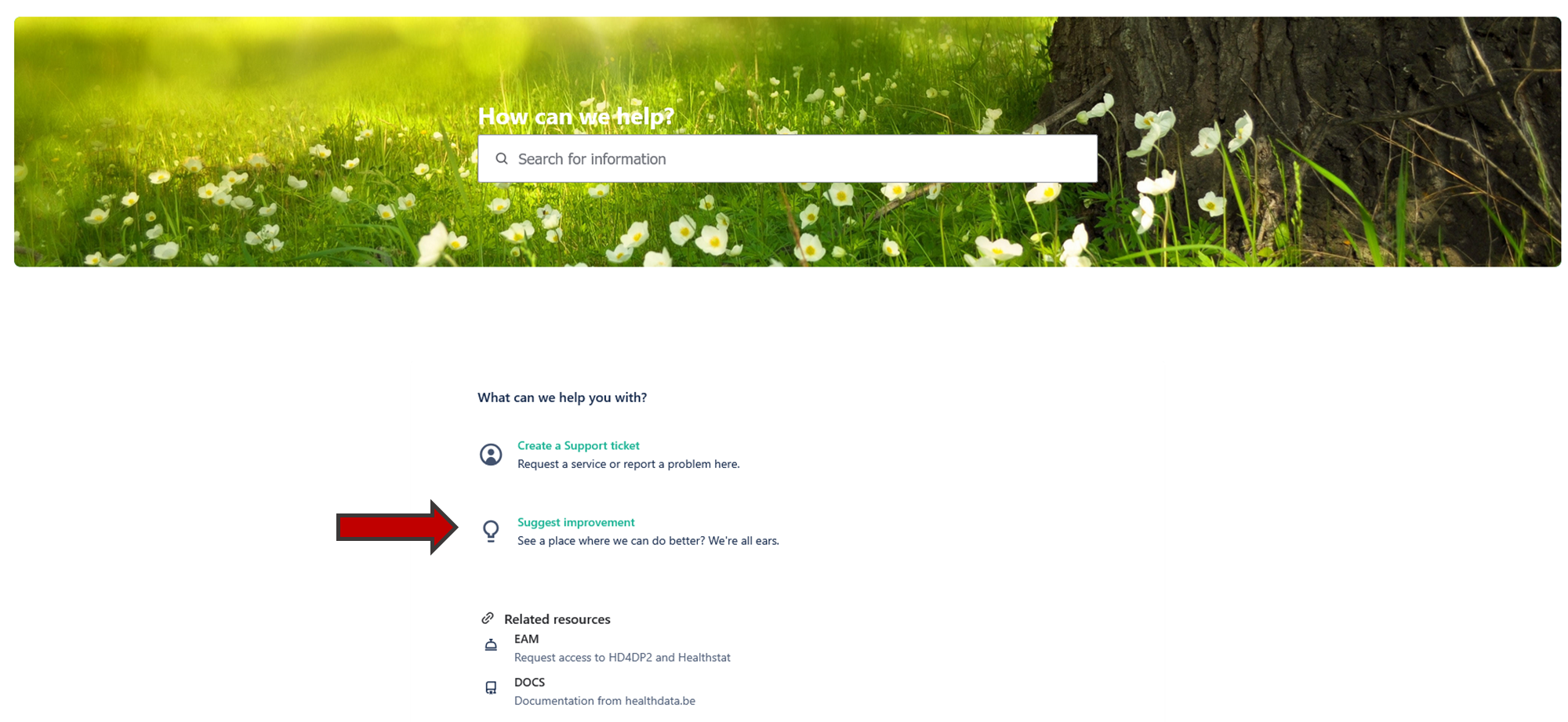
How to submit a question or complaintIf you have questions, remarks or if you would like to submit a complaint, you can do so by clicking on the "Suggest improvement" button on the main page of the Jira Service Management portal.
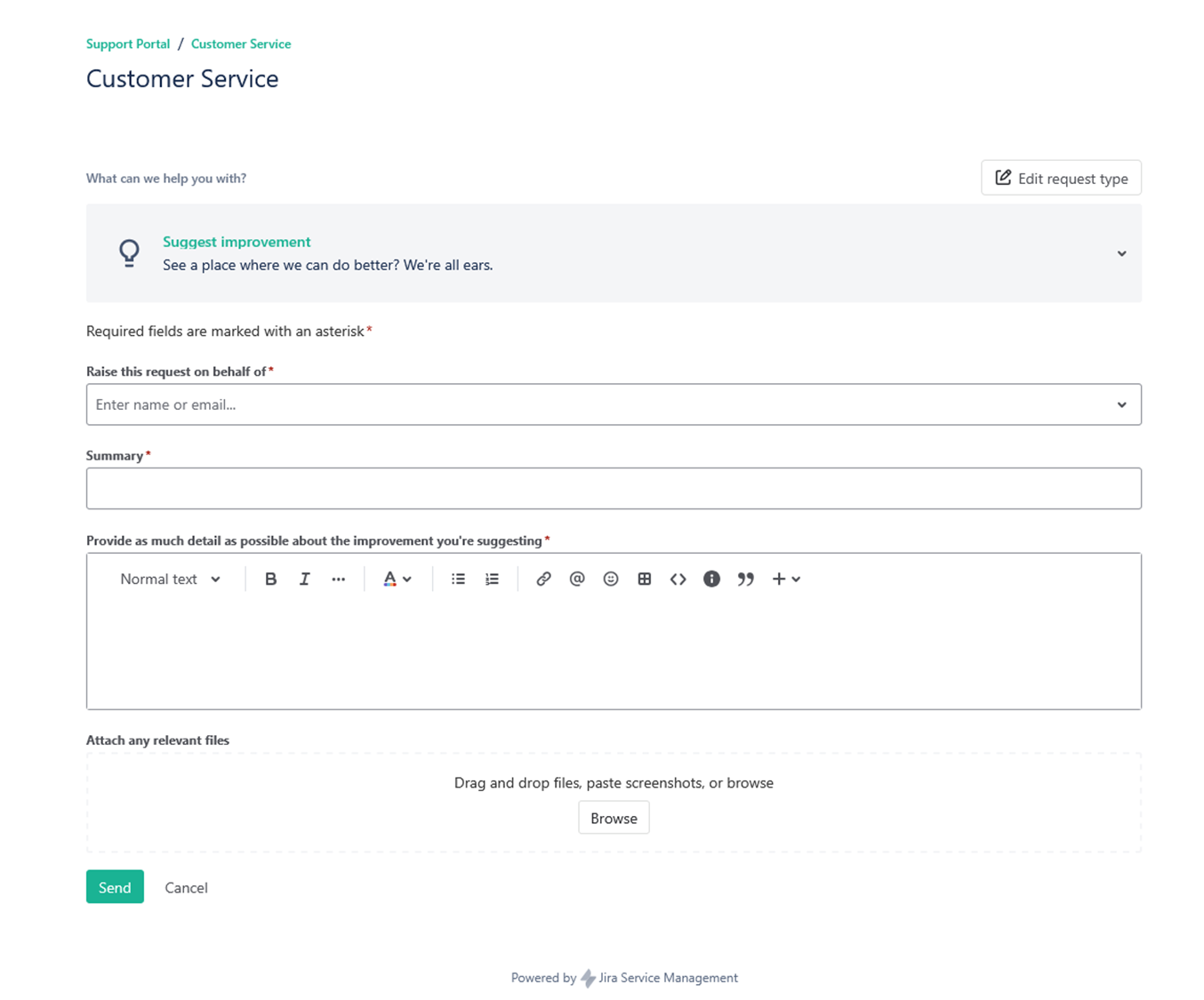
On this page you need to fill in all the mandatory fields and click on "Send".
If you have questions, remarks or if you would like to submit a complaint, you can do so by clicking on the "Suggest improvement" button on the main page of the Jira Service Management portal.
On this page you need to fill in all the mandatory fields and click on "Send".
Definitions
Definitions manager zo, 12/05/2021 - 14:59General definitions
General definitions- Application Software: Software developed in order to meet specific healthdata.be Basic Services requirements.
- Availability of an environment or an application: Availability is usually calculated as a percentage of time the IT Service, the environment or the application, is able to perform according to its agreed function. This calculation is based on the Agreed Service Window and Downtime.
- Closing days of the Service Desk Center: 1 January, Easter Monday, 1 May, Ascension day, White Monday, 21 July, 15 August, 1 November, 2 November,11 November, 25 December, 26 December.
- Customer: A person, an institution, an external IT Service or an IT application who has integrated healthdata.be IT services in their specific IT Services or applications. Customers are distinct from End-user, as some customers do not use the IT Service directly.
- Detection time: Time from the moment the incident occurs and the moment the incident is identified by the user or a monitoring service. (Still not communicated to the Service desk or Supervision). This period of time precedes the response time.
- Downtime: Time during which an IT Service is not available.
- End-user: A person, an institution, an external IT Service or an IT application who uses the IT Service.
- Incident: An unplanned interruption to an healthdata.be basic service or a reduction in the Quality or the Service.
- Key Performance Indicator: A metric that is used to help manage a Process, Service or activity.
- Maintenance Windows for Planned Interventions: An agreed time period during which Changes or Releases may be implemented with minimal impact on Services. Change Windows is defined in the Service Level Agreement.
- Mission: The set of services to be provided by the healthdata.be platform, following a demand from the Partner.
- Partner: Healthcare organization, research organization software package provider, healthcare stakeholders, research stakeholders are identified as healthdata.be Partners.
- Process: A structured set of activities designed to accomplish a specific Objective.
- Reaction time: The time between the moment that the Service Desk is informed of an event (or the moment which an incident is detected via the monitoring) and the moment that a ticket is created, including its assignment to a group for resolution. This period of time precedes the resolution time.
- Release: A group of Changes that are tested, packaged and deployed into the IT Infrastructure at the same time.
- Resolution time: The time from the initial assignment of ticket till the ticket is considered completed. In other word that an answer has been communicated for a request for information or a solution has been implemented.
- Response time: Time between a user or a monitoring service tries to communicate an identified incident or an event to the service desk and the moment the service desk respond to the event. (e.g. number of ring bell, time before a mail is being treated, time before an alert is being treated). This period of time precedes the Reaction time.
- Service Desk: Point of contact for all the Service Requests. The Service Desk consists of the Contact center and Supervision.
- Service Desk: Single point of contact for end-users and customers.
- Service hours: All hours within the Service Window.
- Service Level Agreement: An Agreement between an IT Service Provider and a Partner. The SLA describes the IT Service, documents Service Level Objectives, and specifies the responsibilities of the IT Service Provider and the Partner.
- Service Level Objective: A commitment that is documented in a Service Level Agreement. Service Level Objectives are based on Service Level Requirements, and are needed to ensure that the IT Service quality is fit for purpose. Service Level Objectives are the target of the KPIs.
- Service Request: Request for an healthdata.be basic service (e.g. request for information, request for new project, request for access to an application, …).
- Service Window: Agreed time period during which a particular IT Service must be available. For example, "Monday- Friday 08:00 to 17:00 except closing days of the Service Desk Center". Service Window is defined in the Service Level Agreement.
- Service: A Service is defined, within the context of Service management, as a logical grouping of functionalities that is made available through the combination and specific configuration of hard- and software CI’s.
- Support Window: An agreed time period during which support is available to the Users. Typically this is the period when the Service Desk is available.
- System Software: Basic software as MS Windows, Linux, Oracle, etc.
- Third Party Services : Services used but not developed, provided, maintained and not supported by healthdata.be (ehealth TTP, ehealth ETK, eHealth eHBox, NIC, …)
- Working days: All weekdays except closing days of the healthdata.be platform.
- Working hours: All healthdata.be’s working days between 8:00 and 16:30.
Abbreviations
Abbreviations- AS : Authentic Source
- CI: Configuration item
- ITIL: Information Technology Infrastructure Library
- KPI: Key Performance Indicator
- MSA: Master Service Agreement
- PI, PII, PIII, PIV: The different priority level
- SLA: Service Level Agreement
- SLO: Service Level Objective
- SPOC: Single point of contact
- SR : Service Request