HD4RES v2 Data tables
HD4RES v2 Data tablesIn its current form, HD4RES v2 is a collection of data tables accessible via the SAS eGuide component at the data warehouse of healthdata.be. It is thus integrated in the core of the research environment. In a next stage, the data tables will be visualized using the SAS Visual Analytics component at the data warehouse. While a predefined set of visualizations will be offered by healthdata.be, the researcher will be able to create and execute workflows for interactive reporting and exploration.
The data tables are not created for each research project separately. HD4RES v2 offers a view based on the master data table on which Row-Column Access Control (RCAC) has been applied to grant access to the researcher to only the records related to his/her project.
The following data tables are foreseen by healthdata.be:
List of incidents
List of incidentsThe healthdata.be service (Sciensano) processes each incident report according to a standard operating procedure (SOP). A public version of this SOP "HD Incident Management Process" is also available on this portal docs.healthdata.be.
To submit an incident related to projects and applications in production and facilitated or managed by Sciensano's healthdata.be service, users can submit a ticket in the HD Service and Support portal.
The researchers have access to the list of incidents related to their project. This list is available in a data table in HD4RES v2.
In SAS Enterprise Guide, the data table is accessible via the ‘Servers’ window, located at the bottom left.
First open the following path Servers >> SASAppRES >> Libraries >> HD4RES2
Then, open the following table "V_HDM_SNOW_INCDNT" (incident life-cycle)
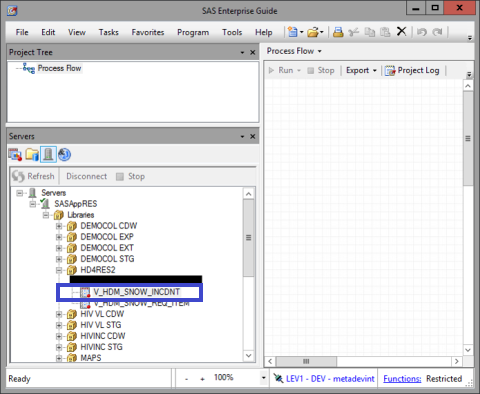
This data table contains the following fields:
| SNOW db field | HD4RES2 column names | Description |
|---|---|---|
| Number | IDC_INCIDENT_NUMBER | Unique number that is created once the incident is submitted (INCxxxxxx) |
| State | TX_STATE | The state in which the incident is at that moment : - New : the ticket is not handled yet - Work in progress : incident is being worked on - On hold : the IT-colleague is waiting for info from another party to continue - Resolved : the incident is resolved. The caller can reopen the incident if not satisfied, within 14 days. - Closed : ticket cannot be reopend anymore |
| Caller | TX_CALLER_ID | The person who has submitted the incident |
| Service | T_U_SVC | The projectname on which the incident is created. Reflects on incidents opened before January 14, 2022. After this date, this field is replaced by the field 'Related Project Name' |
| Category | TX_CAT | The category to which the incident is related (data transfer, infrastructure, application, account, other) |
| Subcategory | TX_SUBCATEGORY | Depending on the category, the type of subcategory will appear that has been chosen. For example : if categroy=application, the list of applications will appear |
| Related Project Name | TX_U_RELATED_PROJ_NAM | The name of the project (full name, abbreviation and projectcode) |
| Opened | DT_OPENED_AT | The date and time when the incident was opened |
| Updated | DT_SYS_UPD_ON | The date and time when the incident was last updated with comments, change of state, … |
| Short description | TX_SHORT_DESC | A short description of the incident |
| Customer Communication | TX_COMMENTS | Communication that has been sent to or received from the caller |
| Organisation | TX_COMP | The organization to which the caller belongs, if filled in in the profile of the caller |
| Assignment group | TX_ASSIGNMENT_GR | The team that is handling the incident. The person of this team that works on the incident, is visible in the portal. |
| Due date | DT_DUE_DATE | The person working on the incident can plan his work by filling in this field. |
| --none-- | CD_PROJ_BUS | The internal project business code (HDBPxxxx) |
| --none-- | TX_PROJ_BUS_ABBREV | Project business abbreviation |
This documentation is being updated regularly. We try to provide as correct, complete and clear as possible information on these pages. Nevertheless, if you see anything in the documentation that is not correct, does not match your experience or requires further clarification, please create a support ticket via our portal Jira Service Management or send us an e-mail via support.hd@hda.fgov.be to report this documentation issue. Please do not forget to mention the URL of the page. We will then adjust the documentation as soon as possible. Thank you!List of requests
List of requestsThe healthdata.be service (Sciensano) processes each request according to a standard operating procedure (SOP). A public version of this SOP "HD Request Management Process" is also available on this portal docs.healthdata.be.
To submit a request related to projects and applications in production and facilitated or managed by Sciensano's healthdata.be service, users can submit a ticket in the HD Service and Support portal.
The researchers have access to the list of requests related to their project. This list is available in a data table in HD4RES v2.
In SAS Enterprise Guide, the data table is accessible via the ‘Servers’ window, located at the bottom left.
First open the following path Servers >> SASAppRES >> Libraries >> HD4RES2
Then, open the following table "V_HDM_SNOW_REQ_ITEM" (incident life-cycle)
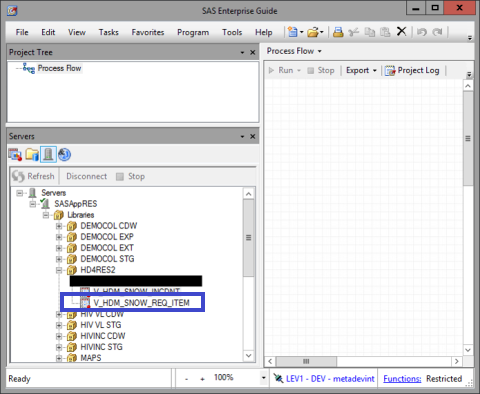
This data table contains the following fields:
| SNOW db field | HD4RES2 column names | Description |
|---|---|---|
| Number | IDC_REQ_ITEM_NUMBER | Unique number that is created once the request is submitted (RITMxxxxxx) |
| State | TX_STATE | The state in which the request is at that moment: - Open: ticket is open but has not yet been assigned to a group to begin work - Work in progress: ticket is being worked on - Pending: the ticket has been placed on-hold and is awaiting action before work can recommence - Closed complete: ticket has been closed and the work has been completed - Closed incomplete: ticket has been closed and the work has not been completed - Closed skipped: ticket has been closed and no work was carried out |
| Caller | TX_REQD_FOR | The person who has submitted the request |
| Category | TX_CAT_ITEM | The category to which the incident is related (Access to a HD Application, Information about HD, Infrastructure by HD, New project with HD, Request Access to a HD Application, Request for information about HD, Request for infrastructure by HD, Request for new project with HD) |
| Related Project Name | TX_U_RELATED_PROJ_NAM | The name of the project (full name, abbreviation and projectcode) |
| Opened | DT_OPENED_AT | The date and time when the request was opened |
| Updated | DT_SYS_UPD_ON | The date and time when the request was last updated with comments, change of state, … |
| Short description | TX_SHORT_DESC | A short description of the request. As from the 22th of December 2022 the field reflects the appropriate request short description. |
| Describe the information you need | TX_DESC | A detailed description of the request. As from the 22th of December 2022 the field reflects the appropriate request description. |
| Customer Communication | TX_COMMENTS | Communication that has been sent to or received from the caller |
| Organisation | TX_COMP | The organization to which the caller belongs, if filled in in the profile of the caller |
| Assignment group | TX_ASSIGNMENT_GR | The team that is handling the incident. The person of this team that works on the incident, is visible in the portal. |
| Due date | DT_DUE_DATE | The person working on the request can plan his work by filling in this field. |
| --none-- | CD_PROJ_BUS | The internal project business code (HDBPxxxx) |
| --none-- | TX_PROJ_BUS_ABBREV | Project business abbreviation |
This documentation is being updated regularly. We try to provide as correct, complete and clear as possible information on these pages. Nevertheless, if you see anything in the documentation that is not correct, does not match your experience or requires further clarification, please create a support ticket via our portal Jira Service Management or send us an e-mail via support.hd@hda.fgov.be to report this documentation issue. Please do not forget to mention the URL of the page. We will then adjust the documentation as soon as possible. Thank you!Count of study records
Count of study recordsThis data table is currently in development by the healthdata.be team.
This documentation is being updated regularly. We try to provide as correct, complete and clear as possible information on these pages. Nevertheless, if you see anything in the documentation that is not correct, does not match your experience or requires further clarification, please create a support ticket via our portal Jira Service Management or send us an e-mail via support.hd@hda.fgov.be to report this documentation issue. Please do not forget to mention the URL of the page. We will then adjust the documentation as soon as possible. Thank you!Count of unique study subjects in multiple studies
Count of unique study subjects in multiple studiesIntroduction
As the reduction of administrative burden at side of data providers is part of Healthdata’s mission. Knowing the number of patients (study subjects) in their own study project that are in multiple study projects supported by healthdata.be (and thus available at data warehouse of healthdata.be), facilitates the reuse of data collected, instead of starting a new data collection to obtain that same information.
Based on the provided solution the client can decide whether it is feasible or not to link its own study project with other projects (i.c. “there are enough unique study subjects that are in both study projects”).
Linking of databases increases the reuse of data, reduces the need to start new data collections, and thus contributes to the reduction of administrative burden of the data providers. It is also less expensive compared with the creation of new data collections.
Through the HD4RES2 application Heathdata delivers a data table on daily bases which aims to provide the necessary insight on the business project common study subject. Those figures are available in the data table V_HDM_COMMON_SUBJ detailed below.
Data table: V_HDM_COMMON_SUBJ_CNT
In SAS Enterprise Guide, the data table is accessible via the ‘Servers’ window, located at the bottom left.
First open the following path Servers >> SASAppRES >> Libraries >> HD4RES2
Then, open the following table "V_HDM_COMMON_SUBJ_CNT"
This data table contains the following fields:
| Label | FieldName | Description |
|---|---|---|
| HDBP1_code | CD_PROJ_BUS | HD business project code (HDBPxxxx) of the base project |
| HDBP1_name | TX_PROJ_BUS_NAME | HD Project business name of the base project |
| HDBP1_abbreviation | TX_PROJ_BUS_ABBREV | HD Project business abbreviation of the base project |
| HDBP2_code | CD_PROJ_BUS2 | HD business project code (HDBPxxxx) of the compared project |
| HDBP2_name | TX_PROJ_BUS2_NAME | Project business name of the compared project |
| HDBP2_abbreviation | TX_PROJ_BUS2_ABBREV | Project business abbreviation of the compared project |
| HD_ARCH_component | TX_ARCH_COMPONENT | Database component/DWH layer |
| Count_Date | D_COUNT | Datepart of the metrics calculation timestamp (at 23:59:59) |
| Count | MS_COMMON_SUBJ | Count of the total number of study records in common between the base and compared project |
| Count_New | MS_NEW_ COMMON_SUBJ | New number of common study subjects as from previous date and time |
Reference table: V_HDM_MAP_TBL_PROJ
As business projects/data collections often led to the creation of several data tables the figures are resulting from the consolidation of the most representative business project data tables. Consequently those data tables must be treated with respect to their own functional and structural properties.
To this end, researchers may consult an additional data table V_HDM_MAP_TBL_PROJ related to their project on the HD4RES2 application which describes the content and rules applied on each data table by business project.
In SAS Enterprise Guide, the data table is accessible via the ‘Servers’ window, located at the bottom left.
First open the following path Servers >> SASAppRES >> Libraries >> HD4RES2
Then, open the following table "V_HDM_MAP_TBL_PROJ"
| FieldName | Description | Used for dimension |
|---|---|---|
| TX_SCHEMA_NAM | Schema location of the data table | HD_ARCH_component |
| TX_TBL_NAM | Table name of the data table | |
| TX_REG_NAM | HD internal DWH register name | HDBP_code |
| CD_PROJ_BUS | HD Project business code (HDBPxxxx) | HDBP_code |
| TX_PROJ_BUS_NAME | HD Project business code name | |
| TX_PROJ_BUS_ABBREV | HD Project business abbreviation | |
| TX_SQL_DP_TPE | Field or SQL statement used to identify the type of the data provider | HCO_NIDHICode |
| TX_SQL_DP_VAL | Field or SQL statement used to identify the data provider | HCO_NIDHICode |
| TX_SQL_SUBJ | Field or SQL statement used to identify the study subject | |
| FL_INCL_METRIC_CNT_REC_PAT | Flag which indicates whether the table contributes toward the calculation of the metrics: 1, 2 => included in the figures calculation 0 => explicitly excluded from the calculation null => implicitly excluded from the calculation | |
| DT_VALID_FROM | Timestamp as from when above properties are applicable | |
| DT_VALID_TO | Timestamp as to when above properties are discarded |
Calculation of common study subject
One study subject is defined as the entity for which data has been collected. Depending the data collection most of the time a study subject represent the patient.
Because of the respect for privacy it is important to understand that each data collection set of data tables were build in such a way that it has been made impossible to users to link data of the same patient from different data collections. Consequently it will be impossible to reproduce the same figures as the table provides.
For every new eHealth patient identification key a new identification key PER patient and PER data collection is created. Because access to different data collections does not imply access to a combination of them, this eHealth identification key has been hidden from all the users of the data collections. Consequently to deliver the requested metric, we have at our disposal a table not accessible to the users, which provide the link between the initial eHealth patient identification and the data collection specific identification.
This documentation is being updated regularly. We try to provide as correct, complete and clear as possible information on these pages. Nevertheless, if you see anything in the documentation that is not correct, does not match your experience or requires further clarification, please create a support ticket via our portal Jira Service Management or send us an e-mail via support.hd@hda.fgov.be to report this documentation issue. Please do not forget to mention the URL of the page. We will then adjust the documentation as soon as possible. Thank you!List of data providers (organizations)
List of data providers (organizations)This data table is currently in development by the healthdata.be team.
This documentation is being updated regularly. We try to provide as correct, complete and clear as possible information on these pages. Nevertheless, if you see anything in the documentation that is not correct, does not match your experience or requires further clarification, please create a support ticket via our portal Jira Service Management or send us an e-mail via support.hd@hda.fgov.be to report this documentation issue. Please do not forget to mention the URL of the page. We will then adjust the documentation as soon as possible. Thank you!List of data providers (individuals)
List of data providers (individuals)This data table is currently in development by the healthdata.be team.
This documentation is being updated regularly. We try to provide as correct, complete and clear as possible information on these pages. Nevertheless, if you see anything in the documentation that is not correct, does not match your experience or requires further clarification, please create a support ticket via our portal Jira Service Management or send us an e-mail via support.hd@hda.fgov.be to report this documentation issue. Please do not forget to mention the URL of the page. We will then adjust the documentation as soon as possible. Thank you!List of data users (organizations)
List of data users (organizations)This data table is currently in development by the healthdata.be team.
This documentation is being updated regularly. We try to provide as correct, complete and clear as possible information on these pages. Nevertheless, if you see anything in the documentation that is not correct, does not match your experience or requires further clarification, please create a support ticket via our portal Jira Service Management or send us an e-mail via support.hd@hda.fgov.be to report this documentation issue. Please do not forget to mention the URL of the page. We will then adjust the documentation as soon as possible. Thank you!List of data users (individuals)
List of data users (individuals)This data table is currently in development by the healthdata.be team.
This documentation is being updated regularly. We try to provide as correct, complete and clear as possible information on these pages. Nevertheless, if you see anything in the documentation that is not correct, does not match your experience or requires further clarification, please create a support ticket via our portal Jira Service Management or send us an e-mail via support.hd@hda.fgov.be to report this documentation issue. Please do not forget to mention the URL of the page. We will then adjust the documentation as soon as possible. Thank you!Status technical components
Status technical componentsThis data table is currently in development by the healthdata.be team.
This documentation is being updated regularly. We try to provide as correct, complete and clear as possible information on these pages. Nevertheless, if you see anything in the documentation that is not correct, does not match your experience or requires further clarification, please create a support ticket via our portal Jira Service Management or send us an e-mail via support.hd@hda.fgov.be to report this documentation issue. Please do not forget to mention the URL of the page. We will then adjust the documentation as soon as possible. Thank you!