HD4DP v2
HD4DP v2 Adelaide.DAmore Wed, 09/13/2023 - 10:27General description of the application HD4DP v2
General description of the application HD4DP v2The HD4DP v2.x Local is an electronic data capture (EDC) system: a computerized system designed for the collection of clinical data in electronic format for use in research supporting human public health policy. HD4DP (Health Data for Data providers) replaces the traditional paper-based data collection methodology and the proliferation of websites to streamline data collection and expedite the time to analysis and reporting.
Components and features
The HD4DP v2.x Local application contains the following major components: NextGen Connect, Form.io, HD Connect (LOCAL Proxy), Local datawarehouse.
NextGen Connect
NextGen Connect is a health care integration engine that translates message standards into the standard required by the receiving system, including data formats and standards like HL7, DICOM, ANSI X12, ASCII, and XML. Main functionalities are filtering, transformation, extraction and routing.
The NextGen Connect component is used to handle all integrations within HD4DP v2.x itself but also all integrations with the external world.
Data collections API: The form.io server offers a REST API which can be used to submit data for each known data collection. Data provider Master Systems cannot access this API directly but need to use the API exposed by the NextGen Connect component. This API is simply a proxy for the form.io API, but allows extra features on top of the form.io API such as security, monitoring, throttling, …
CSV API: For each data collection data can be submitted file-based using a CSV. A CSV can contain multiple data entries for a single data collection definition. These data entries are transformed and pushed by the NextGen Connect component towards the form.io server for potential manual post-processing and validation.
HL7 FHIR API: For some data collections an HL7 FHIR API will be available. The NextGen Connect component performs the transformation towards the Data Collections API and push the data into the form.io server.
Data delivery: the NextGen Connect component handles all routing of data towards the external world. This means it verifies the form.io server for completed data entries which have not yet been delivered. For each data entry that needs to be delivered, it determines where to send the data to, how it needs to be transformed and how it needs to be split. It performs all these actions in a guaranteed delivery fashion: it makes sure the data reaches its destination, possibly retrying when something went wrong.
Feedback: the NextGen Connect component coordinates the reception of feedback, potentially transforming it and pushing it towards the corresponding data collection entry using the data collections API.
Form.io
Form.io is a data management platform that includes a form builder with a drag and drop interface, management of data with complete API platform, management of users, offline forms, dynamic forms, automatic creation of API, and application embedding. In HD4DP v2.x, and Angular frontend application is available in addition to the form.io server. This application provides a user interface to data providers in which they can see the different data collections for which they are allowed to record and submit data manually. A form.io backend server is responsible for providing the form definitions and registrations of new/updated entries.
HD Connect (LOCAL Proxy)
The HD Connect component is used to retrieve metadata from Master Data Management Database (MDM DB) residing within healthdata.be.
Local datawarehouse
Every single change in data entries on the form.io server is pushed towards the local datawarehouse (Local DWH) for easy reporting and data extraction.
Installation and maintenance
The HD4DP v2.x Local application is provided cost-free and installed remotely on the infrastructure of the healthcare organization by healthdata.be. Healthcare organizations are provided the system requirements for installation of the HD4DP v2.x application.
Healthcare organizations unable to provide the system requirements may opt to request the access and use of a HD4DP v2.x Local application of another healthcare organization.
Healthcare organizations unable to provide the system requirements nor access and use a HD4DP v2.x Local application of another healthcare organization, can request access and use of HD4DP v2 WEB hosted by healthdata.be.
The application HD4DP v2.x Local is maintained cost-free remotely on the infrastructure of the healthcare organization by healthdata.be. The infrastructure on which the application HD4DP v2.x Local is installed, should be maintained by the healthcare organization.
Position of HD4DP v2 in HD Architecture 2.0
Position of HD4DP v2 in HD Architecture 2.0
Support service for HD4DP v2
Support service for HD4DP v2The Service Desk of healthdata.be (Sciensano) helps users of our applications and services and deals with requests and incidents.
The Service Desk focuses on those services run by our IT Services (HD4DP, HD4RES, healthstat.be,...) and helps you with accounts and passwords. For questions about the content and objective(s) of the projects, we kindly refer users to the managing research organizations.
For most efficient processing of your request, we advise you to use our support portal: Jira Service management (JSM).
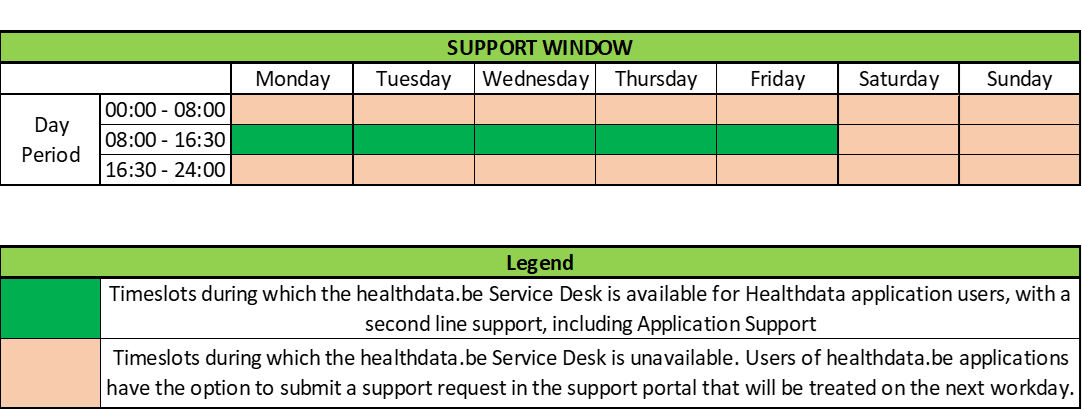
Please find below our support window hours:
How to report an incident
How to report an incidentThe healthdata.be service (Sciensano) processes each incident report according to a Standard Operating Procedure (SOP). A public version of this SOP "HD Incident Management Process" is also available on this portal docs.healthdata.be.
To submit an incident related to registries and applications in production and facilitated or managed by Sciensano's healthdata.be service, you must first log into the HD Service and Support portal: Jira Service Management (JSM).
More info concerning how to request an account is available here.
After the login step, you will arrive at the main page of the portal
To create a ticket click on "Create a Support ticket"' on the main page.

You will see the page below. Once you have filled in all the mandatory fields, click on "Send".
