HD4DP v2 MyCareNet
HD4DP v2 MyCareNetHD4DP v2 permits the administrative obligation of reporting to the insurance institutions. The limited necessary data are sent via HD4DP v2 to the MyCareNet interface of the National Intermutualistic College (NIC). This transmission of nominative data occurs in parallel with the transmission of pseudonymized data to the healthdata.be platform.
Two options are available to enable data transmission from HD4DP v2 to the National Intermutualistic College:
- Option 1: MyCareNet XML Export for PACEMAKER
- Option 2: MyCareNet integration in HD4DP v2
Please read this documentation before its project specific use.
The study Pacemakers consists of 5 sections or DCDs:
- Primo-implantation
- Replacement
- Addition or replacement of electrode(s)
- Explantation
- Follow-up
On the following pages we describe how to submit a PACEMAKER MyCareNet XML for this section.
MyCareNet XML Export for PACEMAKER
MyCareNet XML Export for PACEMAKER Bart.Servaes Tue, 06/04/2024 - 14:13MyCareNet XML Export for PACEMAKER Primo-implantation
MyCareNet XML Export for PACEMAKER Primo-implantationIn this article we describe how to submit a MyCareNet XML for Pacemakers - Primo-implantation.

This configuration is by default active in HD4DP v2.
The files can be found on the SFTP share inside the directory /nippin/valid. The XML files can be downloaded with an SFTP client of your choice. The XML files you download can be sent with the MyCareNet component available in your organization.
Structure of the XML filename
The XML filename is a combination of different values: RIZIVnumber-random_uuid-inputReference.xml. The files are ready for use, thus contain the required fields. No additional editing is required.
How to link an XML file within the Nippin database
You can attach the XML files to the Web Service call to MyCareNet and sign the message with your eHealth P12 certificate. If you would like to search inside the Nippin database for the correct entry you can filter with the following query for the correct entries:
select count(*) from nippin_message where input_reference = '<inputReference>' and identification_value = '<RIZIVnumber>';
- Example: 11111130-6d59369f-11c8-4636-929a-86449f4dde3b-1701979200058.xml
- RIZIVnumber: 11111130
- random_uuid: 6d59369f-11c8-4636-929a-86449f4dde3b
- inputReference: 1701979200058
SFTP Connection
The server name and the SFTP credentials can be requested via our Service Portal
- Server: IP of HD4DP v.2 server
- Port: 22
- Username: (your SFTP credentials)
- Password: (your SFTP credentials)
- Path: /data/localsftp/upload/nippin (Upload is the home directory of the sftp user)

Example XML
An example file of a Pacemakers - Primo-implantation submission XML:
<RegistryRecordList>
    <RegistryRecord>
        <NIHDI>71037157000</NIHDI>
        <SSIN>78112825043</SSIN>
        <DateForRouting>2023-04-01</DateForRouting>
        <RegistrationCode>01172400012464</RegistrationCode>
        <Registry>Pacemakers</Registry>
        <Type>Notification</Type>
        <SubmissionDate>2024-05-18</SubmissionDate>
        <CareDeliveries>
            <CareDelivery>
                <BillingCode>182932-182943</BillingCode>
                <Occurence>
                    <DateOfOccurence>2023-04-01</DateOfOccurence>
                    <ImplantCodes>
                        <IdentificationCode>349040000181</IdentificationCode>
                    </ImplantCodes>
                </Occurence>
            </CareDelivery>
        </CareDeliveries>
    </RegistryRecord>
</RegistryRecordList>
This documentation is being updated regularly. We try to provide as correct, complete and clear as possible information on these pages. Nevertheless, if you see anything in the documentation that is not correct, does not match your experience or requires further clarification, please create a support ticket via our portal Jira Service Management or send us an e-mail via support.hd@hda.fgov.be to report this documentation issue. Please do not forget to mention the URL of the page. We will then adjust the documentation as soon as possible. Thank you!MyCareNet XML Export for PACEMAKER Replacement
MyCareNet XML Export for PACEMAKER ReplacementIn this article we describe how to submit a MyCareNet XML for Pacemakers - Replacement.
This configuration is by default active in HD4DP v2.
The files can be found on the SFTP share inside the directory /nippin/valid. The XML files can be downloaded with an SFTP client of your choice. The XML files you download can be sent with the MyCareNet component available in your organization.
Structure of the XML filename
The XML filename is a combination of different values: RIZIVnumber-random_uuid-inputReference.xml. The files are ready for use, thus contain the required fields. No additional editing is required.
How to link an XML file within the Nippin database
You can attach the XML files to the Web Service call to MyCareNet and sign the message with your eHealth P12 certificate. If you would like to search inside the Nippin database for the correct entry you can filter with the following query for the correct entries:
select count(*) from nippin_message where input_reference = '<inputReference>' and identification_value = '<RIZIVnumber>';
- Example: 11111130-6d59369f-11c8-4636-929a-86449f4dde3b-1701979200058.xml
- RIZIVnumber: 11111130
- random_uuid: 6d59369f-11c8-4636-929a-86449f4dde3b
- inputReference: 1701979200058
SFTP Connection
The server name and the SFTP credentials can be requested via our Service Portal
- Server: IP of HD4DP v.2 server
- Port: 22
- Username: (your SFTP credentials)
- Password: (your SFTP credentials)
- Path: /data/localsftp/upload/nippin (Upload is the home directory of the sftp user)
Example XML
An example file of a Pacemakers - Replacement submission XML:
<RegistryRecordList>
    <RegistryRecord>
        <NIHDI>71037157000</NIHDI>
        <SSIN>29060200603</SSIN>
        <DateForRouting>2019-05-01</DateForRouting>
        <RegistrationCode>01182400009317</RegistrationCode>
        <Registry>Pacemakers</Registry>
        <Type>Notification</Type>
        <SubmissionDate>2024-04-30</SubmissionDate>
        <CareDeliveries>
            <CareDelivery>
                <BillingCode>158631-158642</BillingCode>
                <Occurence>
                    <DateOfOccurence>2019-05-01</DateOfOccurence>
                    <ImplantCodes>
                        <IdentificationCode>323010000196</IdentificationCode>
                    </ImplantCodes>
                </Occurence>
            </CareDelivery>
            <CareDelivery>
                <BillingCode>158653-158664</BillingCode>
                <Occurence>
                    <DateOfOccurence>2019-05-01</DateOfOccurence>
                    <ImplantCodes>
                        <NotificationCode>000017803953</NotificationCode>
                    </ImplantCodes>
                </Occurence>
            </CareDelivery>
        </CareDeliveries>
    </RegistryRecord>
</RegistryRecordList>
This documentation is being updated regularly. We try to provide as correct, complete and clear as possible information on these pages. Nevertheless, if you see anything in the documentation that is not correct, does not match your experience or requires further clarification, please create a support ticket via our portal Jira Service Management or send us an e-mail via support.hd@hda.fgov.be to report this documentation issue. Please do not forget to mention the URL of the page. We will then adjust the documentation as soon as possible. Thank you!MyCareNet XML Export for PACEMAKER Addition or replacement of electrode(s)
MyCareNet XML Export for PACEMAKER Addition or replacement of electrode(s)In this article we describe how to submit a MyCareNet XML for Pacemakers - Addition or replacement of electrode(s).
This configuration is by default active in HD4DP v2.
The files can be found on the SFTP share inside the directory /nippin/valid. The XML files can be downloaded with an SFTP client of your choice. The XML files you download can be sent with the MyCareNet component available in your organization.
Structure of the XML filename
The XML filename is a combination of different values: RIZIVnumber-random_uuid-inputReference.xml. The files are ready for use, thus contain the required fields. No additional editing is required.
How to link an XML file within the Nippin database
You can attach the XML files to the Web Service call to MyCareNet and sign the message with your eHealth P12 certificate. If you would like to search inside the Nippin database for the correct entry you can filter with the following query for the correct entries:
select count(*) from nippin_message where input_reference = '<inputReference>' and identification_value = '<RIZIVnumber>';
- Example: 11111130-6d59369f-11c8-4636-929a-86449f4dde3b-1701979200058.xml
- RIZIVnumber: 11111130
- random_uuid: 6d59369f-11c8-4636-929a-86449f4dde3b
- inputReference: 1701979200058
SFTP Connection
The server name and the SFTP credentials can be requested via our Service Portal
- Server: IP of HD4DP v.2 server
- Port: 22
- Username: (your SFTP credentials)
- Password: (your SFTP credentials)
- Path: /data/localsftp/upload/nippin (Upload is the home directory of the sftp user)
Example XML
An example file of a Pacemakers - Addition or replacement of electrode(s) submission XML:
<RegistryRecordList>
    <RegistryRecord>
        <NIHDI>71037157000</NIHDI>
        <SSIN>51100105190</SSIN>
        <DateForRouting>2019-05-01</DateForRouting>
        <RegistrationCode>01192400004752</RegistrationCode>
        <Registry>Pacemakers</Registry>
        <Type>Notification</Type>
        <SubmissionDate>2024-05-03</SubmissionDate>
        <CareDeliveries>
            <CareDelivery>
                <BillingCode>158653-158664</BillingCode>
                <Occurence>
                    <DateOfOccurence>2019-05-01</DateOfOccurence>
                    <ImplantCodes>
                        <NotificationCode>000017803953</NotificationCode>
                    </ImplantCodes>
                </Occurence>
            </CareDelivery>
        </CareDeliveries>
    </RegistryRecord>
</RegistryRecordList>
This documentation is being updated regularly. We try to provide as correct, complete and clear as possible information on these pages. Nevertheless, if you see anything in the documentation that is not correct, does not match your experience or requires further clarification, please create a support ticket via our portal Jira Service Management or send us an e-mail via support.hd@hda.fgov.be to report this documentation issue. Please do not forget to mention the URL of the page. We will then adjust the documentation as soon as possible. Thank you!MyCareNet integration in HD4DP v2
MyCareNet integration in HD4DP v2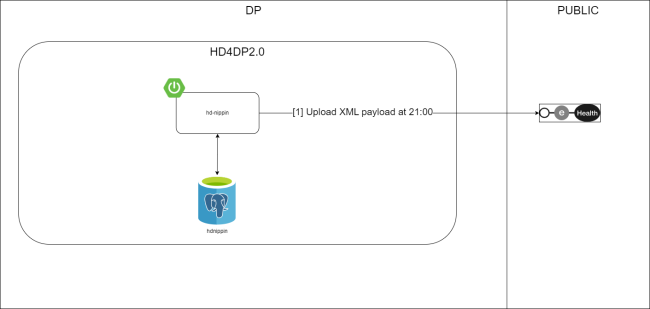
Whitelisting URL's
The following URLs must be whitelisted to communicate with MyCareNet and E-health. Without a direct connection from HD4DP v.2 server to these URLs, a registration to MyCareNet will not work.
https://prod.mycarenet.be:9443/*
https://services.ehealth.fgov.be/*
https://tsl.ehealth.fgov.be/*
https://servicelist.ehealth.fgov.be/*
http://ocsp-eh-ptpki.confidens.zetes.com/*
http://crl-eh-ptpki.confidens.zetes.com/*
How to upload a certificate using SSP
You can find the documentation describing the procedure to upload a certificate via this link: Add and manage certificates
Please make sure to inform Servicedesk when you upload a certificate in the Self-Service Portal application as there is one last action that needs to be performed on their end to enable MyCareNet flow.