HD4DP v2 S2S API
HD4DP v2 S2S APIGeneral description
API is the acronym for Application Programming Interface, enabling two applications to communicate with each other. The HD4DP v2 System to System (S2S) API allows stakeholders (data providers, healthcare organizations ...) to submit registered data to HD4DP v2 in a fully automated way.
In the manual of the application HD4DP v2 we provide detailed information about the S2S API. Please read the below documentation before its project-specific use.
- API Endpoint for supporting the DCD submit process
- MDM Field description - DB Model
- Swagger API
- Postman collection
Important note:
For code fields (fieldType = 'CODE') the id of the codeListValue item must be sent, not the code value or the label. In future releases it will be made possible to also send the code value.
Training
Below you can review the S2S API training organized by healthdata.be:
This documentation is being updated regularly. We try to provide as correct, complete and clear as possible information on these pages. Nevertheless, if you see anything in the documentation that is not correct, does not match your experience or requires further clarification, please create a support ticket via our portal Jira Service Management or send us an e-mail via support.hd@hda.fgov.be to report this documentation issue. Please do not forget to mention the URL of the page. We will then adjust the documentation as soon as possible. Thank you!S2S API data submission for registries
S2S API data submission for registriesData submission procedure in Architecture 2 using S2S API
1. Requirements at Data Provider's side
In order to be able to communicate with the healthdata.be S2S API, the IT services of the healthcare organizations must setup their systems as follows:
- Ensure to have the credentials available for the endpoint/URL for which authorization is necessary. If this is not the case, please contact our service portal: https://healthdatabe.atlassian.net/servicedesk/customer/portals
- Ensure to have the end-to-end API process in place in order to submit data registrations in a fully automated manner.
- Ensure capability of submitted data retrieval in the local database.
2. Preparing the JSON file
- To send data to healthdata.be by S2S API, the file must be in a .json file format.
- Extract the requested data from the electronic patient files and/or other local databases.
- Map the data according to the fields and formats as described in the DCD specifications of this section and the general code lists.
- Go here for additional information on the codes and the formats used for the Author group, SSIN code, Status, "Date" - "Date:Time", Repeatable fields and Multiple choice.
Note: The example files are only provided as a guideline and do not contain real life data.
Note: Below documentation contains generic example screens with the sole purpose to demonstrate how the process looks like regardless of the register.
3. Uploading the JSON file
- The IT department of the Data Provider implements a data transmission system (e.g. Postman) to send the API queries by means of a json file. The correct endpoints for uploading of the json file can be found here.
- The URL that needs to be entered after POST (selected method for uploading) should have a syntax similar to the one below:
POST {{baseURL}}/api/dcd/payload/submit?organization-id={organizationId}&dcd-id={dcdId}&dcd-version-id={dcdVersionId}&data-src-type={dataSrcType}
- Whereby:
- {organizationId} needs to be replaced by the id of your organization; go here for more information
- {dcdId} needs to be replaced by a register-specific numerical value; go here for more information
- <optional> {dcdVersionId} needs to be replaced by the intended version number; if not provided, the latest version of the dcd specifications is assumed; go here for more information
- <optional> {dataSrcType} needs to be replaced by the data source type. Permitted values are API or CSV; go here for more information
- a GET method URL should not contain /submit/ in the endpoint or path
- multiple query parameters need to be connected by an ampersand (&) (see example above)
- In the Authorization tab, select “Basic Auth” in the “Auth Type” drop-down list. Subsequently, fill out the API credentials in the username and password fields.

- In Body tab, select the “raw” option from the top line and paste the content of the JSON file in the box.

- Once the request settings are completed, press the Send button to submit the records.
- After succesful submission of the data, the “Status: 202 Accepted” code will appear below the box where the data was pasted. The bottom box should return a message about the records uploaded or an error message if any.

- A 401 Unauthorized message instead indicates missing or incorrect credentials. Request the correct credentials as described above in the Requirements at Data Provider's side.

- A 400 Bad request might refer to incorrect syntax of the API query. Check the query parameters and ensure to connect multiple parameters with the ampersand (&) character.

4. Validating the JSON Upload
4.1 Validation of the S2S API Upload via the response:
Verify in the same way the request was sent, that the returned response is containing a valid Business key.
If a valid Business key has been provided, the registration upload via System 2 System API was succesful.
4.2 Validation of the S2S API via HD4DP 2.0:
Step 1: Open the HD4DP 2.0 application.
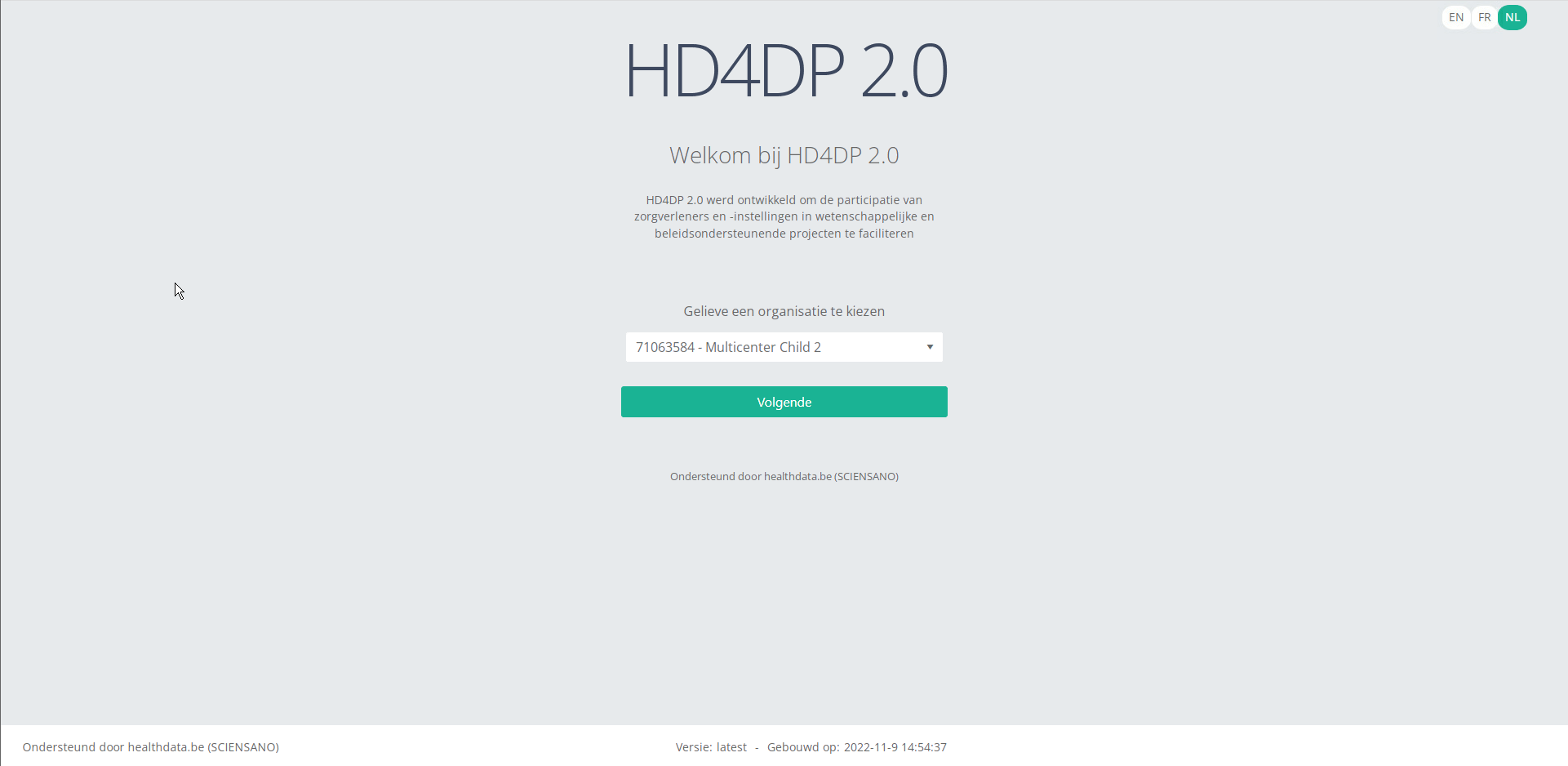
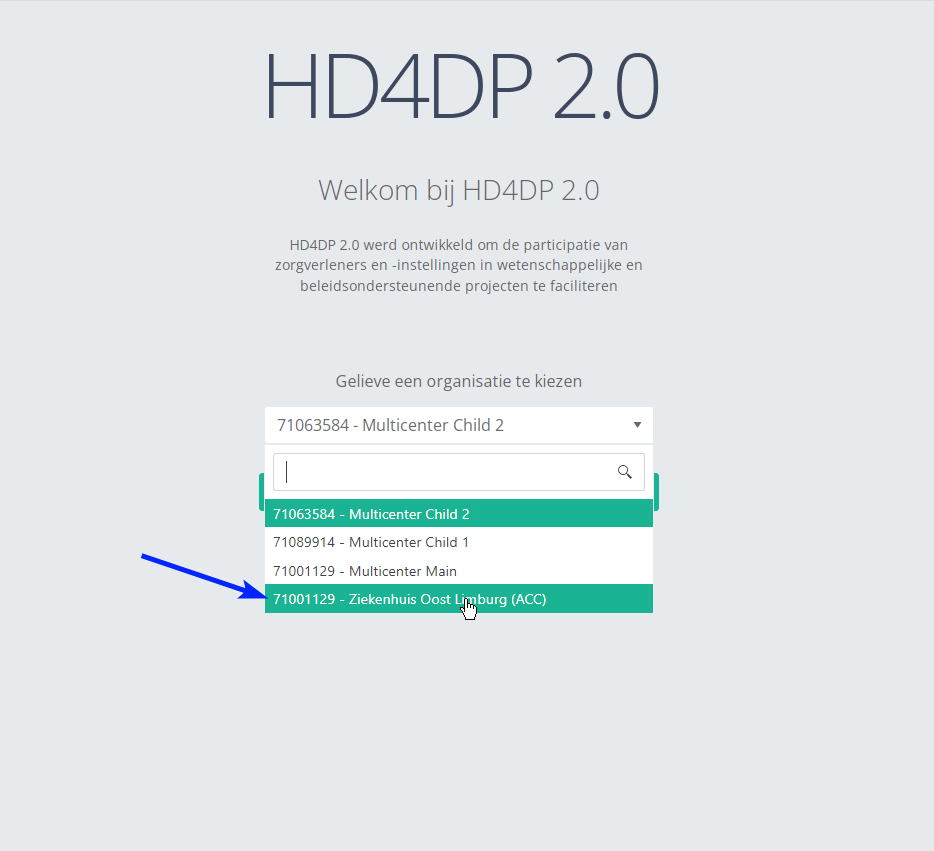
Step 2: Select the organization in the dropdown list and click on Volgende (Next).
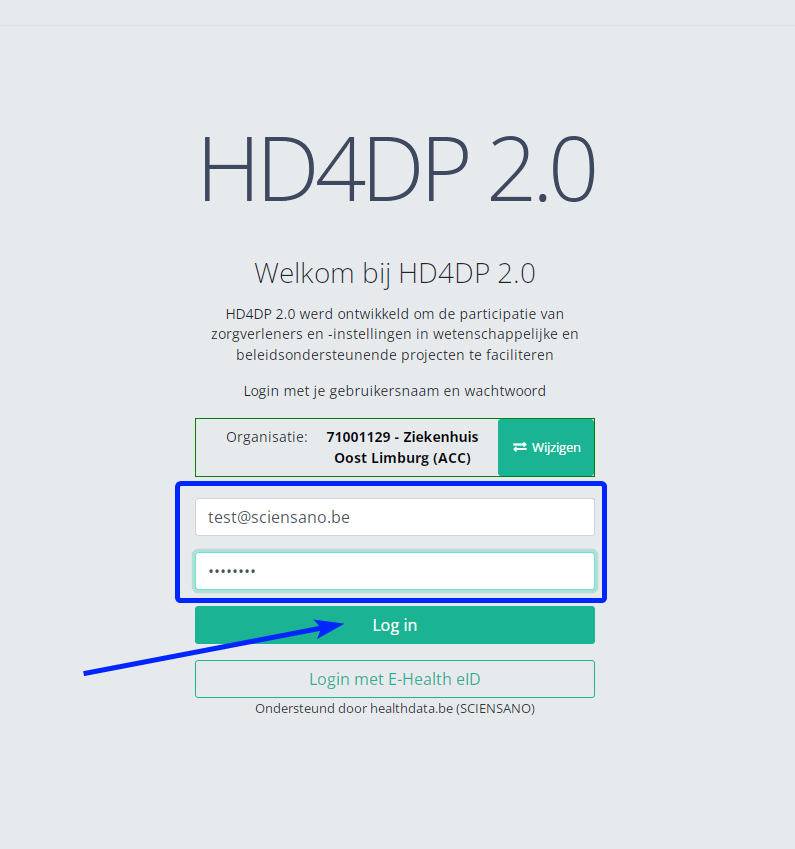
Step 3: Fill in the username and password, that has been provided by your IT Department or Healthdata team, and click on Log in to access the HD4DP v2.0 application.
Step 4: Navigate in the menu on the left-hand side panel to the desired study program:
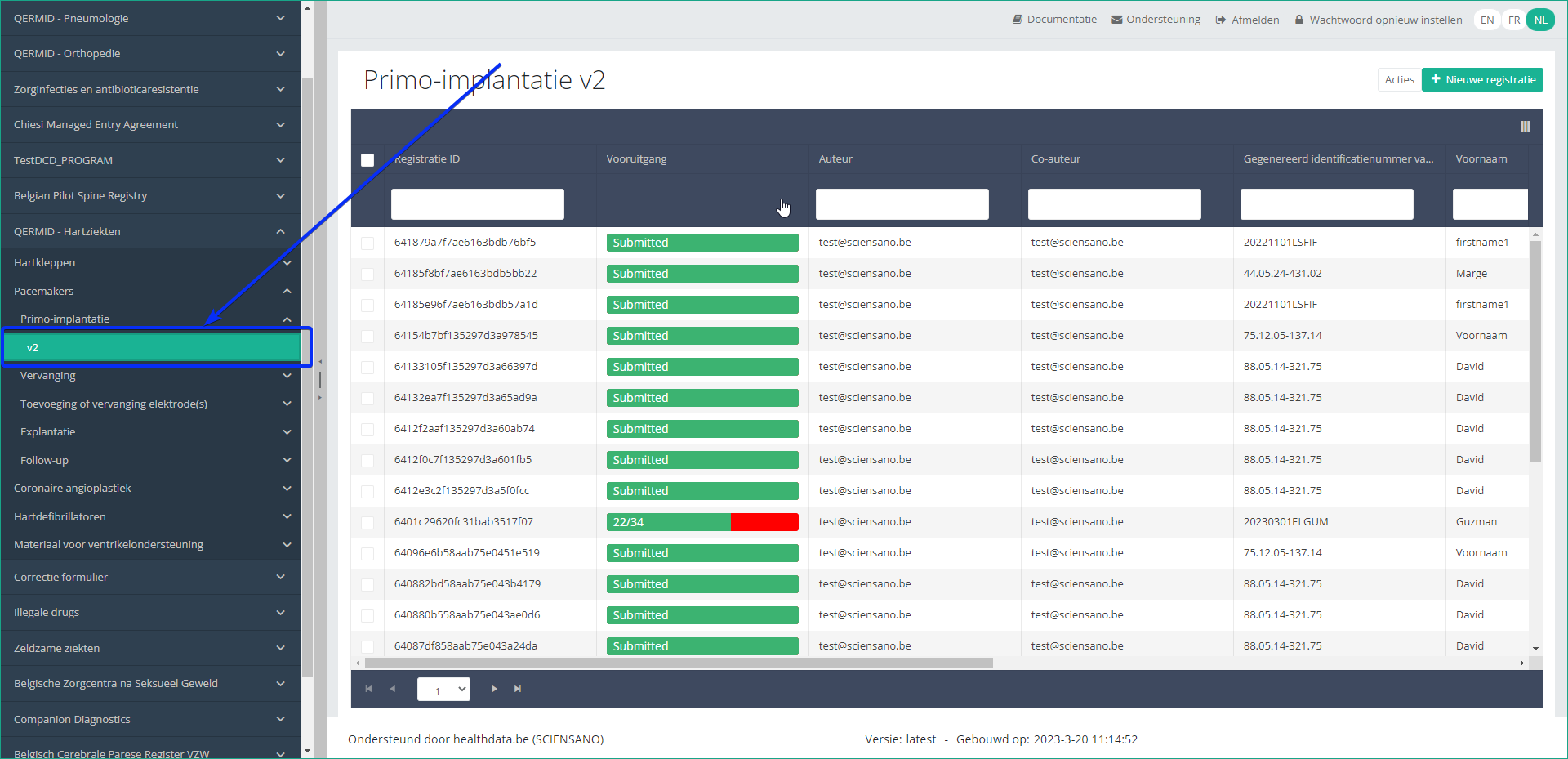
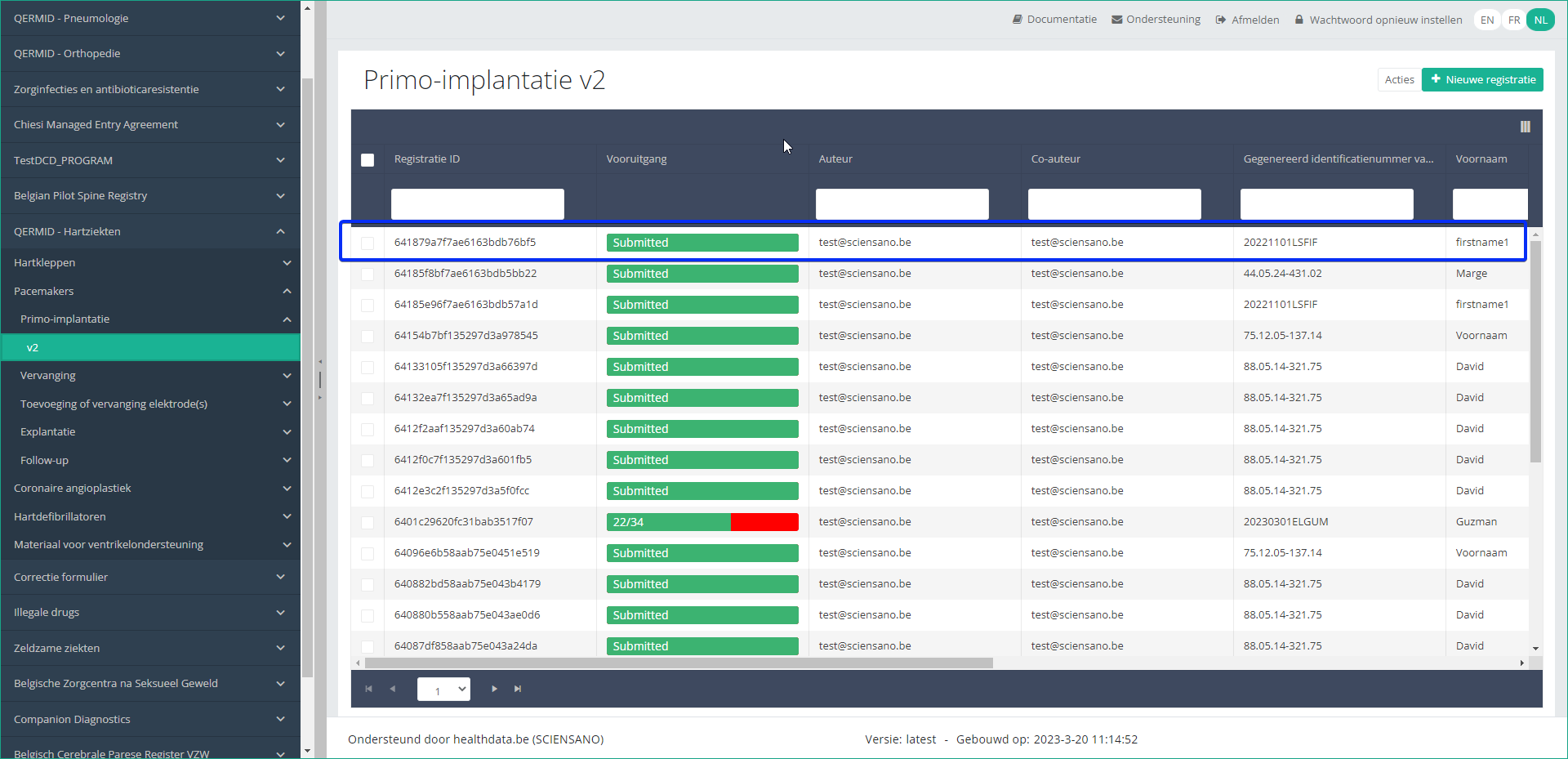
Step 5: Check that the uploaded registration(s) is/are displayed in the overview table:
This documentation is being updated regularly. We try to provide as correct, complete and clear as possible information on these pages. Nevertheless, if you see anything in the documentation that is not correct, does not match your experience or requires further clarification, please create support ticket via our portal (https://healthdatabe.atlassian.net/servicedesk/customer/portals) or send us an e-mail via support.healthdata@sciensano.be to report this documentation issue. Please, do not forget to mention the URL or web address of the page with the documentation issue. We will then adjust the documentation as soon as possible. Thank you!1. API endpoint description to support the data submission process
1. API endpoint description to support the data submission processTable of contents
- API endpoint overview
- Get organizations
- Get the DCD menu structure
- Get DCD field definitions
- Get DCD payload example
- Get DCD field definition list
- Get DCD code list values
- Get DCD menu translations
- Get DCD field definition translations
- Submit DCD registrations
- Search for SADMI medical devices
- User password
- Additional fields
API endpoint overview
The baseURL to be used has the following built: https://<hd4dp_url>/proxy.
Go here for further details on the syntax of API queries to ensure correct uploading of the json file.
| API endpoint | Respons | Notes |
|---|---|---|
| {{baseURL}}/api/organizations | List of organizations. Client must select the right organizationId | GET method Currently existing endpoint is: /api/installation/organizations We’ll create this new endpoint with a different signature re-routing the call to this existing one or we will refactor the existing one to this new signature. |
| {{baseURL}}/api/externalreference/sadmi?notificationCode={notificationCode} <optional> name={name} <optional> reference={reference} <optional> distributorName={distributorName} <optional> manufacturerName={manufacturerName} <optional> classificationCode={classificationCode} | List of Medical Device Types: - NotificationCode - Name - Reference URL - Distributor - Manufacturer - Classification - State Client must select the desired information. | GET method |
| {{baseURL}}/api/dcd/payload/submit?organization-id={organizationId} <optional> dcd-id={dcdId} <optional> dcd-version-id={dcdVersionId} <optional> data-src-type={dataSrcType} | Results info if succeed Error info if failed | POST method Some implementation tasks are needed here in order to return the result info (either succeed or failed). Similar like the one in HDConnectProxyRestTemplate.postCsv method, and the CsvExecutionResult object build. <optional parameter> dcd-version-id={dcdVersionId}: If this parameter is not provided, latest one is assumed. <optional parameter> data-src-type={dataSrcType} : permitted values: - API - CSV If this parameter is not provided, default values is <HD4DP>. |
| {{baseURL}}/api/dcd/payload/example?dcd-id={dcdId} <optional> version={version} | Example of payload in JSON format | GET method Providing this API end-point in order to help the Client on the Payload build with an example <optional parameter> version={version}: If this parameter is not provided, latest one is assumed |
| {{baseURL}}/api/dcd/payload/definition?dcd-id={dcdId} <optional> version={version} <optional> language-id={languageId} | List of all the fields of the form as well as their corresponding data-types that are allowed in the json data structure for the Payload | GET method This field names values are the key properties in the formIO json config form. When we implement this new api end-point, we need to parse the json content in order to get the key properties. Given these field keys, we’ll get each field definition from new API end-points helpers: /api/dcd/field?field-id={fieldId} /api/dcd/codelist?codelist-id={codelistId} These ones are described in the next table. <optional parameter> version = {version}: If this parameter is not provided, latest one is assumed <optional parameter> language-id = {languageId}: language id for the code_list example results. If this parameter is not provided, default language will be English. Current permitted values: en: English nl: Dutch fr: French Client must build this json object as the payload data to be sent based on this list of fields, on the last api call |
| {{baseURL}}/api/dcd/menu/structure?organization-id={organizationId} | List of projects of the given organization, dcds of each project, dcdVersions of each dcd in a JSON format Client can get dcdId and dcdVersionId (optional) which are needed on following API calls. | GET method |
| {{baseURL}}/api/dcd/field?dcd-id={dcdId} <optional> dcd-version-id={dcdVersionId} <optional> included-codelist-values={inclCodelistValues} <optional> field-name={fieldname} <optional> language-id={languageId} | List of DCD fields definition, even with codelist values if the field is CODE field type. | GET method <optional parameter> dcd-version-id={dcdVersionId}: If this parameter is not provided, latest one is assumed <optional parameter> included-codelist-values={inclCodelistValues}: permitted values: - true - false If this parameter is not provided, default value is <true> <optional parameter> field-name={fieldname}: A field name e.g: TX_AUTHOR_GR <optional parameter> language-id={languageId}: language id for the code_list example results If this parameter is not provided, default language will be English. Current permitted values: - en: English - nl: Dutch - fr: French |
| {{baseURL}}/api/dcd/field/translation?dcd-id={dcdId} <optional> dcd-version-id={dcdVersionId} <optional> language-id={languageId} <optional> field-name={fieldName} | List of fields translations for a given dcdId in the specified languageId (English if it is not provided) in a JSON format. Optional fieldId parameter can be provided just for getting this info but only for this fieldId. | GET method <optional parameter> dcd-version-id={dcdVersionId}: If this parameter is not provided, lastest one is assumed <optional parameter> language-id={languageId}: language id for the code_list example results. If this parameter is not provided, default language will be English. Current permitted values: - en: English - nl: Dutch - fr: French <optional parameter> field-name={fieldName}: A field name e.g: TX_AUTHOR_GR |
| {{baseURL}}/api/dcd/codelist?code-list-id={codelistId} <optional> language={language} | List of values for the codelist of the given codelistId.(List<CodeListItem>) | GET method Checking and getting this info based on MDM -> CODE_LIST table and the relationed tables (CODE, CODE_CONTENT etc.) See MDM – Field description – DB model diagram at the Attachment chapter for more details. <optional parameter> language={languageId}: language id for the code_list example results. If this parameter is not provided, default language will be English. Current permitted values: - en: English - nl: Dutch - fr: French |
Get organizations
Request example
GET {{baseURL}}/api/organizations
Request response

Get the DCD menu structure
Request example
GET {{baseURL}}/api/dcd/menu/structure?organization-id={organizationId}
Request parameters
- {organizationId}: Id of the organization as provided by Healthdata.be and for which we want to list the menu structure
- {{baseURL}}: the value for this field is https://<hd4dp_url>/proxy
Request response
All the menu structure for that organization, including projects, dcds of each project and dcd versions of each dcd, in a JSON format.

Get DCD field definitions
Request example
GET {{baseURL}}/api/dcd/payload/definition?dcd-id={dcdId}&version={version}&language-id={languageId}
Request parameters
- {dcdId}: Id of the dcd
- <optional parameter> {version}: If this parameter is not provided, latest one is assumed
- <optional parameter> {languageId}: language id for the code_list example results. If this parameter is not provided, default language will be English. Current permitted values:
- en: English
- nl: Dutch
- fr: French
Request response

https://hd4dp.acceptance.healthdata.be/proxy/api/dcd/payload/definition?dcd-id=18&version=1&language-id=nl
Get DCD payload example
Request example
GET {{baseURL}}/api/dcd/payload/example?dcd-id={dcdId}&version={version}
Request parameters
- {dcdId}: Id of the dcd
- <optional parameter> {version}: If this parameter is not provided, latest one is assumed
Request response
Given the previous Payload field definition example on previous chapter, we build a payload content example accordingly.
{
"CD_SURGL_APPR_FEMO": 68224,
"D_IMPLANT": "2021-04-30T22:00:00",
"TX_TPE_INSTRU": "P-432",
"MS_PAT_HGHT": 180
}
Get DCD field definition list
Request example
GET {{baseURL}}/api/dcd/field?dcd-id={dcdId}&dcd-version-id={dcdVersionId}&included-codelist-values={inclCodelistValues}&field-name={fieldName}&language-id={languageId}
Request parameters
- {dcdId}: Id of the menu dcd which we want to get all the translations.
- <optional parameter> {dcdVersionId}: If this parameter is not provided, latest one is assumed.
- <optional parameter> {includedCodelistValues}: boolean value (true or false). If this parameter is not provided, default value will be true. If true and for those fields with type equal to CODE, codelist values will be provided in the result.
- <optional parameter> {fieldName}: A field name e.g: TX_AUTHOR_GR
- <optional parameter> {languageId} : language id for the menu options example results. If this parameter is not provided, default language will be English. Current permitted values:
- en: English
- nl: Dutch
- fr: French
Request response
with parameter includeCodelistValues equal to true (default value)
{
"TX_TPE_INSTRU": {
"field_type": "FREE TEXT",
"code_list": null
},
"D_IMPLANT": {
"field_type": "DATE",
"code_list": null
},
"MS_PAT_XXXX": {
"field_type": "UNKNOWN",
"code_list": null
},
"MS_PAT_HGHT": {
"field_type": "CODE",
"code_list": [
{
"ID": 68224,
"CODE_VALUE": "870646003",
"LABEL_EN": "Femoral (Hemi)"
},
{
"ID": 68225,
"CODE_VALUE": "465954006",
"LABEL_EN": "Femoral + Cup"
}
]
}
}
with parameter includeCodelistValues equal to false
{
"TX_TPE_INSTRU": {
"field_type": "FREE TEXT",
"code_list": null
},
"D_IMPLANT": {
"field_type": "DATE",
"code_list": null
},
"MS_PAT_XXXX": {
"field_type": "UNKNOWN",
"code_list": null
},
"MS_PAT_HGHT": {
"field_type": "CODE",
"code_list": 23
}
}
Get DCD code list values
Request example
GET {{baseURL}}/api/dcd/codelist?code-list-id={codelistId}&language={languageId}
Request parameters
- {code-list-Id} : Id of codelist which we want to get the permitted values
- <optional parameter> {language} : language id for the code_list example results. If this parameter is not provided, default language will be English. Current permitted values:
- en: English
- nl: Dutch
- fr: French
Request response
{
{
"ID": 68224,
"CODE_VALUE": "870646003",
"LABEL_EN": "Femoral (Hemi)"
},
{
"ID": 68225,
"CODE_VALUE": "465954006",
"LABEL_EN": "Femoral + Cup"
}
}
Get DCD menu translations
Request example
GET {{baseURL}}/api/dcd/menu-translations?dcd-id={dcdId}&dcd-version-id={dcdVersionId}&language-id={languageId}
Request parameters
- {dcdId} : Id of the menu dcd which we want to get all the translations.
- <optional parameter> {dcdVersionId} : If this parameter is not provided, lastest one is assumed.
- <optional parameter> {languageId} : language id for the menu options example results. If this parameter is not provided, default language will be English. Current permitted values:
- en: English
- nl: Dutch
- fr: French
Request response
Example 1: languageId = “en” - English language menu translations
{
{
"zephyr_ortho_program": "QERMID - Orthopedics",
"zephyr_ortho_knee_project": "Orthopride knee",
"zephyr_ortho_knee_t1_dcd": "Primo-implantation"
},
{
"zephyr_ortho_program": "QERMID - Orthopedics",
"zephyr_ortho_knee_project": "Orthopride knee",
"zephyr_ortho_knee_t2_dcd": "Revision"
}
. . . . .
}
Example 2: languageId = “nl” - Dutch language menu translations
{
{
"zephyr_ortho_program": "QERMID - Orthopedie",
"zephyr_ortho_knee_project": "Orthopride knie",
"zephyr_ortho_knee_t1_dcd": "Primo-implantatie"
},
{
"zephyr_ortho_program": "QERMID - Orthopedie",
"zephyr_ortho_knee_project": "Orthopride knie",
"zephyr_ortho_knee_t2_dcd": "Revisie"
},
. . . . .
}
Example 3: languageId = “fr” French language menu translations
{
{
"zephyr_ortho_program": "QERMID - Orthopédie",
"zephyr_ortho_knee_project": "Orthopride genou",
"zephyr_ortho_knee_t1_dcd": "Primo-implantation"
},
{
"zephyr_ortho_program": "QERMID - Orthopédie",
"zephyr_ortho_knee_project": "Orthopride genou",
"zephyr_ortho_knee_t2_dcd": "Revision"
},
}
Get DCD field definition translations
Request example
GET {{baseURL}}/api/dcd/fields/translation?dcd-id={dcdId}&dcd-version-id={dcdVersionId}&language-id={languageId}&field-id={fieldId}
Request parameters
- {dcdId} : Id of the menu dcd which we want to get all the translations.
- <optional parameter> {dcdVersionId} : If this parameter is not provided, lastest one is assumed.
- <optional parameter> {languageId} : language id for the menu options example results. If this parameter is not provided, default language will be English. Current permitted values:
- en: English
- nl: Dutch
- fr: French
- <optional parameter> {fieldName} : Id of field which we want to get the translation from
Request response
Example 1: languageId = "en" - English language fields translations
{
"author_group": "Authors group",
"CD_SLEEVE_LON": "Long sleeves",
"TX_TTL_UNT": "Unit",
"TX_CTNT_BEF_CONT_VEN_ARTER": "Before venous/arterial contact",
"CD_NAIL_DIRT": "Dirty nails",
"CD_PLSH": "Nail polish",
"TX_NHH": "No hand hygiene",
"CD_SITE": "Site number",
"CD_NAIL_EXT": "Nail extensions",
"TX_TTL_STDY": "Study design",
"CD_WATCH": "Wearing a watch",
"D_OBS": "Observation date",
"T_STP_OBS": "Time end observation period",
"CD_OPT_MDL": "Participation module optional",
"CD_SPLTY": "Specialty of the ward",
"CD_PROF": "Profession",
"TX_TTL_OBS": "Observations",
"CD_NAIL_LON": "Long nails",
"CD_RING": "Wearing a ring"
}
Example 2: languageId = "nl" - Dutch language fields translations
{
"author_group": "Auteursgroep",
"CD_SLEEVE_LON": "Lange mouwen",
"TX_TTL_UNT": "Eenheid",
"TX_CTNT_BEF_CONT_VEN_ARTER": "Voor contact met intravasculair stelsel",
"CD_NAIL_DIRT": "Vuile nagels",
"CD_PLSH": "Nagellak",
"TX_NHH": "Geen handhygiëne",
"CD_SITE": "Campus nummer",
"CD_NAIL_EXT": "Kunst-nagels",
"TX_TTL_STDY": "Study design",
"CD_WATCH": "Het dragen van polshorloge",
"D_OBS": "Observatiedatum",
"T_STP_OBS": "Tijdstip einde observatieperiode",
"CD_OPT_MDL": "Deelname optioneel module",
"CD_SPLTY": "Specialiteit van de dienst",
"CD_PROF": "Beroepsgroep",
"TX_TTL_OBS": "Observaties",
"CD_NAIL_LON": "Lange nagels",
"CD_RING": "Het dragen van ring"
}
Example 3: languageId = "fr" - French language fields translations
{
"author_group": "Groupe d’auteurs",
"CD_SLEEVE_LON": "Longues manches",
"TX_TTL_UNT": "Unité",
"TX_CTNT_BEF_CONT_VEN_ARTER": "Avant contact veineux/artériel",
"CD_NAIL_DIRT": "Ongles sales",
"CD_PLSH": "Ongles vernis",
"TX_NHH": "Pas d’hygiène des mains",
"CD_SITE": "Numéro du site",
"CD_NAIL_EXT": "Ongles artificiels",
"TX_TTL_STDY": "Study design",
"CD_WATCH": "Le port d’une montre",
"D_OBS": "Date de l’observation",
"T_STP_OBS": "Heure fin de la période d’observation",
"CD_OPT_MDL": "Participation module optionel",
"CD_SPLTY": "Spécialité du service",
"CD_PROF": "Profession",
"TX_TTL_OBS": "Observations",
"CD_NAIL_LON": "Ongles longs",
"CD_RING": "Le port d’une bague"
}
Submit DCD registrations
Request example
POST {{baseURL}}/api/dcd/payload/submit?organization-id={organizationId}&dcd-id={dcdId}&dcd-version-id={dcdVersionId}&data-src-type={dataSrcType}
Header:
MediaType.APPLICATION_JSON
Body:
{
{
"CD_SURGL_APPR_FEMO": 68224,
"D_IMPLANT": "2021-04-30T22:00:00",
"TX_TPE_INSTRU": "P-432",
"MS_PAT_HGHT": 180
},
{
"CD_SURGL_APPR_FEMO": 68225,
"D_IMPLANT": "2021-04-14T22:00:00",
"TX_TPE_INSTRU": "P-545",
"MS_PAT_HGHT": 1209
},
{
"CD_SURGL_APPR_FEMO": 68224,
"D_IMPLANT": "2021-05-01T22:00:00",
"TX_TPE_INSTRU": "T-678",
"MS_PAT_HGHT": 210
}
}
Request parameters
- {organizationtId}: Id of the organization for which we want to submit the DCD registration.
- {dcdId}: Id of the DCD we want to submit.
- <optional parameter> {dcdVersionId}: Id of the DCD Version we want to submit. If this parameter is not provided, latest one is assumed.
- <optional parameter> {dataSrcType}: The data source type e.g: API or CSV.
Request payload
- {Header}: MediaType.APPLICATION_JSON
- {Body}: JSON object with an array of DCDs data to be submitted, following the specifications and examples provided by the described api end-points:
- GET /api/dcd/payload/definition
- GET /api/dcd/payload/example
Request response
Client get a response per each DCD line. If the DCD submission was successful, Client will get a TXT_BUSINESS_KEY value. If it was failed, Client will get an error detailed info: Http Status Code, Name and Exception details:
{
"TX_BUSINESS_KEY": "NISS 12.06.01-052.46 30/04/2021 67864",
{
"HTTP_STATUS_CODE": 405,
"HTTP_STATUS_NAME": "Method Not Allowed",
"HTTP_STATUS_EXCEPTION_DETAILS": "Exception details for Method Not Allowed example",
},
"TX_BUSINESS_KEY": "NISS 12.06.01-071.48 01/05/2021 67864",
}
Search for SADMI medical devices
Request example
GET {{baseURL}}/api/externalreference/sadmi?notificationCode={notificationCode}&reference={reference}
Request parameters
- <optional parameter> {notificationCode}
- <optional parameter> {name}
- <optional parameter> {reference}
- <optional parameter> {distributorName}
- <optional parameter> {manufacturerName}
- <optional parameter> {classificationCode}
Request response
{
{
"NotificationCode": "First Notification Code Example",
"Name": "First Name Example",
"Reference": "First Reference Example",
"URL": "http://first.url.example",
"Distributor": {
"NotificationNumber": "First Notification Number Example",
"Name": "First Distribuitor Name Example"
},
"Manufacturer": {
"Name": "First Manufacturer Name Example",
"CountryCode": {
"value": "First Country Code Value Example",
"standard": "First Country Code Standard Example"
},
"CountryName": {
"value": "First Country Name Value Example",
"lang": "First Country Name Lang Example"
}
},
"Classification": {
"Code": "First Classification Code Example",
"Description": "First Classification Description Example"
},
"State": {
"Name": "First State Name Example",
"ValidFrom": "First State ValidFrom Example",
"ValidTo": "First State ValidTo Example"
}
},
{
"NotificationCode": "Second Notification Code Example",
"Name": "Second Name Example",
"Reference": "Second Reference Example",
"URL": http://second.url.example,
. . . . .
},
. . . . .
}
User / password
The username and password can be requested at our Servicedesk.
Additional fields
In addition to this, more in depth information about the codes and the formats used for the Author group, NISS code, status, Postal Code, "Date" - "Date:Time", repeatable fields and multiple choice fields are available here.
This documentation is being updated regularly. We try to provide as correct, complete and clear as possible information on these pages. Nevertheless, if you see anything in the documentation that is not correct, does not match your experience or requires further clarification, please create a support ticket via our portal Jira Service Management or send us an e-mail via support.hd@hda.fgov.be to report this documentation issue. Please do not forget to mention the URL of the page. We will then adjust the documentation as soon as possible. Thank you!2. MDM Field description - DB Model
2. MDM Field description - DB Model
3. Swagger API
3. Swagger APIThe Swagger API is available on the local installation of HD4DP2.0. Go to https://<hd4dp2_url>/proxy/api-docs.html.

Some API calls are password protected (S2S api). If you want access to this API, you can request the user/password by creating a ticket in our servicedesk.
Attention: The baseURL to be used has to following built: https://<hd4dp_url>/proxy
This documentation is being updated regularly. We try to provide as correct, complete and clear as possible information on these pages. Nevertheless, if you see anything in the documentation that is not correct, does not match your experience or requires further clarification, please create a support ticket via our portal Jira Service Management or send us an e-mail via support.hd@hda.fgov.be to report this documentation issue. Please do not forget to mention the URL of the page. We will then adjust the documentation as soon as possible. Thank you!4. Postman collection
4. Postman collectionPostman collection HD4DP2.0 can be downloaded here.
Attention: The baseURL to be used has the following built: https://<hd4dp_url>/proxy
This documentation is being updated regularly. We try to provide as correct, complete and clear as possible information on these pages. Nevertheless, if you see anything in the documentation that is not correct, does not match your experience or requires further clarification, please create a support ticket via our portal Jira Service Management or send us an e-mail via support.hd@hda.fgov.be to report this documentation issue. Please do not forget to mention the URL of the page. We will then adjust the documentation as soon as possible. Thank you!